Freedom251 › Music streaming services
Madsonic
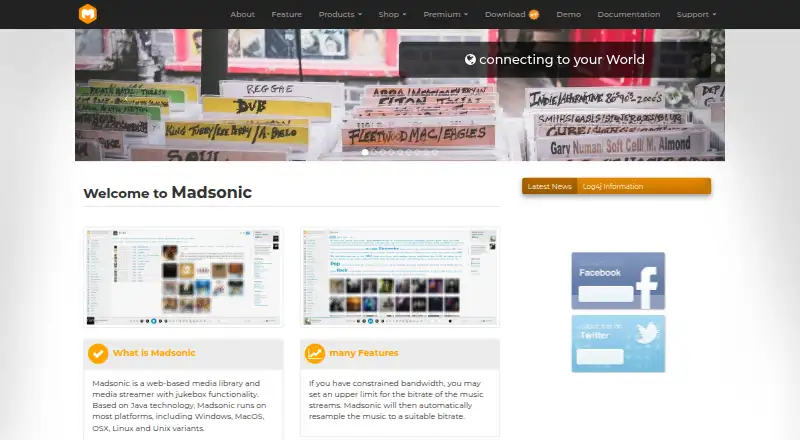
What Madsonic is
Madsonic is music software with tools for organizing and accessing music through artist indexing, folder security, podcasts, and several radio features. Madsonic Free costs nothing and includes an Artist-Hub Index and folder-based security, alongside a podcast feature, Artist Radio, AutoDJ, and radio organized by genre and mood. It is available on the web, Windows, macOS, Linux, iOS, and Android, so the listed platforms cover browsers, desktop operating systems, and mobile devices. The freemium offering also includes a 30-day trial.
Madsonic Premium adds a personal madsonic.org server address and support for Sonos, UPnP/DLNA, and Chromecast. It also includes LDAP authentication and advanced service integrations. These Premium capabilities are distinct from the indexing, folder security, podcast, and radio features listed for Free. The product website is madsonic.org.
Who it suits
Madsonic suits listeners who want artist and folder organization alongside podcasts and radio features across desktop, mobile, or web platforms. Premium is for people who need a personal server address, device support for Sonos, UPnP/DLNA, or Chromecast, LDAP authentication, or advanced service integrations.
What it does well
- Free plan includes artist indexing and folder-based security.
- Includes podcasts, Artist Radio, and AutoDJ on Free.
- Genre and mood radio are included on Free.
- Available on web, desktop, and mobile platforms.
- Premium adds Sonos, UPnP/DLNA, and Chromecast support.
What to know first
- The listed Premium features are not included in Free.
- Premium includes LDAP authentication, while Free does not list it.
Plans
| Plan | Billed and limits | Price |
|---|---|---|
| Madsonic Free | Artist-Hub Index · Folder-based security · Podcast feature · Artist Radio · AutoDJ · Genre and mood radio | Free |
| Madsonic Premium | Personal madsonic.org server address · Sonos support · UPnP/DLNA support · Chromecast support · LDAP authentication · Advanced service integrations | On request |
| FREE | no subscription · no extra feature · common free usage · single instance | Free |
| Lifetime | lifetime subscription · all enterprise feature · advanced support | €14,800, paid once |
| Professional | yearly subscription · common extra feature · common private usage · multi instance | €195 a year |
| Professional Go | monthly subscription · common extra feature · common private usage · multi instance | €215 a month |
| Enterprise | yearly subscription · advanced API access · LDAP/Social access · server synchronisation | €295 a year |
| Enterprise Go | monthly subscription · common extra feature · common private usage · multi instance | €325 a month |
The first 8 of 9 plans, as madsonic.org lists them, read 22 Sept 2026. The maker's own page has the final word. Every plan
Getting started
- Visit the Madsonic website.
- Choose a platform: web, Windows, macOS, Linux, iOS, or Android.
- Start with Madsonic Free, which is listed as free.
- Use the 30-day trial listed with the freemium offering if you want to explore the trial.
Overview
Madsonic is a web-based media library and streamer with jukebox features, built to organize and play personal collections across web, desktop, and mobile. It suits listeners who want control over a large library, multiple playback routes, and radio or podcast features rather than a service centered on a ready-made streaming catalog. Its free edition covers substantial library and playback needs; Premium is the step up for supported devices, authentication, and integrations.
Key features
Madsonic handles music, movies, and photos, with support for MP3, FLAC, OGG, AAC, and other audio and video formats. On-the-fly conversion and bitrate resampling can help adapt playback to different clients or network conditions. The maker says the library can manage 100,000 or more music files without limitations, making scale a notable strength for collectors.
Playback can run through the built-in website or compatible Madsonic/Subsonic REST API clients; the free API supports XML, JSON, and JSONP. Local jukebox mode, playlists shared with other users, and media sharing with family and friends add options beyond personal listening. Chromecast, Sonos, and compatible DLNA/UPnP devices are supported, though these device features are positioned with Premium.
The free edition includes podcasts, artist and genre radio, AutoDJ, history, and advanced player controls. Last.fm, Echonest, Musicbrainz, IMDb, Sonos, Chromecast, and LDAP appear among the supported integrations. Username-and-password accounts can have different privileges, with LDAP/Active Directory authentication and HTTPS/SSL support for users who need more structured access and secure connections.
Pricing
Madsonic uses a freemium model, with a free edition and a 30-day Premium feature trial. The maker’s Madsonic-specific plans are:
- Madsonic Free: free. It includes Artist-Hub Index, folder-based security, podcasts, Artist Radio, AutoDJ, and genre and mood radio. This is the sensible starting point for personal libraries that do not need Premium device support or advanced integrations.
- Madsonic Premium: custom pricing. It adds a personal madsonic.org server address, Sonos, UPnP/DLNA and Chromecast support, LDAP authentication, and advanced service integrations. It fits users who need these connections or account controls; the price is not published.
Separate plan entries describe a broader tier structure. FREE costs nothing, with no extra feature and a single instance. Professional is €195 a year, billed yearly, for common extra features, private use, and multiple instances; Professional Go is €215 a month, billed monthly, with common extra features, private use, and multiple instances. Enterprise is €295 a year, billed yearly, and adds advanced API access, LDAP/Social access, and server synchronisation. Enterprise Go is €325 a month, billed monthly, with common extra features, private use, and multiple instances. Lifetime costs €14,800, paid once and includes all enterprise features and advanced support. Commercial has custom pricing and is described as an advanced business subscription with advanced customizing support, advanced support, and all enterprise features. These tiers distinguish single-instance free use from paid multi-instance options, but their descriptions do not spell out Madsonic-specific feature mapping beyond those items.
Platforms
Madsonic supports web, Windows, macOS, Linux, iOS, and Android, alongside a self-hosted option and API access. That range suits users who want to reach one library from different device types, while the API enables compatible clients beyond the built-in website.
Who it's for
Madsonic is a strong fit for people managing extensive personal media libraries who want streaming, format conversion, radio, podcasts, and jukebox playback in one system. It is also relevant to households that share media or playlists, and to users who need account privileges or LDAP/Active Directory support. It is less suitable for someone whose main priority is choosing from a ready-made commercial music catalog; Madsonic’s defining strengths are library management and streaming of a collection.
Pros and cons
- Pros: The stated capacity of 100,000 or more music files without limitations makes it compelling for large collections.
- Pros: The free edition includes podcasts, radio, AutoDJ, history, and advanced player controls, giving personal-library users meaningful listening features without a subscription.
- Pros: Multiple client routes, media formats, and transcoding options make it adaptable across devices and playback conditions.
- Cons: Chromecast, Sonos, DLNA/UPnP, LDAP, and advanced integrations sit behind Premium, so users relying on those capabilities need a paid plan with custom pricing.
- Cons: The broader paid tier descriptions do not clearly map every tier to the Madsonic-specific feature set, making it harder to compare those options before committing.
Alternatives
For a broader choice of services, browse Music Streaming Software. Amazon Music is worth considering if an included-with-Prime plan appeals: Amazon Music Prime is free with ad-free music and podcasts and offline listening for All-Access Playlists. Anghami offers a free tier and a Family Plan with 6 accounts, so it may better suit a household seeking separate accounts.
Audius is a free option for streaming, uploads, and promotion, with paid content priced by artists and a 10% network fee on music sales. Deezer offers a free ad-supported plan with over 120 million songs, a better fit for listeners seeking a large catalog. IDAGIO may suit listeners who want a free tier capped at 6 collection items and a Premium Audio plan that includes offline mobile playback and ad-free listening.
Playary is another free service spanning songs and podcasts, with movies, audiobooks, and TV shows also named among its offerings. AWA has a free plan capped at 20 hours of playback per month, which may work for more limited listening. Calm Radio is a better match when the priority is its free selection of 200 music channels, guided sleep, meditation, nature sounds, and scenic videos.
Verdict
Choose Madsonic if you want to organize and stream a large personal media collection, with radio and podcast features available in the free edition and broad client support. Its central advantage is the combination of large-library management, transcoding, and flexible playback routes. Look elsewhere if you want a ready-made streaming catalog, or if you need Premium device support and integrations but cannot confirm a custom-priced plan is suitable.
Verdict
Choose Madsonic if you want music organization, podcasts, and several kinds of radio on a free plan across web, desktop, and mobile. Look at Premium if you need its personal server address, device support, LDAP authentication, or advanced service integrations.
Questions
Does Madsonic have a free plan?
Yes. Madsonic Free costs nothing.
What does Madsonic Free include?
It includes an Artist-Hub Index, folder-based security, a podcast feature, Artist Radio, AutoDJ, and genre and mood radio.
Which platforms does Madsonic support?
The listed platforms are web, Windows, macOS, Linux, iOS, and Android.
What does Madsonic Premium add?
Premium includes a personal madsonic.org server address, Sonos, UPnP/DLNA, and Chromecast support, LDAP authentication, and advanced service integrations.
Is there a trial?
A 30-day trial is listed with Madsonic's freemium pricing model.
Facts from Madsonic's own pages
- Clients and API
- Clients can use the built-in website or Madsonic/Subsonic REST API compatible clients; the free API supports XML, JSON, and JSONP. · madsonic.org, 11 Oct 2026
- Formats and transcoding
- It supports MP3, FLAC, OGG, AAC, and other audio or video formats, with on-the-fly conversion and bitrate resampling. · madsonic.org, 11 Oct 2026
- Free edition
- The basic edition is free and includes features such as podcasts, artist and genre radio, AutoDJ, history, and advanced player controls. · madsonic.org, 11 Oct 2026
- Free plan
- Yes · madsonic.org, 22 Sept 2026
- Integrations
- The maker lists Last.fm, Echonest, Musicbrainz, IMDb, Sonos, Chromecast, and LDAP integrations or support. · madsonic.org, 11 Oct 2026
- Library scale
- The maker says it can manage music collections of 100,000 or more files without limitations. · madsonic.org, 11 Oct 2026
- License
- Madsonic is open-source software licensed under GPL. · madsonic.org, 11 Oct 2026
- Maker and location
- The site identifies Karel IT Service e.U. in Wieselburg, Austria, and names Karel Martin as company founder. · madsonic.org, 11 Oct 2026
- Media types
- The maker says Madsonic streams music, movies, and photos. · madsonic.org, 11 Oct 2026
- Playback devices
- Madsonic supports Chromecast, Sonos, and compatible DLNA/UPnP devices, and offers local jukebox mode. · madsonic.org, 11 Oct 2026
- Product
- Madsonic is a web-based media library and media streamer with jukebox functionality. · madsonic.org, 11 Oct 2026
- Security
- The maker says users log in with username and password, receive different privileges, and that LDAP/Active Directory authentication and HTTPS/SSL are supported. · madsonic.org, 11 Oct 2026
- Sharing
- Users can create playlists to share with other users and share media with family and friends. · madsonic.org, 11 Oct 2026
- Support
- The maker lists a support forum and gives contact hours as Monday through Friday, 9:00 AM to 19:00 PM. · madsonic.org, 11 Oct 2026
- Supported platforms
- web,Windows,macOS,Linux,iOS,Android · madsonic.org, 22 Sept 2026
- Trial
- The maker says premium features are available for 30 days to try before upgrading. · madsonic.org, 11 Oct 2026
Where Madsonic stands on Freedom251
- Music streaming services#19 of 62
- Music Streaming Software#21 of 62
- Free music streaming services#22 of 43