Freedom251 › Podiatry Software
MacPractice
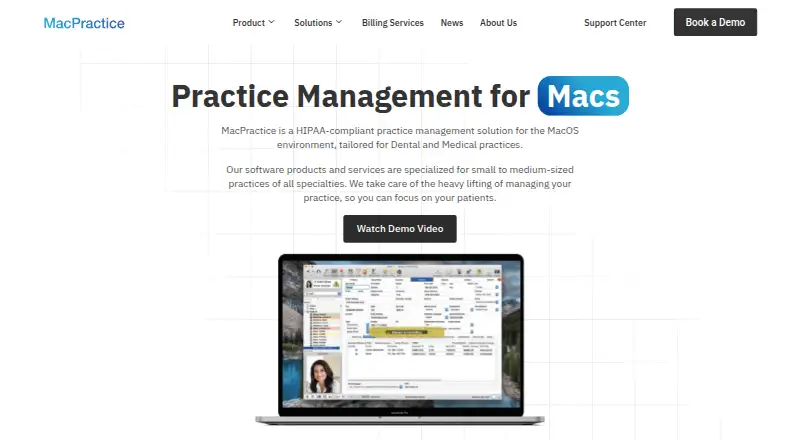
What MacPractice is
MacPractice provides practice management and clinical software for medical and dental practices, with products and services aimed at small to medium-sized practices. Its core software covers patient management, scheduling, ledger tracking, and reporting, with practice data stored locally on the premises. Clinical tools include dental and periodontal charting, digital radiography support, electronic claims, and e-prescribing. iPad apps support electronic forms, paperless patient check-in, and clinical data entry. MP.Go provides browser access to schedules and clinical appointments, appointment booking, and forwarding charges to a biller for review. MacPractice Engage can send appointment reminders and confirmations by SMS, email, or voicemail, and supports two-way SMS. The patient portal adds online appointment scheduling, access to clinical data, and pre-visit forms. Listed integrations include eClaims with Change Healthcare, Inovalon, and DentalXChange; NewCrop for e-prescribing; Updox for faxing; and HL7 messaging. MacPractice Payments supports swipe, tap, manually entered transactions, card-on-file, and customizable surcharges where permitted. The company describes its software as HIPAA-compliant and says built-in AES encryption protects electronic protected health information. Pricing is available on request. Generation 15 is listed as compatible with macOS Monterey 12 and Ventura 13, alongside iPad apps and MP.Go browser access.
Who it suits
MacPractice suits small to medium-sized medical and dental practices seeking practice management alongside clinical tools such as charting, e-prescribing, and electronic claims. It may also fit practices that want iPad intake workflows, patient self-booking, online forms, reminders, and browser access to appointments.
What it does well
- Patient management, scheduling, ledger tracking, and reporting are included.
- Supports dental and periodontal charting and digital radiography.
- Patient portal includes self-scheduling and pre-visit forms.
- Engage supports reminders and two-way SMS.
- Practice data is stored locally, with built-in AES encryption for ePHI.
What to know first
- Pricing is available on request.
- Generation 15 compatibility is listed for macOS Monterey 12 and Ventura 13.
- Downloading requires an MP Serial number and account email and password.
Limits
Pricing is on request. Downloading requires an MP Serial number and account email and password; Generation 15 is listed as compatible with macOS Monterey 12 and Ventura 13.
Getting started
- Visit the MacPractice website and request pricing.
- Confirm that your Mac meets the listed Generation 15 compatibility for macOS Monterey 12 or Ventura 13.
- Obtain an MP Serial number and account email and password for downloading.
- Use MacPractice on macOS, with iPad apps for supported workflows and MP.Go for browser access.
Verdict
Choose MacPractice if your medical or dental practice wants locally stored practice management data alongside clinical, patient communication, and online intake tools. The iPad apps and MP.Go browser access support workflows beyond the core software. Ask the company for pricing, and check the listed macOS compatibility before downloading.
Questions
How much does MacPractice cost?
Pricing is available on request.
Which platforms does MacPractice support?
It is listed for iOS, macOS, and web. Generation 15 is listed as compatible with macOS Monterey 12 and Ventura 13; iPad apps and browser access through MP.Go are also available.
Can patients book appointments online?
Yes. MP.Go supports appointment booking, and the patient portal supports online appointment scheduling.
Does MacPractice support appointment reminders?
Yes. MacPractice Engage supports automated reminders and confirmations by SMS, email, or voicemail, as well as two-way SMS messaging.
Where is practice data stored?
MacPractice says practice data is stored locally on the premises. The company also describes built-in AES encryption for electronic protected health information.
What integrations are listed?
Listed integrations include eClaims with Change Healthcare, Inovalon, and DentalXChange; NewCrop for e-prescribing; Updox for faxing; and HL7 messaging.
Facts from MacPractice's own pages
- Browser access
- MP.Go provides browser access to view schedules and clinical appointments, make appointments, and forward charges to a biller for review. · macpractice.com, 11 Oct 2026
- Clinical tools
- Features include dental and periodontal charting, digital radiography support, electronic claims, and e-prescribing. · macpractice.com, 11 Oct 2026
- Company history
- MacPractice says it was founded on May 3, 2004, by Patrick Clyne and Mark Hollis. · macpractice.com, 11 Oct 2026
- Core features
- Core software includes patient management, scheduling, ledger tracking, and reporting, with data stored locally. · macpractice.com, 11 Oct 2026
- Download access
- Downloading MacPractice requires an MP Serial number and account email and password. · macpractice.com, 11 Oct 2026
- Encryption
- The maker says MacPractice uses built-in industry-standard AES encryption to protect electronic protected health information. · account.macpractice.com, 11 Oct 2026
- Founded
- 2004 · macpractice.com, 28 Sept 2026
- Headquarters
- Lincoln, Nebraska, United States · macpractice.com, 28 Sept 2026
- Integrations
- Listed integrations include eClaims with Change Healthcare, Inovalon, and DentalXChange; e-prescribing with NewCrop; faxing with Updox; and HL7 messaging. · macpractice.com, 11 Oct 2026
- iPad workflow
- The iPad apps support electronic forms and paperless patient check-in and clinical data entry. · macpractice.com, 11 Oct 2026
- iPad workflows
- iPad apps support electronic forms for patients and providers and paperless intake workflows. · macpractice.com, 11 Oct 2026
- Patient access
- MacPractice Go provides web access to schedules and clinical appointments, appointment booking, and forwarding charges to a biller for review. · macpractice.com, 11 Oct 2026
- Patient communications
- MacPractice Engage supports automated appointment reminders and confirmations by SMS, email, or voicemail, as well as two-way SMS messaging. · macpractice.com, 11 Oct 2026
- Patient portal
- The patient portal supports online appointment scheduling, access to clinical data, and pre-visit online forms. · macpractice.com, 11 Oct 2026
- Payments
- MacPractice Payments supports swipe, tap, manually entered transactions, card-on-file, and customizable surcharges where permitted. · macpractice.com, 11 Oct 2026
- Platform requirements
- Build 17 server and workstation requirements list macOS Sequoia 15.x or Sonoma 14.x; the maker says iPad apps require iOS 18 or higher. · macpractice.com, 11 Oct 2026
- Practice management
- Core features include patient management, scheduling, ledger tracking, and reporting, with information stored locally on premise. · macpractice.com, 11 Oct 2026
- Purpose
- MacPractice provides practice management and clinical software for medical and dental practices, with products and services aimed at small to medium-sized practices. · macpractice.com, 11 Oct 2026
- Security
- MacPractice describes its software as HIPAA-compliant and says practice data is stored locally on premise. · macpractice.com, 11 Oct 2026
- Security and data location
- The company describes its software as HIPAA-compliant and says practice data is stored locally on premises; its security page describes built-in AES encryption for ePHI. · macpractice.com, 11 Oct 2026
- Support
- Phone support is available Monday through Friday during listed business hours, chat support is listed as 24/7, and the HelpDesk provides articles and videos. · macpractice.com, 11 Oct 2026
Where MacPractice stands on Freedom251
- Podiatry Software#2 of 12
- Dental Software#11 of 16
- Chiropractic Software#11 of 15
- Dental Charting Software#12 of 16
- Dental Appointment Scheduling Software#36 of 42