MacDraft Professional
What MacDraft Professional is
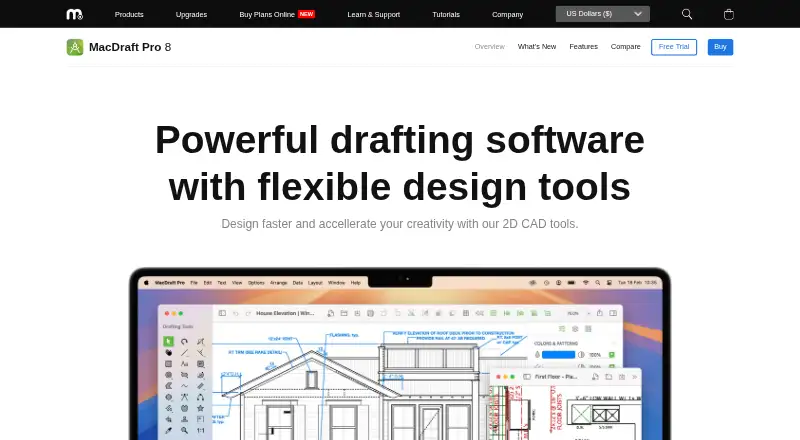
MacDraft Professional, also called MacDraft Pro, is native 2D CAD drafting software for drawing on a Mac. It is aimed at architects, engineers, construction services, CAD professionals, designers, educators, and hobbyists. Vector shape, line, curve, dimensioning, scaling, layer, and smart-snapping tools support precise drawings. Templates and symbol libraries serve different projects; the Complete pack lists more than 7,500 symbols. MacDraft Pro opens, saves, and edits DWG and DXF files through AutoCAD 2022 (AC1032), and exports drawings as PDF and other common image formats. Objects can hold custom details such as name, price, and material for reports including bills of materials. It requires macOS 10.14 (Mojave) or later and supports Apple Silicon. A trial provides unlimited tool access for 14 days after first launch. The listed price starts at $49. Each purchased license covers one machine, so additional computers require additional licenses.
Who it suits
It suits Mac users creating 2D technical drawings, including professionals, educators, and hobbyists. DWG/DXF compatibility and object data can help users working with existing CAD files or material reports.
What it does well
- Native 2D CAD application for Mac
- Supports DWG and DXF through AutoCAD 2022
- Includes precision dimensions, layers, and snapping
- Complete pack lists 7500+ symbols
- 14-day trial has unlimited feature access
What to know first
- macOS 10.14 or later required
- Each license covers one machine
- Additional machines need additional licenses
- Paid software starts at $49
Plans
| Plan | Billed and limits | Price |
|---|---|---|
| MacDraft Pro - Home & Garden | Single license; per machine · 1100+ symbols for home and garden plans | On request |
| MacDraft Pro - Complete | Single license; per machine · 7500+ symbols | On request |
| MacDraft Pro - App Only | Single license; per machine · 100+ sample symbols | On request |
| MacDraft Pro - Starter | Single license; per machine · 3500+ symbols for various drawing types | On request |
As microspot.com lists them, read 8 Oct 2026. The maker's own page has the final word.
Verdict
MacDraft Pro combines Mac-native drafting tools, broad DWG/DXF compatibility, symbol libraries, and report-oriented object data. Its single-machine licensing and macOS requirement should be considered before purchase.
Facts from MacDraft Professional's own pages
- Drawing tools
- It includes vector shape, line and curve tools, precision dimensioning, scaling, layers and smart snapping. · microspot.com, 8 Oct 2026
- Exports
- The product page describes exporting drawings as PDF and other common image formats. · microspot.com, 8 Oct 2026
- File compatibility
- MacDraft Pro supports opening, saving and editing DWG and DXF files up to AutoCAD 2022 (AC1032). · microspot.com, 8 Oct 2026
- Founded
- 1964 · microspot.com, 28 Sept 2026
- Headquarters
- Aylesford, Kent, United Kingdom · microspot.com, 28 Sept 2026
- Intended users
- The maker describes it for architects, engineers, construction services, professional CAD users, designers, educators and hobbyists. · microspot.com, 8 Oct 2026
- Licensing limit
- Each purchased license is valid for one machine, and additional machines require additional licenses. · microspot.com, 8 Oct 2026
- Object data
- Objects can hold custom information such as name, price and material, which can be used to produce reports such as bills of materials. · microspot.com, 8 Oct 2026
- Product
- MacDraft Pro is native 2D CAD drafting software for creating drawings on a Mac. · microspot.com, 8 Oct 2026
- Security and payments
- The pricing page describes payments as secure and says prices exclude applicable tax or VAT, which is calculated at checkout. · microspot.com, 8 Oct 2026
- Support
- Microspot offers free product help and support and lists support by email at [email protected]. · microspot.com, 8 Oct 2026
- System requirements
- MacDraft Pro 8 requires an Apple computer running macOS 10.14 (Mojave) or later and supports Apple Silicon. · microspot.com, 8 Oct 2026
- Templates and symbols
- The software includes built-in templates and a symbol library, with the Complete pack listing over 7500 symbols. · microspot.com, 8 Oct 2026
- Trial
- The free trial provides unlimited access to the software’s tools and features for 14 days from first launch. · microspot.com, 8 Oct 2026
Where MacDraft Professional stands on Freedom251
- 2D CAD Software#33 of 41