Freedom251 › Game Save Managers
Ludusavi
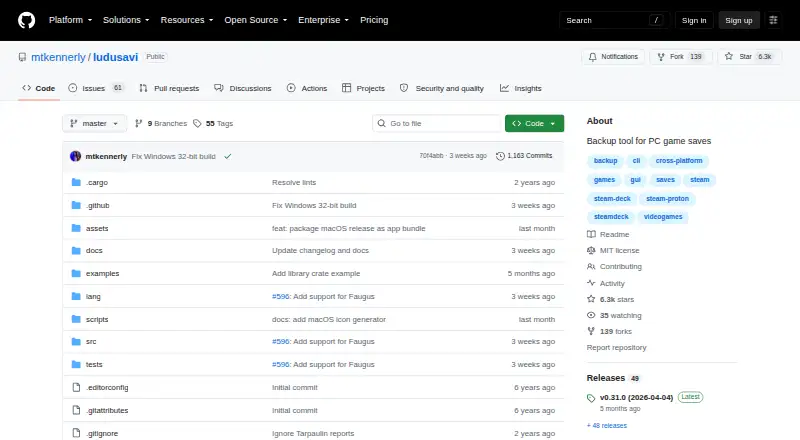
What Ludusavi is
Ludusavi is a free tool for backing up PC video game save data, written in Rust. It covers more than 19,000 games, allows custom entries, and supports libraries including Steam, GOG, Epic, Heroic, and Lutris. Users can work through a graphical interface or a command line for scripting. Supported data includes file-based saves, Windows registry saves, Steam Proton saves, and Steam screenshots. For cloud copies, Ludusavi integrates with Rclone and remotes including Google Drive, OneDrive, Dropbox, Box, FTP, SMB, and WebDAV. Its automatic synchronization checks local and cloud saves before uploading changes and warns about conflicts. It also supports scheduled backups and version history, and is available as a Playnite extension. Backup information comes from the Ludusavi Manifest, whose data is primarily sourced from PCGamingWiki. The project is MIT licensed, with portable executables for Windows, Linux, and Mac. One limitation: it does not automatically support backing up on one operating system and restoring on another.
Who it suits
Ludusavi suits PC gamers who want to back up game saves across supported libraries and use either a graphical or command-line interface. Its cloud synchronization and scripting options may appeal to users managing backups across multiple locations.
What it does well
- Covers more than 19,000 games.
- Supports custom game entries.
- Offers graphical and command-line interfaces.
- Supports scheduled backups and version history.
What to know first
- Cross-operating-system backup and restore is not automatic.
- Backup data is primarily sourced from PCGamingWiki.
Limits
Ludusavi does not automatically support backing up on one operating system and restoring on another.
Plans
| Plan | Billed and limits | Price |
|---|---|---|
| Ludusavi | portable executable · Windows, Linux, or Mac · MIT licensed | Free |
| Free | Portable desktop backup and restore; no paid tiers stated | Free |
As github.com lists them, read 30 Sept 2026. The maker's own page has the final word.
Getting started
- Visit the Ludusavi GitHub project.
- Choose a portable executable for Windows, Linux or Mac, or use a listed distribution route such as Winget, Scoop, Flatpak or Cargo.
- Run Ludusavi through its graphical interface or command line.
- Select supported game data to back up; add custom entries if needed.
- Connect an Rclone remote if you want cloud backup or synchronization.
Ludusavi is a free Rust utility for protecting PC game saves across a very large catalog. It is best suited to players with libraries spread across several storefronts and to technically minded users who want scripted or cloud-backed routines. Its broad format coverage is compelling, although restoring across different operating systems is not automatic.
Overview
Ludusavi covers more than 19,000 games and allows custom entries for titles outside its standard definitions. It recognizes libraries such as Steam, GOG, Epic, Heroic and Lutris, along with other game libraries, making it a practical central backup tool for mixed collections. Its backup definitions are organized through the Ludusavi Manifest, whose information is primarily sourced from PCGamingWiki.
The project is MIT licensed and distributed as portable executables for Windows, Linux and Mac, with Winget, Scoop, Flatpak and Cargo options also listed. GitHub issues and discussions provide community support, while Crowdin is used for translation contributions. For more category choices, see the Game Save Managers list.
Key features
- Wide save coverage: It handles ordinary file saves, Windows registry saves, Steam Proton saves and Steam screenshots, rather than limiting protection to a single save-folder pattern.
- Graphical and command-line workflows: The GUI supports manual operation, while the CLI is suited to repeatable scripts. Its api command accepts bulk JSON requests and supports JSON schemas for both input and output, giving automation projects a structured interface.
- Playnite integration: A Playnite extension brings Ludusavi into that launcher workflow, which can be preferable to maintaining a separate backup application window.
- Cloud storage through Rclone: Rclone integration supports remotes including Google Drive, OneDrive, Dropbox, Box, FTP, SMB and WebDAV, so users can connect storage they already operate instead of being tied to one hosted service.
- Synchronization safeguards: Automatic synchronization checks local and cloud copies before uploading changes and warns about conflicts. That makes it more suitable for ongoing sync than a simple one-way archive.
- Backup scheduling and history: Automatic backups, scheduled backups and version history support both routine protection and recovery from earlier states. Game detection and restore options are provided in both modes.
- Security control: Runtime settings govern certificate and hostname validation for downloads. Safe validation is the default; an unsafe option disables it, so changing that setting should be reserved for situations where the trade-off is understood.
Pricing
| Plan | Price | Includes |
|---|---|---|
| Ludusavi | free | Portable executable for Windows, Linux or Mac; MIT licensed; automatic and scheduled backups, version history, multi-platform support, game detection and restore options |
There is no subscription, seat allowance or storage quota attached to this plan. Cloud capacity and account terms therefore come from the Rclone remote you choose, rather than from Ludusavi itself. This is a strong fit for users willing to manage their own storage; readers wanting a bundled hosted service should compare alternatives with explicit storage plans.
Platforms
Ludusavi supports Windows, Linux and macOS, with API and extension interfaces in addition to its desktop availability. Its cross-operating-system boundary matters: it does not automatically support backing up on one operating system and restoring on another. That makes it a better choice for protecting saves within a consistent environment than for frictionless migration between operating systems.
Who it's for
Choose Ludusavi if you need one free tool for a large, mixed PC library, including Proton data and registry-based saves, or if you want command-line automation and Rclone-backed storage. Scheduled jobs, version history and conflict-aware synchronization also suit users who want an ongoing backup routine rather than occasional manual copies.
Look elsewhere if your primary requirement is automatic cross-OS transfer, or if you prefer a service that supplies storage, quotas and account management in one package.
Pros and cons
- Pros: Coverage for more than 19,000 games plus custom entries; support for major PC storefronts and several save formats; GUI, CLI and JSON API workflows; broad Rclone destination support; scheduled backups, version history and conflict warnings; free MIT-licensed distribution.
- Cons: Cross-OS backup and restore is not automatic; cloud storage requires an Rclone remote and its associated provider; disabling certificate and hostname validation creates a less secure download configuration.
Alternatives
Checkpoint64 is worth considering if you want a freemium service with a 20 MiB free space per space, one team and limited team participation, plus a paid Pro tier at €5 a month billed monthly.
SaveState suits readers seeking local backups with optional cloud sync across Android, Linux, macOS and Windows, without requiring an account.
EmuSync is a free option for API, Linux and Windows users with no subscription or paywall.
Game Backup Monitor may fit Linux and Windows users who want open-source backups, unlimited games and 7-Zip compression, while cloud use requires their own provider and sync client.
Game Save Genie is an alternative for users who want no subscription and prefer using their own cloud storage across Linux, macOS, self-hosted and Windows setups.
Hoard is another freemium choice for Linux, macOS, self-hosted and Windows users.
OpenSave targets users wanting free, open-source software with no subscription, ads or telemetry across API, Linux, macOS, self-hosted and Windows.
QSave is a free, open-source macOS and Windows tool focused on backing up game saves to your own Google Drive.
Verdict
Ludusavi is the right choice for players who want unusually broad game and save-format coverage, multiple interfaces and provider-flexible cloud synchronization without paying for the software. Its main reason to look elsewhere is the lack of automatic cross-operating-system restore, especially for users whose priority is seamless migration rather than comprehensive backup control.
Verdict
Ludusavi provides broad save coverage, multiple interfaces, and cloud synchronization options at no charge. Note its limitation for moving backups between operating systems.
Questions
How much does Ludusavi cost?
The Ludusavi plan is free.
Which operating systems have portable executables?
Portable executables are available for Windows, Linux and Mac.
Which game libraries does it support?
It supports Steam, GOG, Epic, Heroic, Lutris and other game libraries.
Can Ludusavi back up to cloud storage?
It integrates with Rclone and supports remotes including Google Drive, OneDrive, Dropbox, Box, FTP, SMB and WebDAV.
Is Ludusavi open source?
The project is released under the MIT License.
Can a save backed up on one operating system be restored on another?
Ludusavi does not automatically support that cross-operating-system workflow.
Facts from Ludusavi's own pages
- Cloud backup
- It integrates with Rclone and supports Rclone remotes including Google Drive, OneDrive, Dropbox, Box, FTP, SMB, and WebDAV. · github.com, 30 Sept 2026
- Cloud integration
- Cloud synchronization is implemented through Rclone, with bundled Rclone updates noted in releases. · github.com, 15 Oct 2026
- Cloud synchronization
- Automatic synchronization checks whether local and cloud saves are in sync before uploading changes and warns about conflicts. · github.com, 30 Sept 2026
- Command API
- The CLI includes an api command that executes bulk requests using JSON input and supports JSON schemas for input and output. · github.com, 30 Sept 2026
- Command line
- A command-line interface supports scripting and tab completion for Bash, Fish, Zsh, PowerShell and Elvish. · github.com, 15 Oct 2026
- Cross-OS limitation
- Ludusavi does not automatically support backing up on one operating system and restoring on another. · github.com, 30 Sept 2026
- Distribution
- Portable executables are available for Windows, Linux, and Mac, with Winget, Scoop, Flatpak, and Cargo distribution also listed. · github.com, 30 Sept 2026
- Documentation
- The repository links detailed help for automation, exclusions, retention, validation, cloud backup, custom games, configuration, CLI usage, logging and troubleshooting. · github.com, 15 Oct 2026
- Extensibility
- Community projects provide secondary manifests and plugins for Decky Loader, LaunchBox and Visual Studio Code. · github.com, 15 Oct 2026
- Game coverage
- The project says its manifest covers more than 19,000 games and supports custom entries. · github.com, 15 Oct 2026
- Graphical interface
- A graphical interface provides scan, backup and restore workflows. · github.com, 15 Oct 2026
- Independent editor assessment
- FileHippo describes Ludusavi as a portable, free, open-source Rust tool with a user-friendly backup workflow and Playnite integration. · filehippo.com, 15 Oct 2026
- Installation methods
- Portable releases are provided for Windows, Linux and Mac, with Winget, Scoop, Flatpak and Cargo installation options. · github.com, 15 Oct 2026
- Interfaces
- It provides both a graphical interface and a command line interface for scripting. · github.com, 30 Sept 2026
- Latest release
- The releases page lists version 0.31.0 dated April 4, 2026. · github.com, 15 Oct 2026
- Library SDK
- Release 0.31.0 added an experimental crates.io library crate exposing some Ludusavi internals. · github.com, 15 Oct 2026
- License
- The repository is released under the MIT License. · github.com, 15 Oct 2026
- Limit: cross-OS restores
- Steam Deck HQ cautions that moving saves between Linux and Windows may not work well because paths differ. · steamdeckhq.com, 15 Oct 2026
- Limit: duplicate management
- FileHippo's editorial review reports inconsistent duplicate detection and no delete function for unwanted saves. · filehippo.com, 15 Oct 2026
- Limit: missing games
- Independent testing notes that games absent from the manifest require custom entries and manual configuration. · hysenlabs.com, 15 Oct 2026
- Limit: no native post-play automation
- Independent analysis says automatic backup after closing a game requires a launcher such as Playnite rather than Ludusavi alone. · hysenlabs.com, 15 Oct 2026
- Limit: no symlinks
- Independent analysis notes that Ludusavi cannot create symlinks for game data, unlike GameSave Manager. · hysenlabs.com, 15 Oct 2026
- Linux requirement
- Linux source installation lists GCC, CMake, X11/XCB, font, GTK and related development packages for Ubuntu. · github.com, 15 Oct 2026
- Maker identity
- The GitHub account identifies the maintainer as Matthew Kennerly. · github.com, 15 Oct 2026
Where Ludusavi stands on Freedom251
- Game Save Managers#1 of 27