
LogoCreator
What LogoCreator is
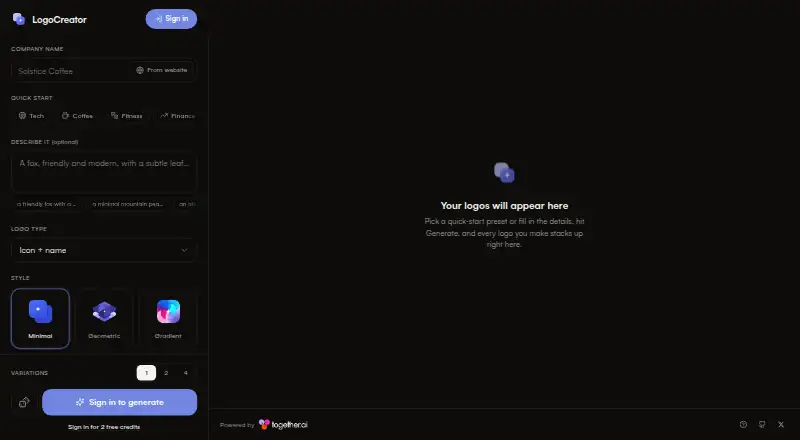
LogoCreator generates logo concepts from a company name, an optional description, and design choices. Users can select Minimal, Geometric, Gradient, Mascot, Hand-drawn, Luxury, Retro, or 3D styles, or choose a surprise option. They can set a brand color and background; the site says its AI can select a fitting color when needed. The interface offers 1, 2, or 4 variations. A free account includes 2 logo generations and does not require a card. Generated logos accumulate in a workspace and stay on the device. The project describes editing logos with FLUX.1 Kontext; generation uses FLUX.2 pro through Together AI. PNG is the current export format, while SVG export is listed as a future task. Users can access the web app or run the project locally by cloning it and supplying a Together AI API key. Clerk authentication and Upstash Redis rate limiting are optional components for self-hosting. The maker pages describe optional security components but make no security or compliance certification claims.
Who it suits
LogoCreator may suit individuals or teams looking for logo concepts from a name and a few visual choices. Its self-hosted option may appeal to users comfortable cloning a project and providing an API key.
What it does well
- Offers eight named styles plus a surprise option.
- Supports brand color and background choices.
- Free account includes two logo generations without a card.
- Generated logos remain in a device workspace.
- Can be run locally with a Together AI API key.
What to know first
- Free account includes only two generations.
- PNG is the current export format; SVG is future work.
- No security or compliance certification claims are made.
Limits
The Free plan costs nothing and includes 2 free credits, with no card needed. PNG is the current export format; SVG export is identified as a future task.
Plans
| Plan | Billed and limits | Price |
|---|---|---|
| Free | 2 free credits · no card needed | Free |
As logo-creator.io lists them, read 5 Oct 2026. The maker's own page has the final word.
Getting started
- Visit https://www.logo-creator.io/ to use LogoCreator on the web.
- Create a free account to get 2 logo generations; no card is needed.
- Enter a company name and optionally add a description.
- Choose a style, brand color, background, and 1, 2, or 4 variations.
- For self-hosting, clone the project and provide a Together AI API key.
- Optionally add Clerk authentication and Upstash Redis rate limiting to a self-hosted setup.
Verdict
LogoCreator offers a small free allowance and several style and variation choices for generating logo concepts. Consider the PNG-only export and local setup requirements if those matter to your workflow.
Questions
How much does LogoCreator cost?
Its Free plan costs nothing and includes 2 free credits.
Do I need a card to use the free plan?
No. The site says the 2 free generations do not require a card.
What platforms are available?
LogoCreator is listed for web and self-hosted use.
What export format does it offer?
PNG is the current export format. SVG export is listed as a future task.
Can I run LogoCreator locally?
Yes. The README says to clone the project and provide a Together AI API key. Clerk and Upstash are optional components.
Which services power logo generation and editing?
Generation uses FLUX.2 pro through Together AI, and the project describes editing with FLUX.1 Kontext.
Facts from LogoCreator's own pages
- Brand options
- Users can set a brand color and background, and the site says AI will pick a fitting color when needed. · logo-creator.io, 5 Oct 2026
- Editing
- The project README describes editing logos with FLUX.1 Kontext. · github.com, 5 Oct 2026
- Export limit
- The project README lists SVG export as a future task, so it identifies PNG as the current export format. · github.com, 5 Oct 2026
- Generation allowance
- The site says a free account comes with 2 free logo generations and no card is needed. · logo-creator.io, 5 Oct 2026
- Generation provider
- The app is powered by FLUX.2 pro on Together AI and uses FLUX.1 Kontext for edits. · github.com, 5 Oct 2026
- Integrations
- The README identifies Together AI as the generation provider and lists Clerk authentication and Upstash Redis rate limiting as optional components. · github.com, 5 Oct 2026
- Logo history
- The site says generated logos stack up in the workspace and stay on the device. · logo-creator.io, 5 Oct 2026
- Purpose
- LogoCreator generates logos from a company name, optional description, and design choices. · logo-creator.io, 5 Oct 2026
- Security and trust
- The opened maker pages describe optional rate limiting and authentication but make no security or compliance certification claims. · github.com, 5 Oct 2026
- Self-hosting
- The README says users can clone the project, provide a Together AI API key, and run it locally; Clerk and Upstash are optional. · github.com, 5 Oct 2026
- Style controls
- The site offers Minimal, Geometric, Gradient, Mascot, Hand-drawn, Luxury, Retro, and 3D styles, plus a Surprise me option. · logo-creator.io, 5 Oct 2026
- Variations
- The interface offers 1, 2, or 4 variations. · logo-creator.io, 5 Oct 2026
Where LogoCreator stands on Freedom251
- AI Logo Makers#21 of 65