Freedom251 › Bookmark Managers
linkding
What linkding is
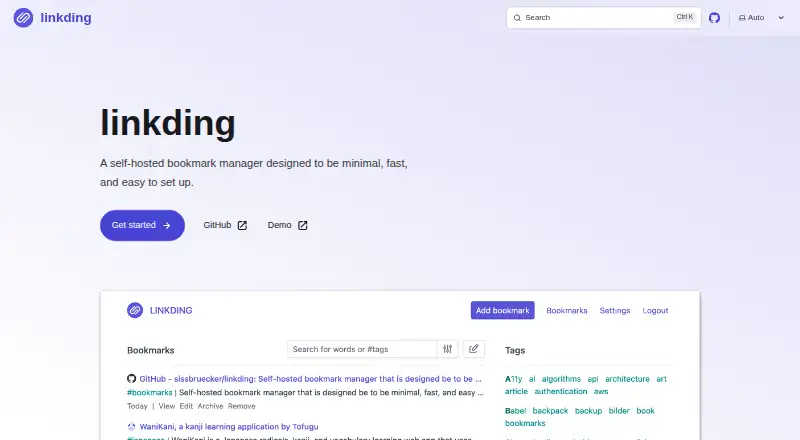
linkding is a free, open-source, self-hosted bookmark manager built for minimal setup and fast access. It fetches bookmark titles, descriptions, icons, and preview images, while tags, Markdown notes, bulk editing, and read-it-later tools help organize saved links. Search handles words, quoted phrases, tags, and AND, OR, NOT, and grouping expressions. Firefox and Chrome extensions can add or search bookmarks from a browser, including through the address bar. linkding can archive websites as local HTML snapshots or through the Internet Archive. The latest-plus Docker image enables local snapshots by including Chromium, but needs more image size, memory, and disk space. Multiple users can share bookmarks with users or guests. A REST API, OpenID Connect single sign-on, authentication proxies, and Netscape HTML import and export support broader workflows. Docker uses SQLite by default, supports PostgreSQL, and works on ARM devices such as Raspberry Pi. The project is MIT-licensed and lists managed hosting services and community-made clients.
Who it suits
linkding suits people who want to host their own bookmark service and organize links with tags, notes, search, and archives. It also fits teams needing sharing, API access, or browser extensions.
What it does well
- Free and open source under MIT license
- Supports Firefox and Chrome extensions
- Offers website snapshot archiving
- Provides REST API and single sign-on
- Works with SQLite, PostgreSQL, and ARM
What to know first
- Self-hosted deployment requires setup
- latest-plus image needs more resources
- Default security blocks internal-host metadata loading
Limits
There is no paid tier to describe because linkding is free. The latest-plus image requires more storage, runtime memory and disk space than the basic image.
Getting started
- Open the linkding website
- Deploy the Docker image on a supported host
- Use SQLite by default or configure PostgreSQL
- Use the latest-plus image for HTML snapshot archiving
- Install the Firefox or Chrome extension
- Configure OpenID Connect or an authentication proxy if required
Verdict
linkding provides broad bookmarking, search, sharing, and archiving capabilities in a self-hosted package. Resource needs for HTML snapshots and the responsibility of hosting are the main trade-offs.
Questions
Is linkding free?
Yes. It is free and open source under the MIT license.
Which platforms does linkding support?
Platforms listed are Android, API, browser extension, iOS, Linux, self-hosted and web. The project also lists community-made Android and iOS clients.
Can linkding archive websites?
Yes. It can create local HTML snapshots or archive through the Internet Archive. Local HTML snapshot archiving is included in the latest-plus image.
Does linkding provide an API?
Yes. A REST API is available for scripts and third-party applications.
What databases can it use?
The Docker image uses SQLite by default and also supports PostgreSQL.
Can several people share bookmarks?
Yes. Multiple users can share bookmarks with other users or guests.
Facts from linkding's own pages
- API
- Linkding provides a REST API for scripts and third-party applications. · linkding.link, 7 Oct 2026
- API and authentication
- It provides a REST API and supports single sign-on through OpenID Connect or authentication proxies. · github.com, 7 Oct 2026
- Archiving
- It can create website snapshots as local HTML files or on the Internet Archive; HTML snapshot archiving is included in the `latest-plus` image variant. · linkding.link, 7 Oct 2026
- Authentication integrations
- Linkding supports OpenID Connect single sign-on and authentication proxies such as Authelia. · linkding.link, 7 Oct 2026
- Bookmark features
- It fetches bookmark titles, descriptions, icons and preview images, and supports bulk editing and Netscape HTML import and export. · linkding.link, 7 Oct 2026
- Browser access
- The project provides Firefox and Chrome extensions for adding and searching bookmarks from a browser. · linkding.link, 7 Oct 2026
- Browser integration
- The official Firefox and Chrome extensions can add and search bookmarks from the browser, including searching from the address bar. · linkding.link, 7 Oct 2026
- Community apps
- The project community page lists third-party Android and iOS clients, desktop apps, browser extensions, utilities and API libraries. · linkding.link, 7 Oct 2026
- Databases
- Linkding uses SQLite by default and also supports PostgreSQL. · linkding.link, 7 Oct 2026
- Deployment
- The installation guide recommends container solutions such as Docker, and says its image supports ARM platforms including Raspberry Pi. · linkding.link, 7 Oct 2026
- Deployment variants
- The latest-plus Docker image includes HTML snapshot archiving and requires more memory and disk space than the basic image. · linkding.link, 7 Oct 2026
- Import and export
- Bookmarks can be imported and exported in Netscape HTML format. · linkding.link, 7 Oct 2026
- License
- The project’s GitHub repository identifies its license as MIT. · github.com, 7 Oct 2026
- Maker
- The repository is maintained under the GitHub account sissbruecker. · github.com, 7 Oct 2026
- Managed hosting
- The project lists PikaPods and CloudBreak as managed services and Hostim.dev as a hosting platform; PikaPods has a revenue-sharing agreement with the project. · linkding.link, 7 Oct 2026
- Metadata and archiving
- Linkding can fetch bookmark titles, descriptions, and icons, and archive websites as local HTML snapshots or on the Internet Archive. · linkding.link, 7 Oct 2026
- Notable limit
- The `latest-plus` image includes Chromium for HTML snapshots and therefore requires more image size, runtime memory and disk space. · linkding.link, 7 Oct 2026
- Organization
- Users can organize bookmarks with tags and use bulk editing, Markdown notes, and read-it-later functionality. · github.com, 7 Oct 2026
- Purpose
- linkding is a self-hosted bookmark manager designed to be minimal, fast, and easy to set up. · linkding.link, 7 Oct 2026
- Search
- Search supports words, quoted phrases, tags, and AND, OR, NOT and grouping expressions. · linkding.link, 7 Oct 2026
- Security
- By default, linkding blocks loading metadata, preview images and PDF snapshots from internal network hosts to help prevent server-side request forgery. · linkding.link, 7 Oct 2026
- Security reporting
- The project security policy says to report vulnerabilities by email and lists version 1.10.x as supported. · github.com, 7 Oct 2026
- Sharing
- Multiple users can share bookmarks with other users or guests. · linkding.link, 7 Oct 2026
- Storage and deployment
- The Docker image uses SQLite by default, supports PostgreSQL, and is compatible with ARM platforms such as Raspberry Pi. · linkding.link, 7 Oct 2026
Where linkding stands on Freedom251
- Bookmark Managers#21 of 43