Freedom251 › Parental control apps
LiFE Parental Control
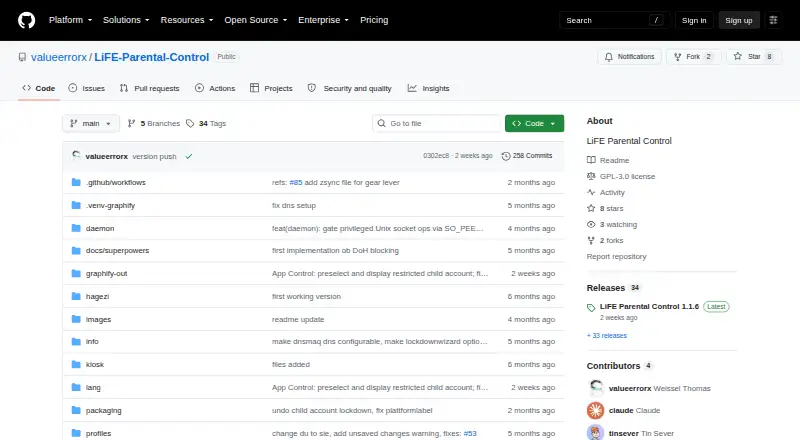
What LiFE Parental Control is
LiFE Parental Control is a free, open-source desktop parental-control app for Linux, including KDE Plasma and GNOME. It combines daily screen-time limits, allowed hours, schedule presets, bonus minutes, and a one-time parent bypass. Parents can block apps, set per-app daily quotas, or exempt selected apps. Web filtering supports custom domains, HaGeZi blocklists, allowlists, category packs, and DNS filtering through dnsmasq. The filter can use DNS4EU’s family-safe resolver and optionally block known public DNS-over-HTTPS resolver addresses. A dashboard shows today’s total and per-app screen time, historical sessions, and enforcement events. The first-run wizard creates a parent administrator, removes child sudo or wheel access, and can restrict FUSE or AppImages. A root-running systemd daemon supports a normal-user frontend. JSON backup excludes the parent password and usage history. The repository lists release 1.1.5 and a GPL-3.0 license.
Who it suits
LiFE suits Linux households that need local web filtering, screen-time rules, app controls, and activity reports. It is intended for systems using KDE Plasma or GNOME.
What it does well
- Free plan with GPL-3.0 license
- Screen schedules and daily limits
- Custom web and DNS filtering
- Per-app quotas and exemptions
- Activity dashboard with historical sessions
What to know first
- Linux-only platform
- No location tracking
- Backups omit passwords and usage history
- Requires root-running systemd daemon
Verdict
LiFE brings web, time, application, and activity controls together for Linux desktops. Families should note its Linux-only scope, absent location tracking, and limited backup contents.
Facts from LiFE Parental Control's own pages
- Activity reports
- Yes · github.com, 22 Sept 2026
- App blocking
- Yes · github.com, 22 Sept 2026
- App controls
- The daemon can block configured apps and enforce daily per-app usage caps. · github.com, 12 Oct 2026
- Backup limit
- JSON backup export and import excludes the parent password and usage history. · github.com, 12 Oct 2026
- Content filtering
- Yes · github.com, 22 Sept 2026
- Dashboard
- The dashboard shows today's total and per-app screen time and an activity log of historical sessions and enforcement events. · github.com, 12 Oct 2026
- Dashboard and backup
- The dashboard shows daily screen time and per-app usage; JSON backup export excludes passwords and usage history. · github.com, 11 Oct 2026
- Deployment
- Settings can be preconfigured in default.json and distributed for the daemon to apply automatically. · github.com, 12 Oct 2026
- DNS filtering
- DNS-based filtering uses dnsmasq to rewrite blocked domains to 0.0.0.0, with an optional DNS4EU family-safe upstream resolver. · github.com, 12 Oct 2026
- DNS options
- The web filter can use DNS4EU’s family-safe resolver and can optionally block known public DNS-over-HTTPS resolver IPs. · github.com, 11 Oct 2026
- Downloads
- The repository lists LiFE Parental Control 1.1.5 as its latest release and shows five release assets. · github.com, 12 Oct 2026
- Free plan
- Yes · github.com, 22 Sept 2026
- KDE restrictions
- KDE kiosk restrictions are applied through /etc/xdg/kdeglobals, with an optional Plasma layout hard lock. · github.com, 12 Oct 2026
- License
- The repository identifies its license as GPL-3.0. · github.com, 12 Oct 2026
- Location tracking
- No · github.com, 22 Sept 2026
- Password storage
- The README says the parent password hash is stored separately in root-only /etc/life-parental/auth.json using SHA-256 with a salt. · github.com, 12 Oct 2026
- Product
- LiFE Parental Control is a desktop parental control app for Linux, including KDE Plasma and GNOME. · github.com, 12 Oct 2026
- Screen time
- Screen-time controls include daily limits, allowed hours, weekday schedules, bonus minutes, and a one-time parent bypass. · github.com, 12 Oct 2026
- Screen-time schedules
- Yes · github.com, 22 Sept 2026
- Security details
- The README says the parent password hash is stored separately in a root-only auth.json file with chmod 600. · github.com, 11 Oct 2026
- Security setup
- The first-run Lockdown Wizard can remove the child account from sudo or wheel, remove SSH keys, and optionally restrict FUSE and AppImages. · github.com, 12 Oct 2026
- Setup and lockdown
- A first-run wizard can create a parent admin account, de-privilege a child account, and optionally set a GRUB password or restrict AppImage/FUSE. · github.com, 11 Oct 2026
- Web filtering
- Its web filter supports custom domains, allowlists, category packs, and HaGeZi blocklists. · github.com, 12 Oct 2026
Where LiFE Parental Control stands on Freedom251
- Parental control apps#64 of 107