Freedom251 › Parental control apps
Child Screen Time
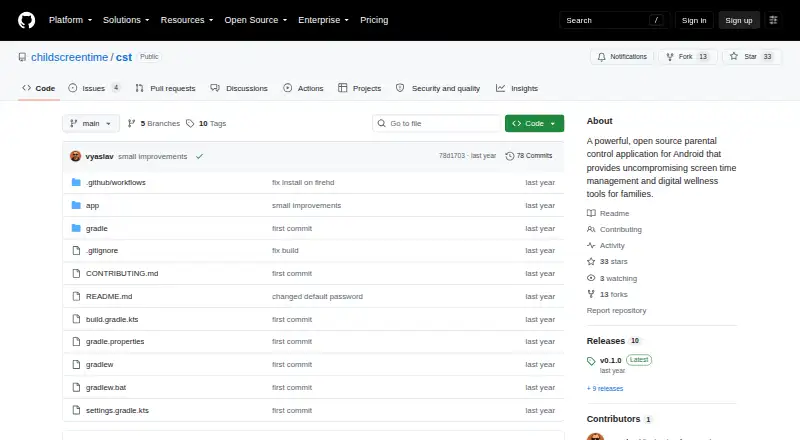
What Child Screen Time is
Child Screen Time is a free, open-source Android parental-control app for managing children’s screen time and digital wellness. It monitors device use in real time with minute-by-minute accuracy described by the project, and displays a fullscreen overlay when a configured limit is reached. Families can set daily allowances and provide extension credits in one-minute or five-minute increments. The app can automatically pause videos, games, and music. Foreground-service monitoring and WorkManager integration support background operation, while device-administrator features provide tamper resistance. Settings are password-protected; the project lists 3443 as the default administrator password and advises changing it for production deployments. Android 9.0 (API 28) or higher and Usage Access permission are required, and the app exits if that permission is denied. The project is licensed under MIT and describes no hidden data collection. Releases are distributed through GitHub Releases and the Amazon Appstore, with support via GitHub Issues, Discussions, and the wiki.
Who it suits
Child Screen Time suits families wanting open-source Android screen-time controls and real-time usage monitoring. It requires Android 9.0 or newer, Usage Access permission, and administrator setup.
What it does well
- Real-time usage monitoring with minute accuracy
- Fullscreen overlay blocks reached time limits
- Supports daily allowances and extension credits
- Can pause videos, games, and music
- Open source under the MIT License
What to know first
- Android 9.0 or higher is required
- Usage Access permission is mandatory
- Default administrator password should be changed
- Android is the listed platform
Verdict
Child Screen Time combines configurable limits, usage monitoring, media controls, and open-source transparency for Android families. Installation and operation depend on Usage Access permission, compatible Android versions, and secure administrator-password changes.
Facts from Child Screen Time's own pages
- Activity reports
- Yes · github.com, 22 Sept 2026
- Admin access
- Settings are password-protected, and the README lists 3443 as the default admin password and advises changing it for production deployments. · github.com, 12 Oct 2026
- Android requirement
- The project lists Android 9.0 (API level 28) or higher as a prerequisite. · github.com, 12 Oct 2026
- Background monitoring
- The project describes foreground-service monitoring and WorkManager integration for background resilience. · github.com, 12 Oct 2026
- Data transparency
- The README describes the project as open source and says it has no hidden data collection. · github.com, 12 Oct 2026
- Default admin password
- The README lists 3443 as the default admin password and advises changing it for production deployments. · github.com, 12 Oct 2026
- Device platforms
- android · github.com, 22 Sept 2026
- Distribution
- The README says automated releases deploy to GitHub Releases and the Amazon Appstore. · github.com, 12 Oct 2026
- Installation
- The README describes cloning the repository, building with Gradle, and installing the resulting APK with adb. · github.com, 12 Oct 2026
- License
- The project says it is licensed under the MIT License. · github.com, 12 Oct 2026
- Media control
- The app can automatically pause videos, games, and music. · github.com, 12 Oct 2026
- Media controls
- The app can automatically pause videos, games, and music. · github.com, 12 Oct 2026
- Product
- Child Screen Time describes itself as an open-source parental control app for Android for screen-time management and digital wellness. · github.com, 12 Oct 2026
- Purpose
- Child Screen Time describes itself as an open-source parental control app for Android that provides screen-time management and digital-wellness tools for families. · github.com, 12 Oct 2026
- Requirements
- The app requires Android 9.0 (API 28) or higher and Usage Access permission to function. · github.com, 12 Oct 2026
- Screen blocking
- The app creates a fullscreen overlay that it says cannot be bypassed when time limits are reached. · github.com, 12 Oct 2026
- Security and privacy
- The README describes the project as open source, with transparency and no hidden data collection, and says it uses device-administrator features for tamper resistance. · github.com, 12 Oct 2026
- Setup requirement
- Usage Access permission is required for the app to function; the README says the app exits if that permission is denied. · github.com, 12 Oct 2026
- Support
- The README directs users to GitHub Issues, Discussions, and the project wiki for support. · github.com, 12 Oct 2026
- Time allowances
- Families can configure daily time allowances and extension credits, including 1-minute and 5-minute options. · github.com, 12 Oct 2026
- Usage tracking
- The README describes real-time usage monitoring with minute-by-minute accuracy. · github.com, 12 Oct 2026
Where Child Screen Time stands on Freedom251
- Parental control apps#63 of 107