Libreture
What Libreture is
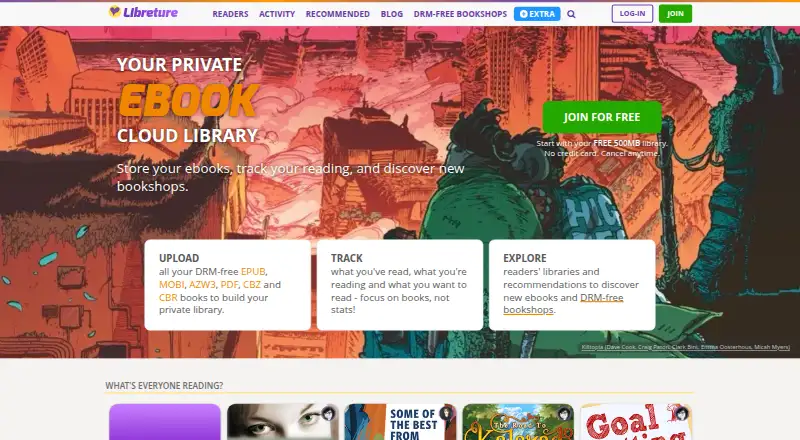
Libreture is a cloud library for DRM-free ebooks, digital comics, magazines, and other digital reading material. It processes uploaded files into book pages using information extracted from them, reducing the need to enter catalogue details manually. Supported file types include ePub, Mobi, PRC, PDF, CBZ, and CBR, and uploaded items can be downloaded in their original format. Readers can track activity, arrange titles into lists and Collections, mark favourites, create wishlists, and write recommendations. Discovery features include public libraries and recommendations, with links to shops where library owners bought titles. Libraries are private by default; owners can make a library public and hide individual books, while uploaded files are not exposed publicly. Books can be downloaded through a browser or accessed using OPDS-compatible reading apps and devices. The listed platforms are Android, iOS, and web. The free plan includes 500MB of storage and all features. Paid plans increase storage, with tiers billed at £3/month, £6/month, and £16/month. Libreture says its aim is to help readers discover independent ebooks and make independent ebook publishing more sustainable. Its site says it is hosted in the UK and EU, while its privacy policy specifies a server in the Netherlands.
Who it suits
Libreture suits readers who want to organize DRM-free ebooks, comics, or magazines in a cloud library and access them through a browser or OPDS-compatible apps and devices. It may also suit readers interested in discovering independent titles through public libraries and recommendations.
What it does well
- Automatically creates book pages using file information.
- Supports ePub, Mobi, PRC, PDF, CBZ, and CBR.
- Offers lists, Collections, favourites, wishlists, and recommendations.
- Libraries are private by default, with individual-book hiding controls.
- Browser access and OPDS-compatible reading apps and devices are supported.
What to know first
- Uploads must be DRM-free.
- The free account has 500MB of storage.
- Paid tiers are billed at £3/month, £6/month, or £16/month.
Limits
The free account includes 500MB of storage. Uploads must be DRM-free; paid tiers increase storage to 30GB, 100GB, or 300GB.
Plans
| Plan | Billed and limits | Price |
|---|---|---|
| Free | 500MB storage · all features | Free |
| Extra Everything | £16/month · 300GB storage · all features | £16 a month |
| Extra Ebooks | £3/month · 30GB storage · all features | £3 a month |
| Extra Comics | £6/month · 100GB storage · all features | £6 a month |
As libreture.com lists them, read 11 Oct 2026. The maker's own page has the final word.
Getting started
- Visit the Libreture website and create an account.
- Upload DRM-free files in a supported format.
- Use the free plan with 500MB storage or select a paid storage tier.
- Browse or organize titles into lists and Collections.
- Read through a browser or use an OPDS-compatible reading app or device.
Verdict
Choose Libreture if you want a cloud-based way to catalogue and organize DRM-free reading files, with discovery and OPDS access alongside browser use. Look elsewhere if your collection includes DRM-protected files or needs more than 500MB without a paid storage tier.
Questions
Is Libreture free?
It has a free plan with 500MB of storage and all features. Paid tiers are billed at £3/month, £6/month, or £16/month.
Which formats can I upload?
The FAQ lists ePub, Mobi, PRC, PDF, CBZ, and CBR. Uploaded files can be downloaded in the format they were uploaded.
Which platforms does Libreture support?
Its listed platforms are Android, iOS, and web. Books can also be accessed through OPDS-compatible reading apps and devices.
Are libraries public?
Libraries are private by default. Owners can make a library public and hide individual books, while uploaded files are not exposed publicly.
Where is Libreture hosted?
The site says it is hosted in the UK and EU; its privacy policy specifies a server in the Netherlands.
How does Libreture handle payment details?
Its privacy policy says payment details are handled by Stripe rather than stored by Libreture.
Facts from Libreture's own pages
- Automatic cataloguing
- It processes DRM-free book files into book pages with information extracted from the files, reducing manual entry. · libreture.com, 11 Oct 2026
- Collections
- Libreture announced that readers can create Collections and move DRM-free ebooks into them. · libreture.com, 11 Oct 2026
- Device access
- Books can be downloaded through a web browser or accessed through OPDS-compatible reading apps and devices. · libreture.com, 11 Oct 2026
- Discovery
- Readers can browse public libraries and book recommendations and find links to the shops where owners bought titles. · libreture.com, 11 Oct 2026
- Headquarters
- North of England, UK · libreture.com, 28 Sept 2026
- Hosting
- The site says it is hosted in the UK and EU; its privacy policy specifies that the server is hosted in the Netherlands. · libreture.com, 11 Oct 2026
- Intended audience
- Libreture says it aims to help readers discover independent ebooks and make independent ebook publishing more sustainable. · libreture.com, 11 Oct 2026
- Notable limits
- Uploads must be DRM-free, and the free account includes 500MB of storage. · libreture.com, 11 Oct 2026
- Personal data
- The privacy policy says the service collects account username, password, and email, and that payment details are handled by Stripe rather than stored by Libreture. · libreture.com, 11 Oct 2026
- Privacy controls
- Libraries are private by default; users can make a library public and hide individual books, while uploaded book files are not exposed publicly. · libreture.com, 11 Oct 2026
- Purpose
- Libreture is a cloud library for storing DRM-free ebooks, digital comics, magazines, and more. · libreture.com, 11 Oct 2026
- Reading organization
- Readers can track activity, organize books into lists, create favourites and wishlists, and write recommendations. · libreture.com, 11 Oct 2026
- Support
- The registration page offers friendly support through the Support site, and the FAQ invites users to email [email protected]. · libreture.com, 11 Oct 2026
- Supported formats
- The FAQ lists ePub, Mobi, PRC, PDF, CBZ, and CBR, and says uploads can be downloaded in the format they were uploaded. · libreture.com, 11 Oct 2026
Where Libreture stands on Freedom251
- Reading Apps#17 of 47