Freedom251 › AI Lesson Plan Generators
Lessonsquill
What Lessonsquill is
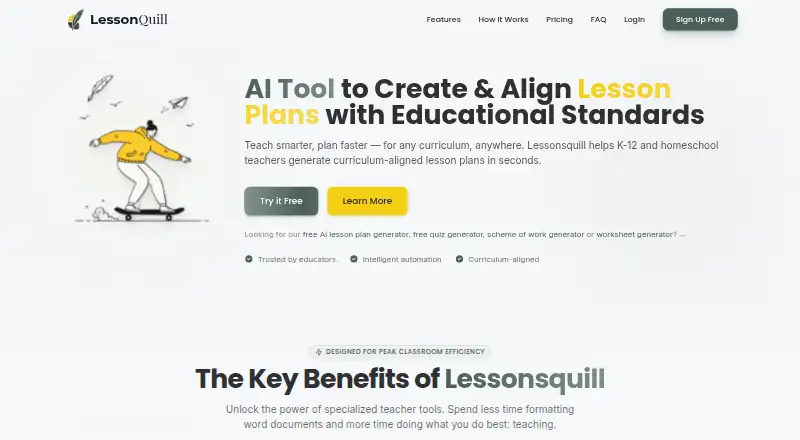
Lessonsquill is a web-based AI tool for K-12 teachers, tutors, and homeschool educators creating curriculum-aligned teaching materials. Its lesson planner produces editable plans with objectives, prior knowledge, activities, teaching methods, assessments, resources, and pacing guidance. The site lists templates for WAEC, NECO, NERDC, Common Core, the UK National Curriculum, IB, CBSE/ICSE, and CAPS. Educators can create quizzes with six question types, adjustable difficulty, answer keys, and print-ready PDF output. The worksheet generator accepts a topic, text, web address, YouTube link, or uploaded TXT, PDF, or DOCX file, and includes an answer key. A scheme-of-work tool builds week-by-week plans with objectives, teaching methods, assessments, resources, and vocabulary. Users can save materials in folders, customize them, and export to PDF, Word, or PowerPoint. The Free plan costs nothing and limits monthly creation across several tools. Pro is $5 a month, billed at checkout at approximately ₦8,000. The School plan is $12 a month and is listed as coming soon, with a waitlist.
Who it suits
Lessonsquill suits K-12 teachers, tutors, and homeschool educators who need curriculum-aligned plans, quizzes, worksheets, or schemes of work. Its listed curricula span several national and international programs.
What it does well
- Editable lesson plans include pacing guidance
- Quiz generator offers six question types
- Worksheets accept links, text, and uploaded files
- Materials export to PDF, Word, or PowerPoint
What to know first
- Free plan limits monthly creation across tools
- School plan is coming soon
- The service is not intended for children under 13
Limits
The Free plan allows three lesson plans, lesson notes, worksheets, and slide presentations per month, plus three schemes of work per month of up to four weeks. It includes up to six folders and watermarked PDF output. Pro provides unlimited tools and DOCX and PDF export without a watermark; the School plan is coming soon.
Plans
| Plan | Billed and limits | Price |
|---|---|---|
| Free | 3 lesson plans/month · 3 lesson notes/month · 3 worksheets/month · 3 slide presentations/month · 3 schemes of work/month (up to 4 weeks) · up to 6 folders · basic curriculum templates · watermarked PDF · community support | Free |
| School | Everything in Pro · admin dashboard · shared resource library · team-wide analytics · volume pricing · dedicated support · coming soon; join waitlist | $12 a month |
| Pro | ≈ ₦8,000 billed at checkout · Unlimited tools · all 15+ curriculum templates · priority support · DOCX and PDF export without watermark · folder organisation | $5 a month |
As lessonsquill.com lists them, read 8 Oct 2026. The maker's own page has the final word.
Getting started
- Visit the Lessonsquill website and use the web service.
- Choose the Free plan or Pro plan; the School plan has a waitlist and is coming soon.
- Create lesson plans, quizzes, worksheets, or schemes of work using the relevant generator.
- Organize materials in folders and customize them.
- Export materials in the formats available to your plan.
Verdict
Lessonsquill covers several stages of classroom preparation, from planning and worksheets to quizzes and exports. The Free plan provides a way to start, while Pro removes the listed tool limits and adds more curriculum templates.
Questions
Is Lessonsquill free?
Yes. The Free plan costs nothing and includes monthly limits on several tools.
How much does Pro cost?
Pro costs $5 a month, billed at checkout at approximately ₦8,000.
What does the Free plan include?
It includes three monthly uses each for lesson plans, lesson notes, worksheets, and slide presentations, plus three schemes of work per month up to four weeks. It also includes up to six folders, basic curriculum templates, watermarked PDF, and community support.
What platforms does Lessonsquill support?
Lessonsquill is listed as a web platform.
What can I export?
The homepage says materials can be exported to PDF, Word, or PowerPoint. Pro includes DOCX and PDF export without a watermark.
Is there a School plan?
A School plan is listed at $12 a month, with an admin dashboard, shared resource library, team-wide analytics, volume pricing, and dedicated support. It is marked coming soon, with a waitlist available.
Facts from Lessonsquill's own pages
- Children
- The privacy policy says Lessonsquill is not intended for children under 13 and says it will promptly delete data it discovers from individuals under that age. · lessonsquill.com, 8 Oct 2026
- Compliance
- The privacy policy says GDPR and international compliance measures are planned for the future. · lessonsquill.com, 8 Oct 2026
- Curricula
- The site lists support for curricula including WAEC, NECO, NERDC, Common Core, UK National Curriculum, IB, CBSE/ICSE, and CAPS. · lessonsquill.com, 8 Oct 2026
- Integrations
- The opened maker pages do not identify third-party product integrations; the worksheet tool accepts a web URL, YouTube link, or uploaded file as input. · lessonsquill.com, 8 Oct 2026
- Intended users
- The founder describes Lessonsquill as an AI tool for teachers, tutors, and homeschooling instructors. · lessonsquill.com, 8 Oct 2026
- Lesson planning
- The lesson plan generator creates editable plans with objectives, prior knowledge, activities, teaching methods, assessments, resources, and pacing guidance. · lessonsquill.com, 8 Oct 2026
- Organization and export
- Users can save lessons in folders, customize content, and export materials to PDF, Word, or PowerPoint according to the homepage. · lessonsquill.com, 8 Oct 2026
- Privacy and security
- The privacy policy says the service uses standard encryption and access controls, does not sell or rent personal information, and retains account data while an account is active or as needed to provide services. · lessonsquill.com, 8 Oct 2026
- Purpose
- Lessonsquill uses AI to help K-12 teachers, tutors, and homeschool educators create curriculum-aligned lesson plans and notes. · lessonsquill.com, 8 Oct 2026
- Quiz generation
- The quiz generator supports six question types, adjustable difficulty, answer keys, and print-ready PDF output. · lessonsquill.com, 8 Oct 2026
- Schemes of work
- The scheme generator creates week-by-week plans with objectives, teaching methods, assessments, resources, and vocabulary. · lessonsquill.com, 8 Oct 2026
- Support and cancellation
- The pricing page lists community support on Free and priority support on Pro; it says Paystack subscriptions can be cancelled from the dashboard, with Pro access continuing through the billing period. · lessonsquill.com, 8 Oct 2026
- Worksheets
- The worksheet generator accepts topics, text, web URLs, YouTube links, or uploaded TXT, PDF, and DOCX files and includes an answer key. · lessonsquill.com, 8 Oct 2026
Where Lessonsquill stands on Freedom251
- AI Lesson Plan Generators#17 of 26