Lemora
What Lemora is
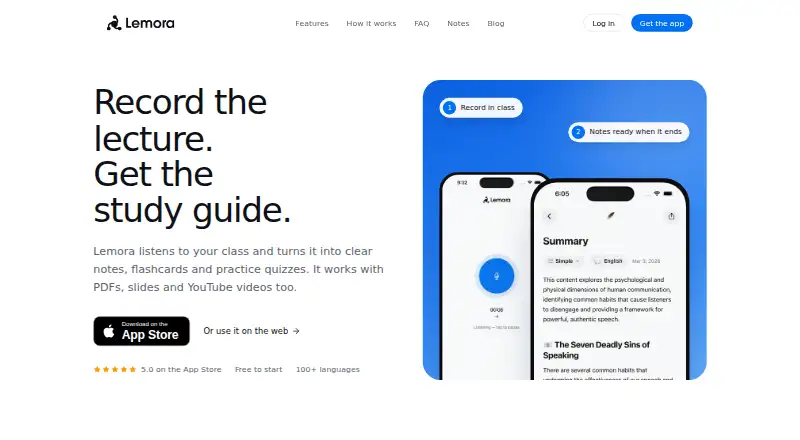
Lemora is a study tool that turns lectures and course materials into notes and learning resources. Students can record a live lecture or add PDFs, slides, YouTube links, web pages, and text. From that material, Lemora can make flashcards, quizzes, mind maps, and podcasts. Its AI tutor answers typed or spoken questions based on the learner’s notes, and can explain answers aloud.
Lemora supports recording and studying in more than 100 languages, and users can select the language of their notes. Notes sync between the app and the web. It is available on Android, iOS, macOS, web, and Windows, with document uploads, webpage summaries, and transcript summaries. The Free plan costs nothing and has daily limits on uploads and tutor chats; Lemora Pro removes those daily limits. The privacy policy says personal uploads are not used to train Lemora’s or third-party AI models, although submitted content may be shared with OpenAI and Anthropic to generate learning materials. Users can delete their account and associated data in app or web settings, though some data may remain in encrypted backups temporarily. Lemora advises checking school rules before recording lectures, since permission may be required.
Who it suits
Lemora suits students who want to turn lectures, documents, and online material into study notes and practice resources. Its language options may also suit people studying in a second language or working with material in different languages.
What it does well
- Creates flashcards, quizzes, mind maps, and podcasts from study material.
- Tutor answers typed or spoken questions using the learner’s notes.
- Supports recording and study in more than 100 languages.
- Notes sync between the app and web.
- Available on Android, iOS, macOS, web, and Windows.
What to know first
- The Free plan limits uploads and tutor chats each day.
- Lecture recording may require permission under a school’s rules.
- Submitted content may be shared with OpenAI and Anthropic to generate learning materials.
Limits
The Free plan has daily limits on uploads and tutor chats. Lemora Pro removes those daily limits.
Plans
| Plan | Billed and limits | Price |
|---|---|---|
| Free | Daily limits on uploads and tutor chats | Free |
| Lemora Pro | Removes the free plan’s daily limits | On request |
As lemora.ai lists them, read 29 Sept 2026. The maker's own page has the final word.
Getting started
- Visit https://www.lemora.ai/ or use Lemora on Android, iOS, macOS, web, or Windows.
- Choose the Free plan or Lemora Pro.
- Add a live lecture, PDF, slides, YouTube link, web page, or text.
- Choose the language for your notes, if needed.
- Create study materials or ask the AI tutor questions about your notes.
- Check school rules before recording a lecture.
Lemora brings lecture capture, course-material processing and revision tools into one study workflow. Its breadth is useful for students who want to move from class content to practice without switching tools, though daily caps on the free plan may restrict regular use.
Overview
Students can supply live lectures, PDFs, slides, YouTube links, web pages or text. Lemora turns that material into study notes and learning materials, including transcript and webpage summaries. That makes it a better fit for coursework that draws on varied sources than for someone who only wants to summarize occasional documents.
Notes sync between the app and web, and users can record and study in more than 100 languages or choose the language of their notes. That flexibility can help with multilingual study or coursework in a second language. The site advises checking school rules before recording, since some schools require permission.
Key features
Revision formats
From class material, Lemora can create flashcards, quizzes, mind maps and podcasts. The range supports different ways of reviewing the same subject; it is more than a summary generator. Students seeking only a short digest may find that broader study toolkit unnecessary.
AI tutor
The tutor answers typed or spoken questions using the learner’s notes and can explain answers aloud. This makes it relevant for follow-up questions tied to personal course material, rather than only generic queries. Free users face daily tutor-chat limits, so frequent question-and-answer study may require Pro.
Privacy and support
Lemora says it encrypts data in transit and at rest, uses secure authentication and conducts regular security audits. Uploaded personal content is not used to train its own or third-party AI models, but submitted content may be shared with OpenAI and Anthropic to generate learning materials. Users can delete accounts and associated data in app or web settings; some data may remain in encrypted backups for a limited time. Support is available by email, with replies typically arriving within 24 hours.
Pricing
Free: free. It includes daily limits on uploads and tutor chats. This is a sensible starting point for occasional study or trying the workflow, but those caps can interrupt heavier use across a full course.
Lemora Pro: custom pricing. It removes the Free plan’s daily limits, making it the better fit for students who regularly upload material or rely on the tutor. The Free plan gives up uncapped daily use; Pro’s value depends on how often those limits would otherwise get in the way.
Platforms
Lemora is available on Android, iOS, macOS, web and Windows. Combined with app-to-web note syncing, this supports moving between mobile and desktop study.
Who it's for
Lemora is aimed at students, including those studying math, science or code and people working in a second language. It suits learners who want to turn class materials into several forms of revision and ask questions against their notes. It is less compelling for readers who need only one-off summaries or who cannot record lectures under their school’s rules.
Pros and cons
- Pros: Accepts lectures and a wide range of course inputs, then produces notes, summaries and multiple practice formats, keeping study steps together.
- Pros: The tutor can answer spoken or typed questions from the learner’s notes and explain answers aloud.
- Pros: More than 100 languages, note-language choice and app-to-web syncing support varied study contexts.
- Cons: Free uploads and tutor chats have daily limits, which can constrain sustained study.
- Cons: Submitted content may be shared with OpenAI and Anthropic for generation, despite not being used to train their models or Lemora’s.
- Cons: Lecture recording may require school permission.
Alternatives
For a different kind of study workflow, AskSia offers daily problem solves, step-by-step solutions and photo input on its free plan, which may suit students focused on solving individual problems. QuillBot is a better fit for paraphrasing and basic writing support: its free plan allows paraphrasing up to 100 words with two modes and basic grammar tools. For broad summarization options, browse AI Summarizers.
Briefy, Grasp, smry, Summify, Summio and Apogee are other alternatives.
Verdict
Choose Lemora if you want a single student-focused tool to turn varied class materials into notes, practice activities and tutor answers. Its strongest case is the range of study formats around one set of course inputs; look elsewhere if you need uncapped daily use without paying, or if lecture recording is not permitted for your classes.
Verdict
Choose Lemora if you want one study tool for turning lectures and course materials into notes, practice activities, and tutor answers. Its Free plan includes daily upload and tutor-chat limits; Lemora Pro removes those limits. Check school rules before recording a lecture.
Questions
Is Lemora free?
Yes. The Free plan costs nothing and has daily limits on uploads and tutor chats.
What does Lemora Pro change?
Lemora Pro removes the Free plan’s daily limits on uploads and tutor chats.
Which platforms does Lemora support?
Lemora is available on Android, iOS, macOS, web, and Windows. Notes sync between the app and web.
What kinds of material can I add?
Lemora accepts live lectures, PDFs, slides, YouTube links, web pages, and text.
Does Lemora use uploaded content to train AI models?
Its privacy policy says uploaded personal content is not used to train Lemora’s or third-party AI models. Submitted content may be shared with OpenAI and Anthropic to generate learning materials.
Can I delete my account and data?
Users can delete their account and associated data through app or web settings. Some data may remain in encrypted backups for a limited time.
Facts from Lemora's own pages
- AI data use
- The privacy policy says uploaded personal content is not used to train Lemora’s or third-party AI models, and submitted content may be shared with OpenAI and Anthropic to generate learning materials. · lemora.ai, 29 Sept 2026
- AI tutor
- The tutor answers typed or spoken questions using the learner’s notes and can explain answers aloud. · lemora.ai, 29 Sept 2026
- Data deletion
- Users can delete their account and associated data through app or web settings, with some data potentially retained in encrypted backups for a limited time. · lemora.ai, 29 Sept 2026
- Designed for
- The site presents Lemora as a study tool for students, including people studying math, science, code or in a second language. · lemora.ai, 29 Sept 2026
- Inputs
- It accepts live lectures, PDFs, slides, YouTube links, web pages and text. · lemora.ai, 29 Sept 2026
- Languages
- Lemora supports recording and study in more than 100 languages, and lets users choose the language of their notes. · lemora.ai, 29 Sept 2026
- Platforms
- Lemora has an iPhone and iPad app, runs on Macs with Apple silicon, and is available in a browser on Android, Windows and Chromebook. · lemora.ai, 29 Sept 2026
- Purpose
- Lemora turns lectures and uploaded course materials into study notes and learning materials. · lemora.ai, 29 Sept 2026
- Recording caveat
- The site advises checking school rules because some schools require permission before recording a lecture. · lemora.ai, 29 Sept 2026
- Security
- The privacy policy says Lemora uses encryption in transit and at rest, secure authentication and regular security audits. · lemora.ai, 29 Sept 2026
- Study tools
- It can create flashcards, quizzes, mind maps and podcasts from class material. · lemora.ai, 29 Sept 2026
- Support
- Users can contact [email protected], and the support page says replies typically arrive within 24 hours. · lemora.ai, 29 Sept 2026
- Sync
- Notes sync between the app and the web. · lemora.ai, 29 Sept 2026
Where Lemora stands on Freedom251
- AI Summarizers#4 of 36