Grasp
What Grasp is
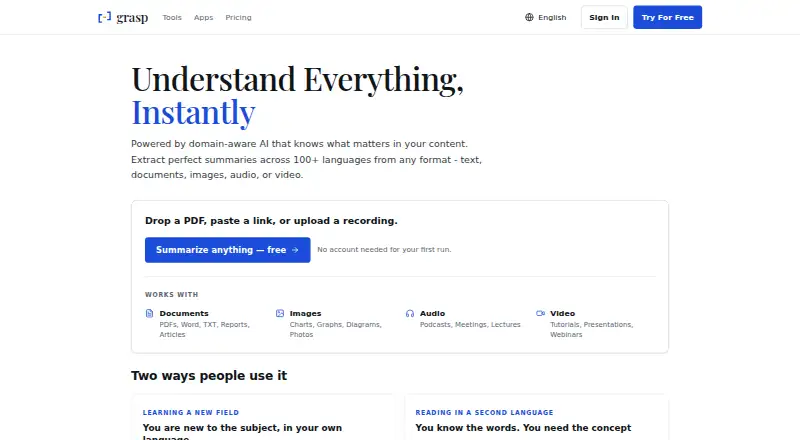
Grasp uses domain-aware AI to create summaries and insights from text, documents, images, audio, and video. It accepts materials such as PDFs, Word and TXT files, reports, charts, photos, podcasts, meetings, lectures, and webinars. Users can choose summary length and focus, then ask follow-up questions; Grasp says it supports summaries in more than 100 languages. Its web product offers 137 tools without installation. A browser extension can explain hovered words and summarize selected text or a full page in the current tab. The Mac app works wherever text renders, including PDF readers, chat windows, and code editors; it requires macOS 15 or later and supports Intel and Apple Silicon. It recognizes screen text locally, including scans, images, and captions. The web product, extension, and Mac app share an account and synchronize saved memos. The Free plan costs nothing and limits use to 5 runs or follow-ups per day, 100 lookups per month, 200,000-character inputs, and files up to 10MB. Premium costs $19.99 a month or $95.88 a year, billed at $7.99 a month annually.
Who it suits
Grasp suits people who summarize varied material, from documents and web pages to audio and video. Its extension and Mac app may suit users who want summaries or text recognition alongside other apps.
What it does well
- Accepts text, documents, images, audio, and video
- Summary length and focus can be adjusted
- Web product offers 137 tools without installation
- Mac app recognizes on-screen text locally
- Apps synchronize saved memos through one account
What to know first
- Free plan limits runs to 5 per day
- Free plan limits lookups to 100 per month
- Mac app requires macOS 15 or later
- No free trial is listed
Limits
The free plan includes 5 runs or follow-ups per day, 100 lookups per month, a 200,000-character input limit, and files up to 10MB. Premium includes unlimited usage with fair use, keeps the 200,000-character input limit, and allows files up to 300MB.
Plans
| Plan | Billed and limits | Price |
|---|---|---|
| Free | 5 runs/follow-ups per day · 100 lookups/month · 200,000-character input · files up to 10MB | Free |
| Premium (monthly) | Billed monthly · Unlimited usage with fair use · 200,000-character input · files up to 300MB · advanced models · video summarizers · priority processing | $19.99 a month |
| Premium (annual) | $7.99 USD per month · Unlimited usage with fair use · 200,000-character input · files up to 300MB · advanced models · video summarizers · priority processing | $95.88 a year |
As grasp.info lists them, read 30 Sept 2026. The maker's own page has the final word.
Getting started
- Open https://grasp.info/ to use the web product without installation.
- Create or use one account for the web product, browser extension, and Mac app.
- Choose the web tools, browser extension, or Mac app for the content you want to work with.
- For the Mac app, use macOS 15 or later on Intel or Apple Silicon.
- Use the free plan or choose Premium at $19.99 a month or $95.88 a year.
Overview
Grasp is a cross-platform AI summarizer that works with text, documents, images, audio and video. It suits readers who want summaries and follow-up insights across different formats, especially those who can use its Mac app or browser extension alongside the web tools. Its broad input support is a strength, but the free plan has firm usage and file-size caps, and the Mac app requires macOS 15 or later.
Key features
Grasp accepts a wide range of material, from PDFs, Word and TXT files to articles, charts, photos, podcasts, meetings, lectures and webinars. It uses domain-aware AI to produce summaries and insights, and supports summaries in more than 100 languages. Users can adjust length and focus, then ask follow-up questions—a useful way to get a targeted digest rather than a single fixed recap.
The web product offers 137 tools for documents, audio, video and images without requiring installation. The browser extension can explain hovered words, summarize selected text or an entire page, and work within the current tab. Grasp for Mac extends that approach to any app where text renders, including PDF readers, chat windows and code editors. Its local screen-text recognition includes scans, images and captions; Grasp says that text is not uploaded to be read.
The web product, extension and Mac app share an account and synchronize saved memos. Grasp says submitted content is stored securely and encrypted, that it uses industry-standard security measures, and that it does not sell personal data. Users can access, correct, delete and export their data, or delete their account.
Pricing
The Free plan costs nothing and allows 5 runs or follow-ups per day, 100 lookups per month, inputs up to 200,000 characters and files up to 10MB. Community support is included. Those caps make it a practical way to try Grasp or handle occasional small uploads, but the daily run allowance can constrain regular use.
Premium (monthly) costs $19.99 a month. It includes unlimited usage with fair use, the same 200,000-character input limit, files up to 300MB, advanced models, video summarizers, priority processing and premium support. The larger upload allowance and added tools make it the better fit for frequent work with substantial files or video, though “unlimited” remains subject to fair use.
Premium (annual) costs $95.88 a year, billed at $7.99 a month. It includes the same Premium features and limits as the monthly plan. The annual price is the lower-cost Premium option for someone ready to commit for a year; the monthly plan costs more but avoids that annual commitment. Grasp has no free trial, so the free plan is the available way to assess the service before paying.
Platforms
Grasp is available on the web, as a browser extension and as a Mac app. The Mac app supports Intel and Apple Silicon, but requires macOS 15 or later, ruling it out for users on older macOS versions. The shared account and synchronized memos connect the three access points rather than treating them as separate products.
Who it's for
Grasp is a strong fit for people who regularly move between web pages, documents and other text-heavy apps, or who need to summarize material in multiple formats. Its controls for summary length, focus and follow-up questions help when a general recap is not enough. Occasional users may find the free caps workable; heavier users should weigh Premium's larger file allowance and added video features against its price. It is less suitable for Mac users who cannot meet the operating-system requirement or anyone seeking a free plan without tight daily and monthly limits.
Pros and cons
- Pros: Broad support for documents, images, audio and video, with more than 100 summary languages, makes Grasp useful across varied source material.
- Pros: The extension, Mac app and web tools share an account and synchronized memos, while the Mac app's text recognition is performed locally.
- Cons: Free use is capped at 5 runs or follow-ups per day and 100 lookups per month, with a 10MB file limit.
- Cons: The Mac app requires macOS 15 or later, and Premium's monthly price is $19.99 a month.
- Cons: Premium's unlimited usage is qualified by fair use, and its input limit remains 200,000 characters.
Alternatives
For a wider device footprint and a free plan centered on paraphrasing, consider QuillBot, which runs on Android, iOS, Mac, Windows, the web and browser extensions; its free plan limits paraphrasing to 100 words and two modes. Lemora is another cross-device option, with daily upload and tutor-chat limits on its free plan and a Pro plan that removes those limits.
Choose AskSia if its daily problem solves, step-by-step solutions and photo input better match the task. Briefy offers 30 free credits per month at standard response speed, with a Premium plan at $89.88 a year. For article-focused reading with a free allowance of 20 summaries and 20 article chats a day, plus audio for one article a day, consider smry.
Summify offers five free analyses per day, Learn cards, quizzes and saved analyses, and its Scholar plan costs $4.99 a month for eligible users with an .edu school email. Summio lets users read public summaries for free and includes one translation and 10 chat questions with the first AI summary. If an extension-only, free option with no subscription, API key or account requirement is preferable, consider Apogee. Browse more options in AI Summarizers.
Verdict
Choose Grasp if you need one account for summarizing varied media across the web, browser and Mac, and can use the Mac app's operating-system requirement or work through the web and extension. Its flexible summaries and broad input support are the clearest reasons to choose it. Look elsewhere if the free caps are too restrictive, you need a Mac app on an older system, or Premium's price and fair-use condition do not fit your workload.
Verdict
Grasp covers multiple input formats and offers web, browser extension, and Mac access through a shared account. Review the free usage limits and macOS requirement before choosing a plan or app.
Questions
What does Grasp cost?
The free plan costs nothing. Premium costs $19.99 a month, or $95.88 a year billed at $7.99 a month.
What are the free plan limits?
It includes 5 runs or follow-ups per day, 100 lookups per month, inputs up to 200,000 characters, and files up to 10MB.
Which platforms are available?
Grasp is available on the web, as a browser extension, and as a Mac app. The Mac app requires macOS 15 or later and supports Intel and Apple Silicon.
What kinds of content can Grasp summarize?
It accepts documents, articles, charts, graphs, photos, podcasts, meetings, lectures, tutorials, presentations, webinars, and other text, image, audio, or video content.
Does Grasp offer a free trial?
No. The listed free option is a free plan; a free trial is not offered.
How does Grasp handle Mac screen text?
The Mac app recognizes screen text locally, including scans, images, and captions. Grasp says nothing is uploaded to be read.
Facts from Grasp's own pages
- Browser extension
- The browser extension can explain hovered words, summarize selected text or a full page, and work inside the current tab. · grasp.info, 30 Sept 2026
- Context-aware summaries
- Grasp lets users set summary length, focus and follow-up questions. · grasp.info, 30 Sept 2026
- Core function
- Grasp uses domain-aware AI to extract summaries and insights from text, documents, images, audio and video. · grasp.info, 30 Sept 2026
- Data rights
- Users can access, correct, delete and export their data and delete their account. · grasp.info, 30 Sept 2026
- Input types
- The service accepts PDFs, Word and TXT documents, reports, articles, charts, graphs, photos, podcasts, meetings, lectures, tutorials, presentations and webinars. · grasp.info, 30 Sept 2026
- Language support
- Grasp says it supports summaries in more than 100 languages. · grasp.info, 30 Sept 2026
- Mac app
- Grasp for Mac works in any app where text renders, including PDF readers, chat windows and code editors. · grasp.info, 30 Sept 2026
- Mac requirements
- The Mac app requires macOS 15 or later and supports Intel and Apple Silicon. · grasp.info, 30 Sept 2026
- On-device recognition
- The Mac app recognizes screen text locally, including scans, images and captions, and says nothing is uploaded to be read. · grasp.info, 30 Sept 2026
- Privacy and security
- Grasp says submitted content is stored securely and encrypted, uses industry-standard security measures, and does not sell personal data to third parties. · grasp.info, 30 Sept 2026
- Shared account and memo
- The web product, browser extension and Mac app use one account and synchronize saved memos. · grasp.info, 30 Sept 2026
- Support
- The Free plan includes community support and Premium includes premium support. · grasp.info, 30 Sept 2026
- Web tools
- The web product provides 137 tools for documents, audio, video and images without requiring installation. · grasp.info, 30 Sept 2026
Where Grasp stands on Freedom251
- AI Summarizers#5 of 36