Freedom251 › Version Control Software
lazygit
What lazygit is
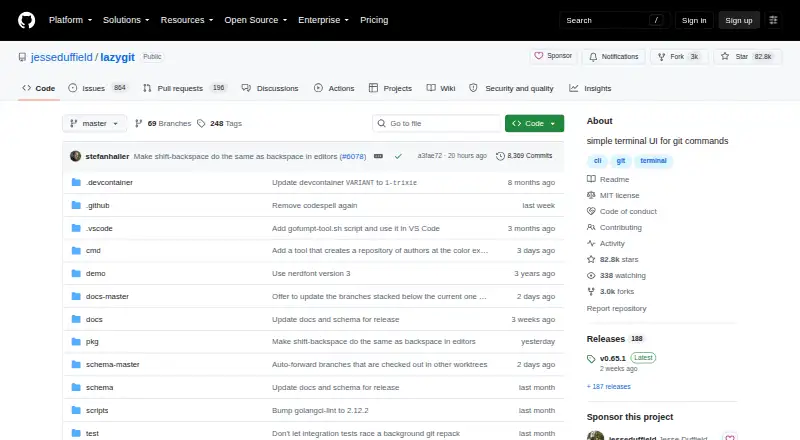
lazygit is a terminal interface for Git commands that runs within a Git repository. It is free and available for Linux, macOS, and Windows. For file changes, it can stage or unstage individual lines, selected ranges, or entire hunks from a diff. Its history tools include interactive rebase, cherry-pick, bisect, amending older commits, and viewing or comparing commits in a graph. Users can also create a worktree from a selected branch in the branches view.
Undo and redo use the reflog for commits and branches, but do not cover working-tree or stash changes. lazygit can show GitHub pull requests associated with branches and open a pull request in a browser; this requires the GitHub CLI and one-time authentication. Gitflow and git-flow-next options are available when the corresponding tool is installed. Users can configure custom commands and diff renderers. The project repository identifies its license as MIT. Its README suggests it may suit people who find Git difficult to use in daily work, and directs contributors to a contributing guide and Discord channel. lazygit was founded in 2018 and uses a distributed versioning model; self-hosted deployment is not available.
Who it suits
lazygit may suit people who find Git difficult to use in daily work and want a terminal interface for staging changes and working with repository history. It is available on Linux, macOS, and Windows, and includes tools for branches, worktrees, and commit operations.
What it does well
- Free, MIT-licensed software.
- Available for Linux, macOS, and Windows.
- Stage or unstage selected lines, ranges, or hunks.
- Includes interactive rebase, cherry-pick, and bisect.
- Supports custom commands and diff renderers.
What to know first
- Undo and redo do not cover working-tree or stash changes.
- GitHub pull request features require the GitHub CLI and one-time authentication.
- Gitflow options require the corresponding tool to be installed.
- Self-hosted deployment is not available.
Plans
| Plan | Billed and limits | Price |
|---|---|---|
| Free | MIT-licensed software · third-party package maintainers are not controlled by the project | Free |
As github.com lists them, read 5 Oct 2026. The maker's own page has the final word.
Getting started
- Visit the lazygit project website on GitHub.
- Use it on Linux, macOS, or Windows.
- Run it inside a Git repository.
- Install the GitHub CLI and complete one-time authentication if you want its GitHub pull request features.
- Install Gitflow or git-flow-next if you want to use those options.
Verdict
Choose lazygit if you want a free terminal interface for staging selected changes and handling Git history across Linux, macOS, or Windows. Look elsewhere if you need undo and redo to cover working-tree or stash changes, or require self-hosted deployment.
Questions
Is lazygit free?
Yes. Its Free plan costs nothing, and the repository identifies the project license as MIT.
Which platforms does lazygit support?
It is available for Linux, macOS, and Windows.
Does lazygit integrate with GitHub pull requests?
It can show pull requests associated with branches and open one in a browser. This requires the GitHub CLI and one-time authentication.
Can lazygit undo working-tree or stash changes?
No. Undo and redo use the reflog for commits and branches, but do not cover working-tree or stash changes.
Can I use Gitflow options?
Gitflow and git-flow-next options are available when the corresponding tool is installed.
Is lazygit self-hosted?
No. Self-hosted deployment is not available; lazygit uses a distributed versioning model.
Facts from lazygit's own pages
- Audience
- The README says lazygit may suit people who find Git difficult to use in daily work. · github.com, 5 Oct 2026
- Customization
- Users can configure custom commands and custom diff renderers. · github.com, 5 Oct 2026
- Founded
- 2018 · github.com, 28 Sept 2026
- GitHub integration
- Lazygit can show associated GitHub pull requests beside branches and open a pull request in a browser; this requires the GitHub CLI and a one-time authentication. · github.com, 5 Oct 2026
- History tools
- Features include interactive rebase, cherry-pick, bisect, amending older commits, and viewing or comparing commits in a graph. · github.com, 5 Oct 2026
- Other integrations
- Gitflow and git-flow-next options are available when the corresponding tool is installed. · github.com, 5 Oct 2026
- Platforms
- The README lists binary releases for Windows, macOS 10.12 or later, and Linux. · github.com, 5 Oct 2026
- Purpose
- Lazygit is a terminal UI for Git commands that runs inside a Git repository. · github.com, 5 Oct 2026
- Security and license
- The repository identifies the project license as MIT; its GitHub Security page displays no security advisories. · github.com, 5 Oct 2026
- Stage changes
- It lets users stage or unstage selected lines, ranges, or whole hunks from a file diff. · github.com, 5 Oct 2026
- Support
- The README directs contributors to a contributing guide and a Discord channel for contributor discussion. · github.com, 5 Oct 2026
- Undo
- Undo and redo use the reflog for commits and branches, but do not cover working-tree or stash changes. · github.com, 5 Oct 2026
- Worktrees
- Users can create a worktree from a selected branch in the branches view. · github.com, 5 Oct 2026
Where lazygit stands on Freedom251
- Version Control Software#24 of 62
- Cli Tools#19 of 32