Freedom251 › Demo Automation Software
Layerpath
What Layerpath is
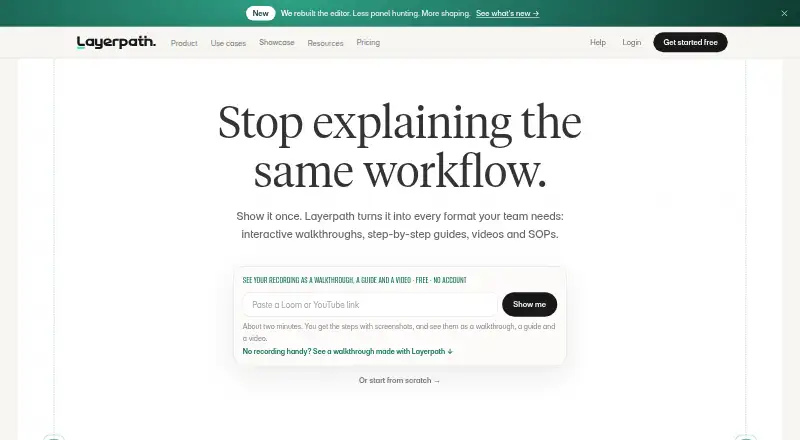
Layerpath turns software knowledge into interactive tours, step-by-step guides, videos, and standard operating procedures. Teams can start projects from images, video, library media, or a Loom link; Create with Agent drafts editable steps and callouts, with optional voiceover. A Chrome extension records browser interactions as ordered, editable steps, and narration can help draft callouts and voiceover. Each project can be shared as an interactive tour, read as a guide, or exported as a video. Sharing options include embedding in a portal, learning management system, help center, or Notion, as well as a public URL.
Layerpath lists training and onboarding, customer education, internal enablement, product management, product marketing, and sales enablement as use cases. Its AI voiceover offers 28 languages and more than 100 voices. Insights show training completion, viewer drop-off, and steps to improve. Brand memory can set voice, colors, terminology, and style, and is in beta. The free plan allows three published projects at a time and adds Layerpath branding to shared demos and video exports. Pro is $50 a month per creator, or $500/year; Team starts at $500 a month.
Who it suits
Layerpath suits teams creating software training, onboarding, customer education, or internal enablement materials. It also lists product and sales teams among its intended use cases.
What it does well
- Creates editable projects from images, video, or Loom links.
- Chrome extension records browser interactions as editable steps.
- Projects can be tours, guides, or video exports.
- AI voiceover supports 28 languages and 100+ voices.
- Insights show completion, drop-off, and steps to improve.
What to know first
- Free plan allows only three published projects at once.
- Free shared demos and video exports carry Layerpath branding.
- Brand memory is in beta.
Limits
The Free plan has one creator, allows unlimited projects but only three published at a time, and includes five watermarked video exports per month. Brand memory, Create with Agent, and AI voiceover are limited on Free; shared demos and video exports show Layerpath branding.
Plans
| Plan | Billed and limits | Price |
|---|---|---|
| Free | 1 creator · unlimited projects, up to 3 published at a time · 5 watermarked video exports/month · limited Brand memory, Create with Agent, and AI voiceover | Free |
| Enterprise | From $10,000/year · custom contract · 15+ creators or custom capacity · security and procurement review · custom organizational requirements · onboarding and support defined in agreement | $10,000 |
| Team Pilot | 3-month Team pilot; fee credited toward $5,000 annual Team if converted within 30 days after pilot ends · Team access for five creators · guided onboarding based on agreed scope · no done-for-you content production | $1,500, paid once |
| Pro | $50/month per creator (or $500/year — two months free) · 1 creator included, up to 3 · unlimited published projects · no watermark · one custom domain · fair use for Agent and AI voiceover | $50 a month |
| Team | Billed monthly · Starts at 4 creators, 5 included, up to 14 · shared workspace with folders · roles · centralized billing · guided onboarding | $500 a month |
As layerpath.com lists them, read 4 Oct 2026. The maker's own page has the final word.
Getting started
- Visit https://layerpath.com/.
- Use the Chrome extension to capture browser interactions, or start with images, video, library media, or a Loom link.
- Use Create with Agent to draft editable steps and callouts.
- Share a project as an interactive tour, guide, video, public URL, or embed.
- Choose the Free plan or request pricing for paid plans.
Verdict
Layerpath offers several ways to turn software knowledge into shareable guidance, with insights into training completion and viewer drop-off. The free plan has publishing and branding limits; Pro is listed at $50 a month per creator.
Questions
Does Layerpath have a free plan?
Yes. Free costs $0.00 per free and includes one creator and unlimited projects, with up to three published at a time.
What does Layerpath cost?
The pricing note says pricing is on request. Listed plans include Pro at $50.00 per month, Team at $500.00 per month, Team Pilot at $1,500.00 per once, and Enterprise from $10,000.00 per contact.
Which platforms does Layerpath support?
Layerpath is available as a web product and a Chrome extension.
Where can I share Layerpath projects?
Projects can be shared by public URL or embedded in a portal, LMS, help center, or Notion.
Can Layerpath create voiceovers in multiple languages?
Yes. Its AI voiceover supports 28 languages and more than 100 voices.
What is Brand memory?
Brand memory lets teams set voice, colors, terminology, and style. The feature is in beta.
Facts from Layerpath's own pages
- AI voiceover
- Layerpath says its multi-language voiceover can generate training voiceovers in 28 languages and 100+ voices. · layerpath.com, 4 Oct 2026
- Audience
- The site lists training and onboarding, customer education, internal enablement, product management, product marketing, and sales enablement as use cases. · layerpath.com, 4 Oct 2026
- Brand memory
- Brand memory lets teams set voice, colors, terminology, and style, and the About page says the feature is in beta. · layerpath.com, 4 Oct 2026
- Create from media
- Create with Agent accepts images, video, Layerpath library media, or a Loom link and drafts an editable project with ordered steps, callouts, and optional voiceover. · layerpath.com, 4 Oct 2026
- Data retention
- The privacy policy says personal information is not kept longer than three months after account termination unless a longer period is required or permitted by law. · layerpath.com, 4 Oct 2026
- Formats
- One project can be shared as an interactive tour, read as a guide, or exported as a video. · docs.layerpath.com, 4 Oct 2026
- Insights
- The product page describes insights for seeing who completed training, where viewers drop off, and which steps to improve. · layerpath.com, 4 Oct 2026
- Integrations
- The product page names Loom and Zoom recordings as source material and describes embedding content in an LMS, help center, Notion, or portal. · layerpath.com, 4 Oct 2026
- Notable limit
- On the Free plan, Layerpath branding appears on shared demos and video exports, and only three projects may be published at once. · layerpath.com, 4 Oct 2026
- Product
- Layerpath turns software knowledge into reusable guidance and creates interactive tours, step-by-step guides, videos, and SOPs. · layerpath.com, 4 Oct 2026
- Recording
- The Chrome extension captures browser interactions as ordered editable steps, with narration used to draft callouts and voiceover. · layerpath.com, 4 Oct 2026
- Security and privacy
- The privacy policy says Layerpath uses organizational and technical security measures and does not process sensitive personal information. · layerpath.com, 4 Oct 2026
- Sharing
- Layerpath says projects can be embedded inside a portal, LMS, help center, Notion, or shared through a public URL. · layerpath.com, 4 Oct 2026
- Support
- Guided onboarding is included with Team; Enterprise onboarding and support are defined in the agreement. · layerpath.com, 4 Oct 2026
Where Layerpath stands on Freedom251
- Demo Automation Software#8 of 26
- Interactive Product Demo Software#14 of 42