Freedom251 › Songwriting Software
Kordra Capture
What Kordra Capture is
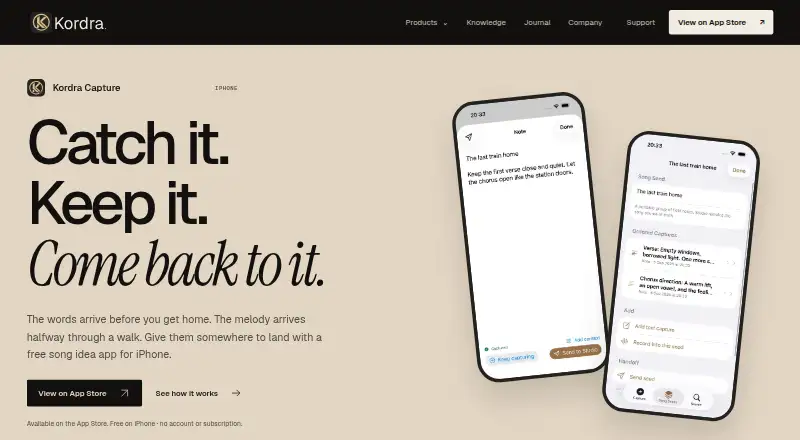
Kordra Capture is a free iPhone app for keeping songwriting ideas as text, chords and voice recordings. Users can save lyrics, chord changes or brief notes without first setting a title, tempo or structure, then record melodies, rhythms or riffs and add another take. Related items can be grouped into a Song Seed, an ordered set of captures such as lyrics, notes and recordings. Optional details include a title, tags, type, section, mood, key, tempo and chords. Text, audio and songwriting context are stored locally and remain available offline. Users can search captures and recover recently deleted ideas on the device for up to 30 days. Selected text and audio can be shared through iOS destinations such as Files or AirDrop, while the original stays on the iPhone. Kordra says the app requires no account, uses no cloud storage, advertising or analytics SDKs, and does not send captures or library records to the company. It requires iOS 18 or later; Kordra Studio is a separate Mac app and is not needed to keep, search or export captures.
Who it suits
It suits songwriters who want to capture and organize ideas on an iPhone, including offline. Kordra describes Capture as a pocket companion for creative professionals using Kordra Studio, though Studio is not required.
What it does well
- Free on iPhone with no account or subscription
- Text and audio remain available offline
- Can record additional takes
- Recently deleted ideas recoverable for up to 30 days
- Export selected material while originals stay on device
What to know first
- Requires iOS 18 or later
- Available on iPhone only
- Kordra Studio for Mac is sold separately
Limits
The app is available on iPhone and requires iOS 18 or later. Kordra Studio is a separate Mac app and is not required for Capture’s storage, search, or export features.
Plans
| Plan | Billed and limits | Price |
|---|---|---|
| Kordra Capture | Free on iPhone; no account, subscription or in-app purchase · iPhone app · iOS 18 or later | Free |
As kordra.io lists them, read 8 Oct 2026. The maker's own page has the final word.
Getting started
- Install Kordra Capture on an iPhone running iOS 18 or later
- Open the app without creating an account
- Save lyrics, chord changes, notes, or a recording
- Add optional context or another take
- Group related captures into a Song Seed
- Export selected text or audio through iOS when needed
Verdict
Kordra Capture focuses on local, offline songwriting notes and recordings, with optional context and Song Seed grouping. It is a fit for iPhone users who want capture and export without an account or cloud storage.
Questions
How much does Kordra Capture cost?
Kordra Capture is free, with no subscription or in-app purchase.
Does it require an account?
No. Capture requires no account or sign-in.
Where are my captures stored?
Text, audio, and songwriting context are stored locally on the iPhone and remain available offline. Kordra says it uses no cloud or hosted storage.
Can I export ideas?
Yes. You choose what to export or share, and iOS can send selected text and audio to Files, AirDrop, or another app while the original stays on the iPhone.
What is Kordra Studio?
Kordra Studio is a Mac app sold separately. Capture can prepare ideas for Studio, but Studio is not required to keep, search, or export captures.
Can deleted captures be recovered?
Recently deleted ideas can be recovered on the device for up to 30 days.
Facts from Kordra Capture's own pages
- Context
- Captures can include optional titles, tags, type, section, mood, key, tempo or chords. · kordra.io, 8 Oct 2026
- Export
- Users choose what to export or share, and iOS hands selected text and audio to destinations such as Files, AirDrop or another app while the original stays on the iPhone. · kordra.io, 8 Oct 2026
- Headquarters
- London, United Kingdom · kordra.io, 28 Sept 2026
- Intended users
- Kordra describes its products as focused tools for creative professionals and Capture as a pocket companion for songwriters using Studio. · kordra.io, 8 Oct 2026
- Microphone and sharing
- Capture requests microphone permission only when recording begins, and files leave the app only when users deliberately export or share them. · kordra.io, 8 Oct 2026
- Offline storage
- Text, audio and songwriting context are stored locally on the iPhone and remain available offline. · kordra.io, 8 Oct 2026
- Privacy
- Kordra says Capture requires no account or sign-in, uses no cloud or hosted storage, advertising or analytics SDKs, and does not send users’ text captures, recordings, context or library records to Kordra. · kordra.io, 8 Oct 2026
- Purpose
- Kordra Capture is a native iPhone app for saving lyric, chord, note and voice ideas while they are fresh. · kordra.io, 8 Oct 2026
- Search and recovery
- Users can search captures and recover recently deleted ideas on the device for up to 30 days. · kordra.io, 8 Oct 2026
- Song Seeds
- A Song Seed is an ordered group of related captures, such as lyrics, notes and recordings. · kordra.io, 8 Oct 2026
- Spotlight
- Spotlight search integration is off by default; when enabled, only approved capture titles, tags and Song Seed titles are added to the on-device index. · kordra.io, 8 Oct 2026
- Studio handoff
- Capture can prepare ideas for Kordra Studio, a Mac app sold separately; Studio is not required to keep, search or export captures. · kordra.io, 8 Oct 2026
- Support
- Kordra directs Studio and Capture users to email [email protected] with the app version, iOS or macOS version, and a description of what happened. · kordra.io, 8 Oct 2026
- Text capture
- It lets users save lyrics, chord changes or a few words about a song without first setting a title, tempo or structure. · kordra.io, 8 Oct 2026
- Voice recording
- Users can record melodies, rhythms or riffs and add another take to a capture. · kordra.io, 8 Oct 2026
Where Kordra Capture stands on Freedom251
- Songwriting Software#8 of 30