Freedom251 › Digital Painting Software
KolourPaint
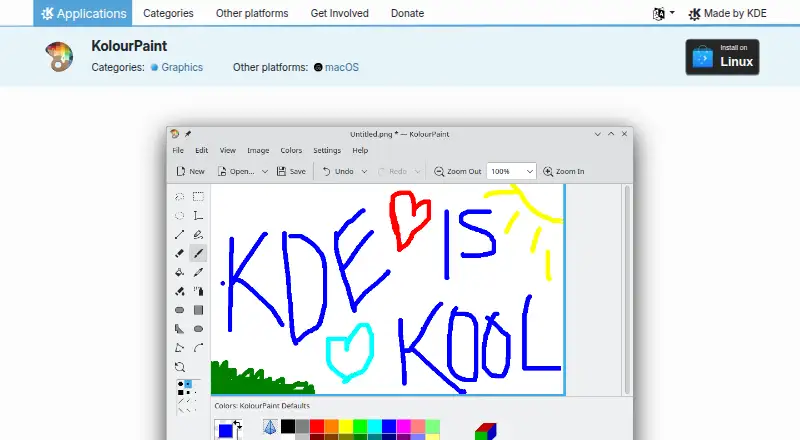
What KolourPaint is
KolourPaint is a free desktop painting program for creating raster images and making quick touch-ups or simple edits. Its drawing tools include lines, rectangles, rounded rectangles, ovals, polygons, curves and text. For editing, it has a color picker, selections, rotation, monochrome conversion and other effects. The handbook also documents tools such as a brush, eraser, flood fill, pen and spraycan, alongside effects including autocrop, emboss, flip, invert, mirror, grayscale, resize and soften or sharpen. The listed price is free. KDE lists Linux and macOS platforms. Linux installation options include Discover and other AppStream stores, distribution package managers and Flathub. For macOS, KDE lists nightly installers for ARM and Intel Macs; these are testing builds from the latest development branch. The product page lists BSD-2-Clause, LGPL-2.0+ and GFDL-1.2 licenses. KDE links to the KolourPaint Handbook, a community forum, and bug-reporting and bug-list pages.
Who it suits
KolourPaint suits people who need a simple desktop tool for raster drawing, touch-ups or basic image edits. It is available to Linux users and, through testing nightly installers, macOS users.
What it does well
- Free plan costs nothing.
- Includes drawing tools and a color picker.
- Handbook documents a range of image effects.
- Linux installation options include Flathub and package managers.
What to know first
- macOS installers are nightly testing builds.
- Free trial is not available.
Plans
| Plan | Billed and limits | Price |
|---|---|---|
| KolourPaint | Desktop application · Linux via app stores or distribution package managers · macOS nightly installers listed | Free |
As apps.kde.org lists them, read 4 Oct 2026. The maker's own page has the final word.
Getting started
- On Linux, install through Discover or another AppStream store.
- Alternatively, use a distribution package manager or Flathub.
- On macOS, choose the nightly installer for an ARM or Intel Mac.
- Use the KolourPaint Handbook or community forum for help.
Verdict
KolourPaint covers everyday raster drawing and basic edits with a range of documented tools and effects. macOS users should note that the listed installers are testing builds.
Questions
How much does KolourPaint cost?
The Free plan costs nothing.
Which platforms are listed?
Linux and macOS are listed. The macOS installers are nightly testing builds for ARM and Intel Macs.
Is KolourPaint open source?
The product page lists BSD-2-Clause, LGPL-2.0+, and GFDL-1.2 licenses.
Where can Linux users install it?
KDE lists Discover and other AppStream stores, distribution package managers, and Flathub.
Where can users get help?
KDE links to the KolourPaint Handbook and a community forum, along with bug-reporting and bug-list pages.
Facts from KolourPaint's own pages
- Drawing tools
- It supports lines, rectangles, rounded rectangles, ovals, polygons, curves and text. · apps.kde.org, 4 Oct 2026
- Editing tools
- It includes a color picker, selections, rotation, monochrome conversion and other advanced effects. · apps.kde.org, 4 Oct 2026
- Handbook effects
- The handbook lists image effects including autocrop, emboss, flip, invert, mirror, grayscale, resize, rotate and soften or sharpen. · docs.kde.org, 4 Oct 2026
- Handbook tools
- The handbook documents tools including brush, color picker, eraser, flood fill, line, pen, rectangles, selections, spraycan and text. · docs.kde.org, 4 Oct 2026
- Help
- KDE links to the KolourPaint Handbook and a community forum for help. · apps.kde.org, 4 Oct 2026
- Issue reporting
- KDE provides a bug-report link and a bug-list link for KolourPaint. · apps.kde.org, 4 Oct 2026
- License
- The product page lists BSD-2-Clause, LGPL-2.0+ and GFDL-1.2 licenses. · apps.kde.org, 4 Oct 2026
- Linux installation
- The KDE page lists Linux installation through Discover and other AppStream stores, distribution package managers, and Flathub. · apps.kde.org, 4 Oct 2026
- macOS availability
- The KDE page lists macOS as another platform and provides nightly installers for both ARM and Intel Macs. · apps.kde.org, 4 Oct 2026
- Privacy
- KDE's general software privacy policy says its software generally transfers no user-device information except through explicit user action, with some optional automated checks and opt-in telemetry in some applications. · kde.org, 4 Oct 2026
- Purpose
- KolourPaint is a simple painting program for quickly creating raster images and handling touch-ups and simple image editing. · apps.kde.org, 4 Oct 2026
- Testing builds
- KDE describes nightly installers as testing versions generated from the latest development branch. · apps.kde.org, 4 Oct 2026
Where KolourPaint stands on Freedom251
- Digital Painting Software#16 of 46