KitchenOwl
What KitchenOwl is
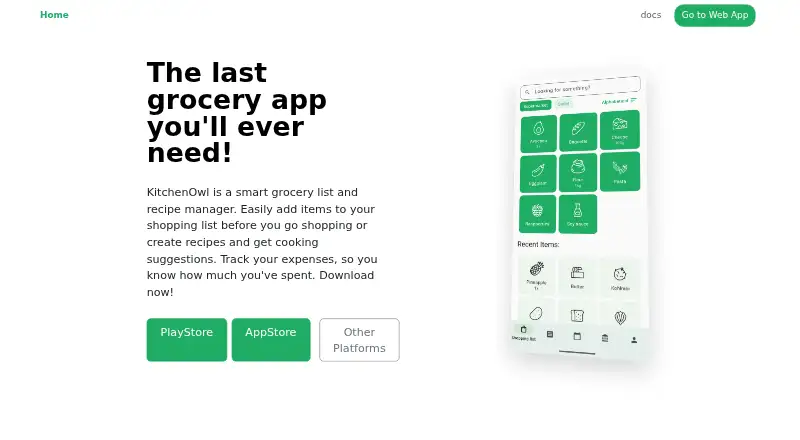
KitchenOwl is a free, open-source app for managing household groceries, recipes, meals, and expenses. Members can share shopping lists, recipes, meal plans, and household costs. Lists support descriptions and categories, can be sorted by store, and sync in real time across users and devices. You can create recipes or bring them in from popular websites, then add their ingredients to a shopping list. Meal planning can draw on household preferences and pantry inventory, with plans syncing to lists. Expense tools let members split bills and review monthly reports and charts. The apps provide partial offline support for keeping track of grocery lists. KitchenOwl lists Home Assistant integration for automations and smart-home connectivity. It is available on Android, iOS, Linux, macOS, Windows, and the web, and can also be self-hosted. The official server installation uses Docker or Docker Compose, and its documentation recommends HTTPS behind a reverse proxy. The project is licensed under AGPL-3.0. Its free plan is listed as free.
Who it suits
KitchenOwl suits households that want shared grocery lists, recipes, meal plans, and expense tracking across devices. It also fits people who want to self-host or use Home Assistant integration.
What it does well
- Free and open source under AGPL-3.0
- Lists sync in real time across users and devices
- Recipes can be imported from popular websites
- Meal plans can use pantry inventory and preferences
- Expense reports include monthly charts
What to know first
- Offline support is partial
- Self-hosting setup uses Docker or Docker Compose
Limits
The free plan is priced at $0. Offline support for grocery lists is partial.
Plans
| Plan | Billed and limits | Price |
|---|---|---|
| KitchenOwl | Free, open-source application; self-hosting supported | Free |
As kitchenowl.org lists them, read 30 Sept 2026. The maker's own page has the final word.
Getting started
- Visit kitchenowl.org.
- Choose the Android, iOS, Linux, macOS, Windows, or web platform.
- Use the free KitchenOwl plan.
- For self-hosting, follow the official server installation using Docker or Docker Compose.
- For a self-hosted setup, the documentation recommends HTTPS behind a reverse proxy.
Overview
KitchenOwl is a free household app for coordinating groceries, recipes, meal plans, and shared expenses. It suits households that want those tasks connected, particularly users comfortable choosing between cloud syncing and a self-managed server. Its broad scope is useful, but offline support is partial and self-hosting calls for some technical setup.
Key features
Shopping and recipes
Household members can share shopping lists with descriptions and categories, sort items by store, and see changes sync in real time across users and devices. That makes it a practical fit for dividing shopping as plans change. Recipes can be created or imported from popular websites, organized, and turned into shopping-list ingredients, linking meal ideas to the grocery run.
Meal plans and household expenses
Meal-planning suggestions can take preferences and pantry inventory into account, and plans sync with shopping lists. This can reduce the work of turning a household's plan into a list, while leaving the choices themselves to its members. Expense tracking adds bill splitting and monthly reports and charts, making KitchenOwl more than a dedicated shopping-list app.
Offline, smart home, and privacy
Partial offline support helps users keep track of grocery lists without a connection, but should not be mistaken for full offline access to the app's functions. Home Assistant integration supports smart-home connectivity and automations. The apps do not send data to services without authorization, and the privacy policy says app data is not sent to tracking APIs. With the default cloud, content is stored and synced and encrypted in transit; server owners can see uploaded content and account and device information. Households wanting to control their hosting can use the AGPL-3.0-licensed software, but the official server installation uses Docker or Docker Compose, and the documentation recommends HTTPS behind a reverse proxy.
Pricing
KitchenOwl's free plan costs nothing and is an open-source application with self-hosting supported. It includes the household shopping, recipe, meal-planning, and expense-tracking functions, with shared lists and real-time syncing. There is no paid tier or seat or list cap in the plan details provided, so there is no cheaper tier that trades away features. The practical choice is between using the default cloud and taking on the work of running a server yourself.
Platforms
KitchenOwl is available on Android, iOS, Linux, macOS, Windows, and web, as well as through self-hosting. That range accommodates households mixing phones and computers; the partial offline support remains limited to keeping track of grocery lists.
Who it's for
KitchenOwl is a strong fit for households that want recipes, meal planning, shopping coordination, and shared expenses in one place, especially where members use a mix of devices. It also suits people who value free software and either accept the cloud's data visibility for server owners or can manage a Docker-based installation. It is less suitable for anyone who needs full offline operation or wants self-hosting without server administration.
Pros and cons
- Pros: Free and AGPL-3.0 licensed, with self-hosting supported, giving technically comfortable households an alternative to the default cloud.
- Pros: Recipes and meal plans connect to shopping lists, while real-time sharing helps household members coordinate changes.
- Pros: Expense splitting and monthly reports extend the app beyond grocery organization.
- Cons: Offline support is partial, covering grocery-list tracking rather than establishing full offline use.
- Cons: Self-hosting uses Docker or Docker Compose, and the recommended HTTPS reverse-proxy setup adds operational work.
- Cons: Default-cloud server owners can see uploaded content and account and device information, a consideration for privacy-sensitive households.
Alternatives
For a broader comparison, see Shopping List Apps.
- AnyList is worth considering if its free plan's core list creation and sharing and allowance of up to 5 imported web recipes suit your needs.
- Buy Me a Pie! may suit shoppers who prefer a defined free allowance of 3 lists, sharing with 2 other accounts, and 8 color groups.
- OurGroceries offers all features and list sharing on its free plan, with ads in a few screens.
- BuyBye may fit households whose needs align with its free caps of 5 shopping lists, 2 people per list, a 5-recipe box, and current-week meal planning.
- GroceryShare is an option for Android, iOS, or macOS users seeking free grocery lists, smart categories, shopping mode, and basic recipes.
- Bring! is a free option on Android, iOS, and web with shared shopping lists, recipes, and special offers.
- Grocery Buddy offers all features free on Android and iOS.
- Groly may appeal to those seeking a free, self-hosted Docker option on Android, iOS, or web, with users invited by an admin rather than open registration.
Verdict
Choose KitchenOwl if your household wants one free, open-source place for shared shopping, recipes, meal planning, and expenses, and values the choice to self-host. Look elsewhere if you need full offline use or want a hosted privacy model that does not expose uploaded content to server owners.
Verdict
KitchenOwl brings household shopping, recipes, meal planning, and expense tracking together in one free app. Consider its partial offline support and Docker-based self-hosting setup when choosing how to use it.
Questions
Is KitchenOwl free?
Yes. Its free plan is priced at $0.
Which platforms does it support?
KitchenOwl is available on Android, iOS, Linux, macOS, Windows, and the web. Self-hosting is also supported.
Can household members share lists and recipes?
Yes. Members can collaborate on shopping lists, recipes, meal plans, and expenses; lists sync in real time across users and devices.
Can I import recipes?
Yes. Users can scrape recipes from popular websites, organize them, and add their ingredients to shopping lists.
Is KitchenOwl open source?
It is Free Software under the AGPL-3.0 license.
Can I self-host it?
Yes. The official server installation uses Docker or Docker Compose, and the documentation recommends HTTPS behind a reverse proxy.
Facts from KitchenOwl's own pages
- Cloud data
- The default cloud stores and syncs app content, encrypts data in transit, and server owners can see uploaded content and account and device information. · kitchenowl.org, 30 Sept 2026
- Expense tracking
- Household members can track expenses, split bills, and review monthly reports and charts. · kitchenowl.org, 30 Sept 2026
- Households
- Household members can collaborate on recipes, expenses, shopping lists, and meal plans. · kitchenowl.org, 30 Sept 2026
- Integration
- KitchenOwl lists Home Assistant integration for automations and smart home connectivity. · kitchenowl.org, 30 Sept 2026
- License
- KitchenOwl is Free Software available under the AGPL-3.0 license. · docs.kitchenowl.org, 30 Sept 2026
- Meal planning
- Meal plans can use suggestions based on preferences and pantry inventory and sync with shopping lists. · kitchenowl.org, 30 Sept 2026
- Offline use
- The apps provide partial offline support for keeping track of grocery lists without an internet connection. · kitchenowl.org, 30 Sept 2026
- Platforms
- The privacy policy names Android, iOS, Web, Windows, macOS, and Linux applications. · kitchenowl.org, 30 Sept 2026
- Privacy
- The apps do not send data to services without authorization, and the policy says app data is not sent to tracking APIs. · kitchenowl.org, 30 Sept 2026
- Purpose
- KitchenOwl is a grocery list and recipe manager that also supports meal planning and household expense tracking. · kitchenowl.org, 30 Sept 2026
- Recipes
- Users can create recipes, scrape them from popular websites, organize them, and add their ingredients to shopping lists. · kitchenowl.org, 30 Sept 2026
- Self-hosting
- The official server installation uses Docker or Docker Compose, and the documentation recommends HTTPS behind a reverse proxy. · docs.kitchenowl.org, 30 Sept 2026
- Shopping lists
- Shopping lists support item descriptions, categories, store-based sorting, sharing, and real-time syncing across users and devices. · kitchenowl.org, 30 Sept 2026
- Support
- The documentation directs users to GitHub issues for bug reports and feature requests and lists [email protected] for privacy questions. · docs.kitchenowl.org, 30 Sept 2026
Where KitchenOwl stands on Freedom251
- Recipe Apps#2 of 67
- Shopping List Apps#7 of 31