Freedom251 › Co-Parenting Apps
KidsFirst
What KidsFirst is
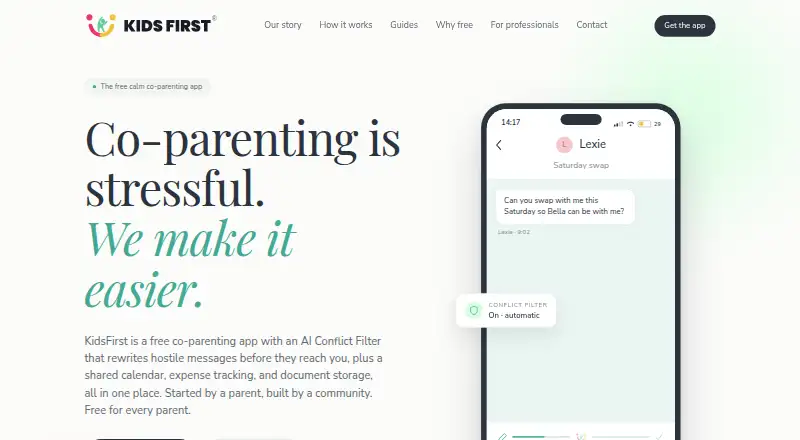
KidsFirst is a co-parenting app for separated parents coordinating communication and care for their children. Its separate message threads can organize discussions about school, health, handovers, and expenses. A shared calendar, expense tracking, and shared document and photo storage support coordination between households. The expense tracker records shared costs; it does not process payments or banking transactions. An AI Conflict Filter rewrites hostile or aggressive messages before delivery, and the filter cannot be disabled. After sending, messages cannot be edited or deleted, while a full thread can be exported as a timestamped PDF. KidsFirst is available on iOS and Android in Australia, New Zealand, and Singapore. It is intended for parents, guardians, or authorised carers aged 18 and over, and both co-parents need the app to use shared features together. The maker says data is encrypted in transit with TLS 1.2+ and at rest with AES-256, and hosted on AWS infrastructure in Australia. The maker also says message details are removed before AI processing, messages are not used to train AI, and processing uses AWS Bedrock in Australia. The privacy statement notes that some providers may store or process data in the United States, Singapore, or the European Union as well as Australia. The app is free for both parents, with every feature included and no paid tier or trial.
Who it suits
KidsFirst suits separated parents, guardians, or authorised carers aged 18 and over who want shared communication and care coordination. Both co-parents need the app to use its shared features together, and it is available in Australia, New Zealand, and Singapore.
What it does well
- Separate threads organize discussions by family topic.
- Shared calendar, expense tracking, and document and photo storage are included.
- Sent threads can be exported as timestamped PDFs.
- Free for both parents, with every feature included.
- The maker says messages are not used to train AI.
What to know first
- Both co-parents need the app for shared features.
- The Conflict Filter cannot be disabled.
- Expense tracking does not process payments or banking transactions.
- Sent messages cannot be edited or deleted.
Limits
The free plan includes every feature, and there is no paid tier or trial. Shared features require both co-parents to use the app; the expense tracker records costs but cannot process payments or banking transactions.
Plans
| Plan | Billed and limits | Price |
|---|---|---|
| KidsFirst | Free for both parents; every feature included · Core co-parenting tools stay free · no paid tier · no trial | Free |
As kidsfirst.app lists them, read 11 Oct 2026. The maker's own page has the final word.
Getting started
- Visit https://kidsfirst.app/.
- Install the app on iOS or Android in Australia, New Zealand, or Singapore.
- Have both co-parents use the app to access shared features together.
- Use the free plan; every feature is included for both parents.
Verdict
Choose KidsFirst if both co-parents want free shared tools for communication, scheduling, expense records, and document storage. Look elsewhere if you need to turn off the Conflict Filter, change sent messages, or process payments through the expense tracker.
Questions
Is KidsFirst free?
Yes. The KidsFirst plan is free for both parents and includes every feature. There is no paid tier or trial.
Which devices can use KidsFirst?
KidsFirst is available on iOS and Android in Australia, New Zealand, and Singapore.
Who can use the app?
It is for parents, guardians, or authorised carers aged 18 and over. Both co-parents need the app to use shared features together.
Does the expense tracker handle payments?
No. It records shared costs but does not process payments or banking transactions.
Can sent messages be changed or removed?
Messages cannot be edited or deleted once sent. A full thread can be exported as a timestamped PDF.
How does KidsFirst handle AI message processing?
The maker says message details are removed before processing, messages are not used to train AI, and processing uses AWS Bedrock in Australia.
Facts from KidsFirst's own pages
- AI data handling
- The maker says message details are automatically removed before AI processing, messages are not used to train AI, and processing uses AWS Bedrock in Australia. · kidsfirst.app, 11 Oct 2026
- Availability
- KidsFirst is available in Australia, New Zealand, and Singapore on iOS and Android. · kidsfirst.app, 11 Oct 2026
- Compliance
- The maker states it complies with the Australian Privacy Act 1988, New Zealand Privacy Act 2020, and Singapore PDPA 2012. · kidsfirst.app, 11 Oct 2026
- Conflict Filter
- The AI Conflict Filter rewrites hostile or aggressive messages before delivery, and the filter cannot be disabled. · kidsfirst.app, 11 Oct 2026
- Court records
- KidsFirst says it cannot guarantee that its records or exports will be admissible in court or meet every jurisdiction's evidentiary standards. · kidsfirst.app, 11 Oct 2026
- Headquarters
- Australia · kidsfirst.app, 28 Sept 2026
- Message records
- Messages cannot be edited or deleted once sent, and a full thread can be exported as a timestamped PDF. · kidsfirst.app, 11 Oct 2026
- Payment limit
- The expense tracker records shared costs but does not process payments or banking transactions. · kidsfirst.app, 11 Oct 2026
- Privacy limits
- The privacy statement says some providers may store or process data in the United States, Singapore, or the European Union, in addition to Australia. · kidsfirst.app, 11 Oct 2026
- Product
- KidsFirst is a co-parenting app for separated parents to communicate and coordinate care for their children. · kidsfirst.app, 11 Oct 2026
- Security
- The maker states data is encrypted in transit with TLS 1.2+ and at rest with AES-256, and hosted on AWS infrastructure in Australia. · kidsfirst.app, 11 Oct 2026
- Shared tools
- The app includes a shared calendar, expense tracking, and shared document and photo storage. · kidsfirst.app, 11 Oct 2026
- Support
- The FAQ directs users with questions to contact KidsFirst by email. · kidsfirst.app, 11 Oct 2026
- Topic threads
- Separate message threads organize discussions such as school, health, handovers, and expenses. · kidsfirst.app, 11 Oct 2026
- Who it is for
- KidsFirst is for parents, guardians, or authorised carers aged 18 and over; both co-parents need the app to use shared features together. · kidsfirst.app, 11 Oct 2026
Where KidsFirst stands on Freedom251
- Co-Parenting Apps#11 of 33