Freedom251 › Secrets Management Tools

Keyway
What Keyway is
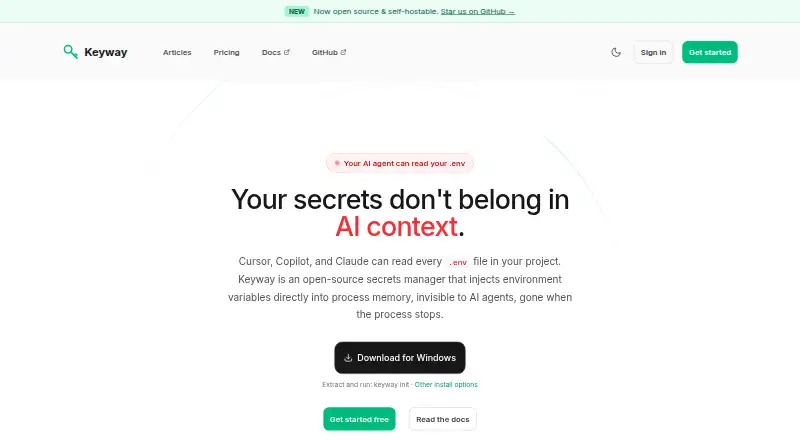
Keyway is an open-source secrets manager that injects environment variables into a running process rather than storing them in a project .env file. Its `keyway run` command makes secrets available only while that process runs. Keyway says AI agents reading files from disk cannot see secrets injected this way. Secret access follows GitHub repository permissions, so removing a person's repository access revokes their Keyway access. Secrets use AES-256-GCM encryption with a unique random IV for each one; an isolated crypto service holds the encryption key, separate from the API server and database. Connections among the CLI, API, crypto service, and database use TLS 1.3, and an audit trail records who accessed which secrets, when, and from where. Provider workflows are documented for Vercel, Netlify, and Railway. CLI binaries are listed for macOS, Linux, and Windows, and the full stack can be self-hosted with Docker Compose. Plans include a free option and paid plans starting at €9/mo. Keyway's stated threat model does not cover compromised developer machines or application code and dependencies that can read process environments.
Who it suits
Keyway suits developers who want to inject secrets into running processes instead of keeping them in project files. Its GitHub-based access model and documented provider workflows may fit teams using those services.
What it does well
- Secrets disappear when the process stops
- Access follows GitHub repository permissions
- Uses AES-256-GCM encryption and TLS 1.3
- Audit trail records secret access details
- Full stack can be self-hosted with Docker Compose
What to know first
- Does not protect against compromised developer machines
- Application code can read the process environment
- No dynamic secrets or database credential rotation
- Provider integrations listed for Vercel, Netlify, and Railway
Limits
The Free plan allows one private repository, three environments per repository, and two provider integrations. Pro costs €9 a month and includes 10 private repositories; it lists unlimited environments and collaborators.
Plans
| Plan | Billed and limits | Price |
|---|---|---|
| Team | 19€/month · 20 private repos · Unlimited environments · Audit logs · Member management | €19 a month |
| Business | 39€/month · 50 private repos · Unlimited collaborators · Exposure reports · Priority support | €39 a month |
| Pro | 9€/month · 10 private repos · Unlimited environments · Unlimited collaborators | €9 a month |
| Free | 0€/month · Unlimited public repos · 1 private repo · 3 environments per repo · 2 provider integrations · Unlimited collaborators | On request |
As keyway.sh lists them, read 3 Oct 2026. The maker's own page has the final word.
Getting started
- Visit https://keyway.sh/.
- Choose the Free plan or a paid plan; a 14-day trial is available.
- Install the CLI binary for macOS, Linux, or Windows.
- Connect a GitHub repository and use its repository permissions to manage secret access.
- Use `keyway run` to inject secrets into a process.
- For a self-hosted deployment, use Docker Compose.
- Configure a documented provider workflow for Vercel, Netlify, or Railway if needed.
Overview
Keyway is an open-source secrets manager for developers who want credentials injected into running processes rather than kept in project files. It is a good fit for teams that already manage access through GitHub and need an audit trail. Its approach narrows exposure from files, but it cannot protect secrets from compromised machines or code that reads process environments.
Key features
The keyway run command injects secrets into a process and removes them when it stops. That avoids storing them in a project .env file, and Keyway says AI agents reading files from disk cannot see secrets injected this way. It is a useful boundary for file-based exposure, not a barrier against application code or dependencies that can read the running process environment.
Access follows GitHub repository permissions: removing someone's repository access also revokes their Keyway access. This keeps access management aligned with an existing team workflow, though it may be a poor fit when secret access should differ from repository access.
Keyway encrypts secrets with AES-256-GCM and a unique random IV for each secret. The encryption key stays in an isolated crypto service rather than the API server or database, while connections among the CLI, API, crypto service, and database use TLS 1.3. Its audit trail records who accessed which secrets, when, and from where, giving teams a basis for reviewing access.
Documented provider workflows sync secrets with Vercel, Netlify, and Railway. Keyway also supports CI/CD injection and Kubernetes integration, extending its use beyond local development. Teams needing dynamic secrets, PKI, or database credential rotation should look elsewhere; Keyway does not cover those use cases, and it does not offer secret rotation.
The CLI has binaries for macOS, Linux, and Windows. Teams that want to operate the service themselves can self-host the full stack with Docker Compose.
Pricing
Keyway has a free plan, paid plans from €9/mo, and a 14-day trial. Its published monthly tiers are:
| Plan | Price | What it includes |
|---|---|---|
| Free | 0€/month | Unlimited public repos, 1 private repo, 3 environments per repo, 2 provider integrations, and unlimited collaborators. |
| Pro | €9 a month | 10 private repos, unlimited environments, and unlimited collaborators. |
| Team | €19 a month | 20 private repos, unlimited environments, audit logs, and member management. |
| Business | €39 a month | 50 private repos, unlimited collaborators, exposure reports, and priority support. |
Free is a capable starting point for public projects, but one private repository, three environments per repo, and two provider integrations constrain private-team use. Pro removes the environment and collaborator caps while allowing 10 private repos; it does not include the audit logs and member management specified for Team. Team suits organizations that need those controls across 20 private repos. Business raises the repository allowance to 50 and adds exposure reports and priority support, making it the tier for teams that value those capabilities. The plan terms are monthly; the trial lasts 14 days.
Platforms
Keyway supports API, Linux, macOS, self-hosted, web, and Windows. The CLI installation guide covers macOS, Linux, and Windows, while self-hosting uses Docker Compose.
Who it's for
Keyway is best for developer teams that want process-scoped secret injection, already use GitHub repository permissions to manage membership, and need an access trail. Its controls are not a substitute for endpoint security or safeguards against runtime code reading environment variables. It is also not aimed at teams seeking dynamic credentials, PKI, or automated database credential rotation.
Pros and cons
- Pro: Process-scoped injection keeps secrets out of project .env files and away from AI agents reading files from disk.
- Pro: GitHub permissions govern access, and the audit trail records who accessed secrets, when, and from where.
- Pro: The free plan allows unlimited public repos and collaborators, making it useful for public projects.
- Con: Secrets remain exposed to compromised developer machines and application code or dependencies that can read the process environment.
- Con: The free plan limits private use to one repo and three environments per repo, and allows only two provider integrations.
- Con: No secret rotation, dynamic secrets, PKI, or database credential rotation limits its scope.
Alternatives
Browse secrets management tools to compare more options. Consider Kubermatic Kubernetes Platform for its free, open-source Community Edition under Apache License 2.0. Phase is another freemium option, with a free tier for up to five users or service accounts, three apps, and three environments, plus OAuth SSO and AI agent integration.
SikkerKey is an alternative with a free Developer plan for 10 machines, one month of audit retention, and 20 webhook deliveries per day. Infisical offers a free secrets-management tier billed forever, with five identities, unlimited projects, and more than 100 integrations. Choose KeyEnv if its free tier's three-project limit, 100 secrets per environment, CLI access, end-to-end encryption, and community support better fit your needs.
Stashbase, Teller, and Akeyless are also alternatives to consider.
Verdict
Choose Keyway if your team wants secrets injected only for a process, uses GitHub permissions as its access-control backbone, and values an audit trail. Its clearest reason to look elsewhere is scope: it cannot defend against compromised machines or runtime code reading secrets, and it omits rotation and dynamic credentials.
Verdict
Keyway focuses on process-level secret injection, repository-based access, and an auditable access trail. Its stated threat model excludes compromised machines and code that can inspect environment variables.
Questions
Is Keyway free?
Yes. The Free plan is billed at 0€/month and includes unlimited public repositories, one private repository, three environments per repository, two provider integrations, and unlimited collaborators.
What do paid plans cost?
Pro is €9 a month, Team is €19 a month, and Business is €39 a month.
Which platforms does Keyway support?
The listed platforms are API, Linux, macOS, self-hosted, web, and Windows. CLI binaries are listed for macOS, Linux, and Windows.
Can Keyway be self-hosted?
Yes. Keyway says its full stack can be self-hosted with Docker Compose.
Which provider integrations are documented?
Vercel, Netlify, and Railway integrations are documented, with workflows to sync secrets.
Does Keyway support secret rotation or dynamic secrets?
No. Secret rotation and dynamic secrets are listed as unsupported.
Facts from Keyway's own pages
- AI assistant access
- Keyway says secrets injected by keyway run are not visible to AI agents reading files from disk. · keyway.sh, 3 Oct 2026
- Audit trail
- Keyway logs who accessed which secrets, when, and from where. · keyway.sh, 3 Oct 2026
- CLI
- The keyway run command injects secrets into a process, and the secrets disappear when that process stops. · keyway.sh, 3 Oct 2026
- Company status
- Keyway's legal notice describes it as a personal project in the process of legal structuring. · keyway.sh, 3 Oct 2026
- Encryption
- Secrets are encrypted with AES-256-GCM, using a unique random IV for each secret. · keyway.sh, 3 Oct 2026
- GitHub access
- Keyway uses GitHub repository permissions for secret access, and removing a person's repository access revokes their Keyway access. · keyway.sh, 3 Oct 2026
- Installation platforms
- The CLI installation guide lists macOS, Linux, and Windows binaries. · docs.keyway.sh, 3 Oct 2026
- Integrations
- The documented available provider integrations are Vercel, Netlify, and Railway, with workflows to sync secrets. · docs.keyway.sh, 3 Oct 2026
- Key isolation
- The encryption key is held by an isolated crypto service and does not touch the API server or database. · keyway.sh, 3 Oct 2026
- Out of scope
- The stated threat model excludes dynamic secrets, PKI, and database credential rotation. · keyway.sh, 3 Oct 2026
- Purpose
- Keyway is an open-source secrets manager that injects environment variables into process memory so they are not stored in a project .env file. · keyway.sh, 3 Oct 2026
- Self-hosting
- Keyway says its full stack can be self-hosted with Docker Compose. · keyway.sh, 3 Oct 2026
- Support
- The Business plan includes priority support, and Keyway lists [email protected] as its contact email. · keyway.sh, 3 Oct 2026
- Threat model
- Keyway says it does not protect secrets from a compromised developer machine or from application code and dependencies that can read the process environment. · keyway.sh, 3 Oct 2026
- Transport security
- Keyway states that connections between its CLI, API, crypto service, and database use TLS 1.3. · keyway.sh, 3 Oct 2026
Where Keyway stands on Freedom251
- Secrets Management Tools#8 of 46