Freedom251 › AI Video Lip Sync Tools
KeySync
What KeySync is
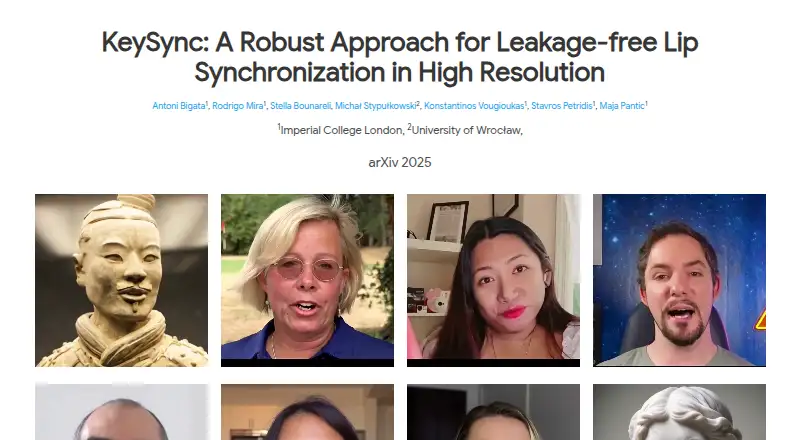
KeySync is a free, open-source web project for matching the lip movements in an existing video to new audio. Its two-stage framework is intended to improve temporal consistency, while masking methods address expression leakage from the source video and facial occlusions. The project reports results for lip reconstruction and cross-synchronization, and introduces LipLeak as a measure of expression leakage.
The online demo takes video and audio uploads to create a synchronized video and accepts videos up to 6 seconds long. For local installation, the listed prerequisites are a CUDA-compatible GPU, Python 3.11, and Conda. The quick-start process uses MP4 video and WAV audio; provided scripts can convert video to 25 fps and audio to 16000 Hz, and crop video around the face. Inference options include enabling occlusion handling and supplying coordinates for an object to mask. The repository provides separate training scripts for keyframe and interpolation models, and instructions for downloading pretrained models from Hugging Face. KeySync is licensed under Apache-2.0.
Who it suits
KeySync suits people who need to align a video's existing lip movements with new audio and can work with its video and audio preparation steps. It may also suit developers who want to use its local training scripts or configure masking for facial occlusions.
What it does well
- Free and open source under Apache-2.0.
- Online demo creates synchronized videos from uploaded video and audio.
- Includes masking approaches for expression leakage and facial occlusions.
- Provides scripts for video, audio, and face-crop preparation.
- Includes separate training scripts for keyframe and interpolation models.
What to know first
- The online demo accepts videos only up to 6 seconds.
- Local installation lists a CUDA-compatible GPU, Python 3.11, and Conda as prerequisites.
Limits
The online demo is limited to videos up to 6 seconds. Local installation lists a CUDA-compatible GPU, Python 3.11, and Conda as prerequisites.
Getting started
- Open the KeySync website and use the online demo to upload video and audio.
- For local installation, prepare a CUDA-compatible GPU, Python 3.11, and Conda.
- Use MP4 video and WAV audio inputs for the quick-start workflow.
- Use the provided scripts to prepare video at 25 fps, audio at 16000 Hz, and crop around the face.
- Download pretrained models from the toninio19/keysync Hugging Face repository.
- Use the command-line occlusion option and provide object coordinates when masking is needed.
Verdict
Choose KeySync if you need a free, open-source tool for synchronizing existing video with new audio and value its masking options. Look elsewhere if your demo workflow needs videos longer than 6 seconds or you cannot meet the listed local prerequisites.
Questions
Is KeySync free?
Yes. Its pricing model is free, and it is open source.
Which platforms does KeySync support?
KeySync is listed for the web. Its repository also describes local installation prerequisites.
What input formats does the quick start use?
It uses MP4 video and WAV audio files.
Can the online demo handle long videos?
The demo accepts videos up to 6 seconds.
What license does KeySync use?
The GitHub repository identifies the license as Apache-2.0.
Can I train its models?
The repository includes separate scripts for training the keyframe and interpolation models.
Facts from KeySync's own pages
- Architecture
- KeySync is a two-stage framework designed to improve temporal consistency in lip synchronization. · antonibigata.github.io, 9 Oct 2026
- Demo limit
- The Hugging Face demo is limited to videos of up to 6 seconds because of GPU restrictions. · github.com, 9 Oct 2026
- Evaluation
- The repository includes a LipScore metric for measuring synchronization quality between generated and ground-truth videos. · github.com, 9 Oct 2026
- Expression leakage
- Its masking strategy is designed to reduce expression leakage from the input video. · antonibigata.github.io, 4 Oct 2026
- Framework
- KeySync uses a two-stage framework to improve temporal consistency in lip synchronization. · antonibigata.github.io, 4 Oct 2026
- Input formats
- The quick start guide uses MP4 video files and WAV audio files as inputs. · github.com, 4 Oct 2026
- Input preparation
- The repository recommends converting video to 25 fps and audio to 16000 Hz for compatibility with the models. · github.com, 9 Oct 2026
- Interactive demo
- The demo accepts video and audio uploads to create synchronized videos and is limited to videos up to 6 seconds by Hugging Face Spaces GPU restrictions. · github.com, 4 Oct 2026
- Leakage and occlusion handling
- The framework uses a masking strategy to address expression leakage and facial occlusions. · antonibigata.github.io, 9 Oct 2026
- License
- The GitHub repository identifies its license as Apache-2.0. · github.com, 9 Oct 2026
- Local requirements
- The repository lists a CUDA-compatible GPU, Python 3.11, and Conda as prerequisites for local use. · github.com, 9 Oct 2026
- Model weights
- The repository instructs users to download pretrained models from the toninio19/keysync Hugging Face repository. · github.com, 4 Oct 2026
- Occlusion controls
- The command-line options include a setting to enable occlusion handling and coordinates for the object to mask. · github.com, 4 Oct 2026
- Occlusion option
- The inference parameters include an option to mask objects that block the face. · github.com, 9 Oct 2026
- Occlusions
- The framework includes a masking approach for handling facial occlusions. · antonibigata.github.io, 4 Oct 2026
- Online demo
- The interactive demo accepts video and audio uploads to create synchronized videos. · github.com, 9 Oct 2026
- Preprocessing
- Provided scripts can convert videos to 25 fps and audio to 16000 Hz, and crop videos around the face. · github.com, 4 Oct 2026
- Pretrained models
- The repository provides instructions to download pretrained models from Hugging Face. · github.com, 9 Oct 2026
- Purpose
- KeySync synchronizes lip movements in an existing video with new input audio. · antonibigata.github.io, 9 Oct 2026
- Reported results
- The authors report improved lip reconstruction and cross-synchronization, and reduced expression leakage measured with their LipLeak metric. · antonibigata.github.io, 9 Oct 2026
- Training
- The repository includes separate scripts for training the keyframe and interpolation models. · github.com, 9 Oct 2026
Where KeySync stands on Freedom251
- AI Video Lip Sync Tools#26 of 28