Freedom251 › Password Managers
KeeWeb
by KeeWeb
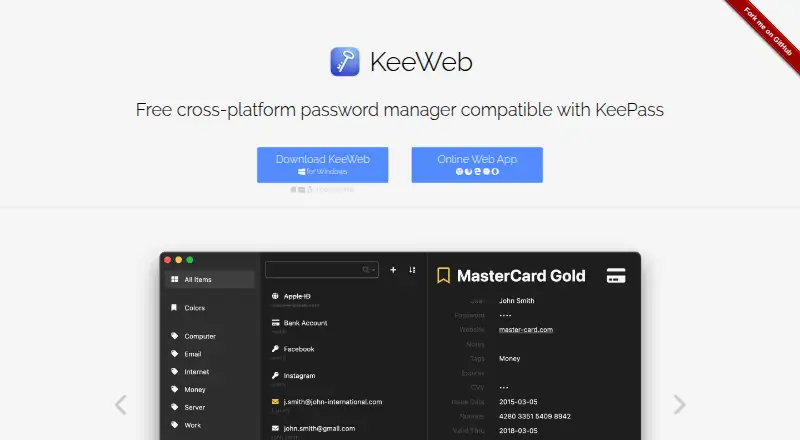
What KeeWeb is
KeeWeb is a free password manager for people using KeePass-compatible databases. It supports KeePass v2 kdbx files, but not KeePass v1 kdb files. Desktop apps are available for Windows, macOS, and Linux, while the web app runs in modern browsers without installation. Mobile browsers can display entry details and copy passwords. KeeWeb can open files from Dropbox, Google Drive, OneDrive, or a user’s own server; changes sync across devices, and files remain available offline until the user reconnects. Users can manage multiple files, search across them, add tags, and refine searches by fields, passwords, history, or regular expressions. A configurable password generator and protected fields are also included. The maker says app data stays on the user’s computer unless the user chooses encrypted cloud storage. KeeWeb can be self-hosted on a static server or in a Docker container. The maker is KeeWeb, based in Amsterdam, Netherlands. Its FAQ cautions that defenses against trojans and keyloggers are incomplete and cannot protect against targeted malware running with superuser privileges.
Who it suits
KeeWeb suits people who want a free password manager compatible with KeePass v2 files and access across desktop, web, or mobile browsers. It also fits users who want to keep data locally or choose their own cloud provider.
What it does well
- Free password management with no trial required.
- Supports KeePass v2 kdbx files.
- Desktop apps cover Windows, macOS, and Linux.
- Files can be used offline and synced later.
- Can be self-hosted on a static server or Docker.
What to know first
- Does not support KeePass v1 kdb files.
- Mobile access is through browsers.
- Malware protections are not complete.
- Only the latest product version is supported.
Plans
| Plan | Billed and limits | Price |
|---|---|---|
| Free | The app is completely free. · No trials · No demo versions · No limits · Open-source | On request |
| KeeWeb | No trials, demo versions, or limits stated | Free |
As keeweb.info lists them, read 20 Sept 2026. The maker's own page has the final word.
Verdict
KeeWeb offers a free way to work with KeePass v2 databases across desktop and browser platforms. Its stated security limits and lack of KeePass v1 support are important considerations.
Facts from KeeWeb's own pages
- Cloud storage
- Files can be opened from Dropbox, Google Drive, OneDrive, or a user's own server, with changes synced across devices. · keeweb.info, 11 Oct 2026
- Database compatibility
- It supports KeePass v2 kdbx files, but not KeePass v1 kdb files. · github.com, 11 Oct 2026
- Desktop and web
- Desktop apps are available for macOS, Windows, and Linux, and the web app works in modern browsers without installation. · keeweb.info, 11 Oct 2026
- Free plan
- Yes · keeweb.info, 20 Sept 2026
- Headquarters
- Amsterdam, Netherlands · keeweb.info, 28 Sept 2026
- Maker and geography
- The FAQ says KeeWeb is made in the Netherlands; the homepage credits Antelle. · github.com, 11 Oct 2026
- Mobile browsers
- Mobile browsers can view entry details and copy passwords. · keeweb.info, 11 Oct 2026
- Offline use
- Files are saved for offline access, including files opened from Dropbox, and changes sync when the user is online again. · keeweb.info, 11 Oct 2026
- Organization and search
- Users can manage multiple files, search across them, add tags, and refine searches by fields, passwords, history, or regular expressions. · keeweb.info, 11 Oct 2026
- Password tools
- The app includes a password generator with configurable length and symbols, and protected fields that can be hidden and stored in memory more securely than usual fields. · keeweb.info, 11 Oct 2026
- Privacy
- The maker says app data stays on the user's computer unless the user chooses to save it in encrypted form to a cloud provider. · keeweb.info, 11 Oct 2026
- Product
- KeeWeb is a free cross-platform password manager compatible with KeePass. · keeweb.info, 11 Oct 2026
- Security limits
- The FAQ says KeeWeb's protections against trojans and keyloggers are not complete and cannot protect against targeted malware running with superuser privileges. · github.com, 11 Oct 2026
- Security review
- The FAQ states that Hackmanit conducted a penetration test in April–May 2020 and that all vulnerabilities were fixed in version 1.14.2. · github.com, 11 Oct 2026
- Self-hosting
- The project says KeeWeb can be self-hosted on a static server and describes Docker images for hosting it in a container. · github.com, 11 Oct 2026
- Supported platforms
- web; Windows; macOS; Linux; iOS mobile web; Android mobile web; browser extensions · keeweb.info, 20 Sept 2026
- Supported releases
- The security policy says only the latest product version is supported. · github.com, 11 Oct 2026
Where KeeWeb stands on Freedom251
- Password Managers#32 of 104