Freedom251 › Password Managers

Codebook
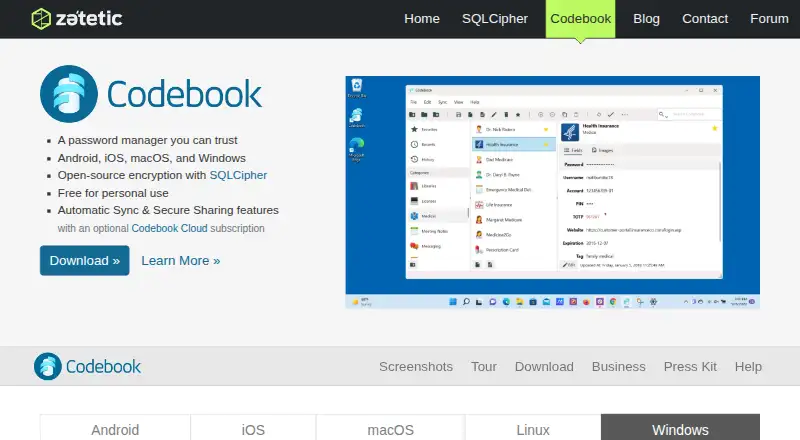
What Codebook is
Codebook is a password manager and data vault for passwords, financial details, and other sensitive information. You can arrange records into categories, entries, and fields, then create custom labels and field types. Images and PDF files can sit alongside records. Password tools include a generator, weakness warnings, and HaveIBeenPwned breach checks. Supported devices can use biometric login, and a TOTP authenticator supplies verification codes. Codebook encrypts stored data with SQLCipher using AES-256-CBC and derives keys through 256,000 PBKDF2-HMAC-SHA512 rounds. Cloud data is encrypted on your device with a Sync Key that Zetetic says it does not possess. Free manual sync works with Dropbox, Google Drive, Desktop WiFi, and Local Folder; automatic background sync requires Codebook Cloud. Platforms include Android, iOS, macOS, Windows, and Linux through Wine. Personal non-commercial use is free; business use needs a license.
Who it suits
Codebook suits people storing passwords and sensitive records across major desktop and mobile platforms. It also supports families and organizations needing sharing, administration, or business licensing.
What it does well
- Free personal, non-commercial plan
- Passkey support and secure sharing
- Biometric login and TOTP authenticator
- Manual sync with four listed options
- Business administration controls available
What to know first
- Business use requires a license
- Automatic background sync requires paid Cloud
- Linux runs through Wine compatibility layer
- Cloud Personal costs 7.00 USD monthly
Limits
The free Codebook plan is for personal, non-commercial use. Codebook Cloud Personal provides one user and 5 GB of storage, while Cloud Family provides six users with 5 GB per user; automatic background sync is a paid Cloud feature.
Plans
| Plan | Billed and limits | Price |
|---|---|---|
| Codebook Cloud Personal | Billed monthly · Annual cost: $84 · 1 user account · 1 month free trial · 5 GB storage · Priority email support | $7 a month |
| Codebook Cloud Family | Billed monthly · Annual cost: $168 · 6 user accounts · 1 month free trial · 5 GB storage per user · Priority email support | $14 a month |
| Codebook | Free for personal, non-commercial use · Personal use · business use requires a license | Free |
| Codebook for Business | Billed annually · Starting price per user · Flexible tiers · Volume discounts available · Contact sales for options | $5 a month |
As zetetic.net lists them, read 11 Oct 2026. The maker's own page has the final word.
Getting started
- Open the Codebook website
- Choose the free plan, trial, or a Cloud plan
- Install Codebook on Android, iOS, macOS, or Windows
- Use the Windows version through Wine on supported Linux distributions
- Set up manual sync with Dropbox, Google Drive, Desktop WiFi, or Local Folder
- Choose Codebook Cloud for automatic background sync
Verdict
Codebook combines vault organization, password tools, authentication features, and device-side encryption. Its free personal plan and manual sync options contrast with paid Cloud syncing and separate business licensing.
Questions
Is Codebook free?
Yes. Codebook is free for personal, non-commercial use, and a 30-day trial is listed. Business use requires a license.
What does Codebook Cloud Personal cost?
Codebook Cloud Personal costs $7 a month, billed monthly, with an annual cost of $84. It includes one user account, 5 GB of storage, a one-month free trial, and priority email support.
What platforms does Codebook support?
It supports Android, iOS, macOS, and Windows. Linux use is through the Windows version with Wine.
Does Codebook sync automatically?
Free manual sync options include Dropbox, Google Drive, Desktop WiFi, and Local Folder. Automatic background sync is provided by paid Codebook Cloud.
Does Codebook offer a family plan?
Yes. Codebook Cloud Family costs $14 a month, billed monthly, and includes six user accounts, 5 GB per user, a one-month free trial, and priority email support.
Facts from Codebook's own pages
- Attachments
- Codebook can store images and PDF files alongside users’ records. · zetetic.net, 11 Oct 2026
- Authentication
- Codebook supports biometric login on supported devices and includes a TOTP authenticator for verification codes. · zetetic.net, 11 Oct 2026
- Business admin controls
- Yes · zetetic.net, 20 Sept 2026
- Business audience
- Business licenses can cover employees, contractors, and consultants, with onboarding support and controls for sharing permissions between employees. · zetetic.net, 11 Oct 2026
- Business use
- Codebook is free for personal, non-commercial use, while business use requires a business license that can manage Codebook Cloud subscriptions for an organization. · zetetic.net, 11 Oct 2026
- Cloud privacy
- Codebook Cloud data is encrypted on the user’s device with a Sync Key that Zetetic says it does not have, so Zetetic cannot decrypt the synced data. · codebook.cloud, 11 Oct 2026
- Data organization
- Users can organize information into categories, entries, and fields, and define custom labels and field types. · zetetic.net, 11 Oct 2026
- Encryption
- Codebook encrypts stored data with SQLCipher using AES-256-CBC and derives encryption keys with 256,000 rounds of PBKDF2-HMAC-SHA512. · zetetic.net, 11 Oct 2026
- Family plan
- Yes · zetetic.net, 20 Sept 2026
- Free plan
- Yes · zetetic.net, 20 Sept 2026
- Linux support
- The Windows version runs on many Linux distributions through the Wine compatibility layer. · zetetic.net, 11 Oct 2026
- Passkey support
- Yes · zetetic.net, 20 Sept 2026
- Password tools
- Features include a password generator, password weakness warnings, and breach checks with HaveIBeenPwned. · zetetic.net, 11 Oct 2026
- Purpose
- Codebook is a password manager and data vault for passwords, financial details, and other sensitive information. · zetetic.net, 11 Oct 2026
- Secure sharing
- Codebook Cloud supports sharing credentials with trusted contacts and family plan members. · zetetic.net, 11 Oct 2026
- Support
- Codebook provides help articles, FAQs, a discussion forum, and direct contact with support; Cloud plans list priority email support. · zetetic.net, 11 Oct 2026
- Supported platforms
- Android,iOS,macOS,Windows,Linux via Wine · zetetic.net, 20 Sept 2026
- Sync integrations
- Free manual sync options include Dropbox, Google Drive, Desktop WiFi, and Local Folder; automatic background sync is provided by the paid Codebook Cloud service. · zetetic.net, 11 Oct 2026
Where Codebook stands on Freedom251
- Password Managers#31 of 104