
KBackup
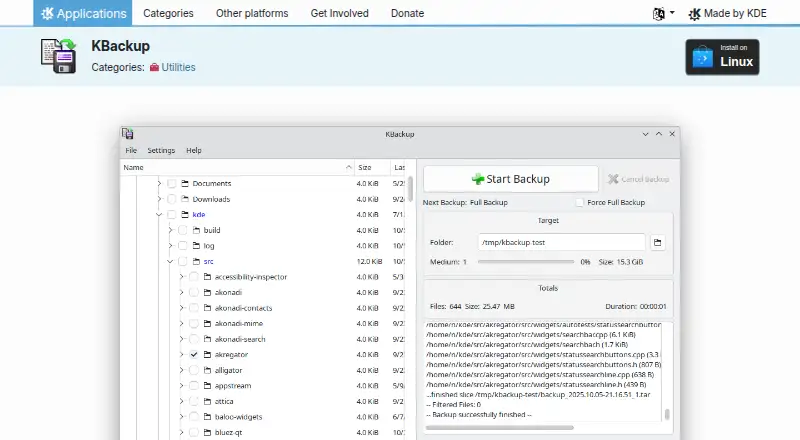
What KBackup is
KBackup is a free Linux application for file-based computer backups. Profile files define which folders and files to include or exclude, allowing repeatable backup scopes. Destinations can be locally mounted devices such as ZIP drives or USB sticks, as well as remote URLs. KBackup can run automated backups without using its graphical interface, and its restore mode is file-based. KDE provides installation through Discover, other AppStream application stores and distribution package managers, and links to a Flathub download. The application is licensed under GPL-2.0+. Help resources include the KBackup Handbook, KDE Forum and the #kde-utils channel on Libera.chat. KDE also links to bug reporting and a bug list. KDE is identified as the maker, while KDE e.V. is a registered non-profit representing the KDE Community in legal and financial matters. The listed KBackup plan costs nothing. There is no free trial, and Linux is the supported platform.
Who it suits
It suits Linux users who need straightforward file backups to local devices or remote URLs. Automated, non-graphical runs can support scheduled backup workflows.
What it does well
- Free Linux backup application
- Profiles include or exclude files
- Supports local devices and remote URLs
- Automated runs without graphical interface
- GPL-2.0+ licensed
What to know first
- Linux platform only
- No free trial
- Restore mode is file-based
Plans
| Plan | Billed and limits | Price |
|---|---|---|
| KBackup | Linux application · GPL-2.0+ | Free |
As apps.kde.org lists them, read 12 Oct 2026. The maker's own page has the final word.
Verdict
KBackup focuses on profile-driven file backups for Linux, with local or remote destinations and automated runs. It is free under GPL-2.0+ and includes KDE documentation and support links.
Facts from KBackup's own pages
- Automation
- KBackup can run automated backups without using a graphical user interface. · apps.kde.org, 12 Oct 2026
- Backup destinations
- Backup targets can be locally mounted devices, such as ZIP drives or USB sticks, or any remote URL. · apps.kde.org, 12 Oct 2026
- Backup profiles
- Profile files define which folders and files to include in or exclude from a backup. · apps.kde.org, 12 Oct 2026
- Backup scope
- file · apps.kde.org, 23 Sept 2026
- Computer backup
- Yes · apps.kde.org, 23 Sept 2026
- Distribution
- The KDE page links to a Flathub download for KBackup. · apps.kde.org, 12 Oct 2026
- Free plan
- Yes · apps.kde.org, 23 Sept 2026
- Installation
- The KDE page lists Linux installation through Discover and other AppStream application stores, and says users can also use their distribution's package manager. · apps.kde.org, 12 Oct 2026
- Issue reporting
- The KDE page links to a bug reporting page and a bug list. · apps.kde.org, 12 Oct 2026
- Latest listed release
- The page lists version 26.08.2 dated 2026-10-08. · apps.kde.org, 12 Oct 2026
- License
- The KDE page identifies KBackup's license as GPL-2.0+. · apps.kde.org, 12 Oct 2026
- Maintainer
- The page identifies KDE as the maker of KBackup. · apps.kde.org, 12 Oct 2026
- Organization
- KDE e.V. says it is a registered non-profit organization that represents the KDE Community in legal and financial matters. · ev.kde.org, 12 Oct 2026
- Supported platforms
- Linux · apps.kde.org, 23 Sept 2026
- Purpose
- KBackup lets users back up data in a simple, user friendly way. · apps.kde.org, 12 Oct 2026
- Support
- The KDE page links to the KBackup Handbook, KDE Forum, and #kde-utils on Libera.chat for help. · apps.kde.org, 12 Oct 2026
Where KBackup stands on Freedom251
- Backup software#86 of 151