KaraokeMedia Pro X
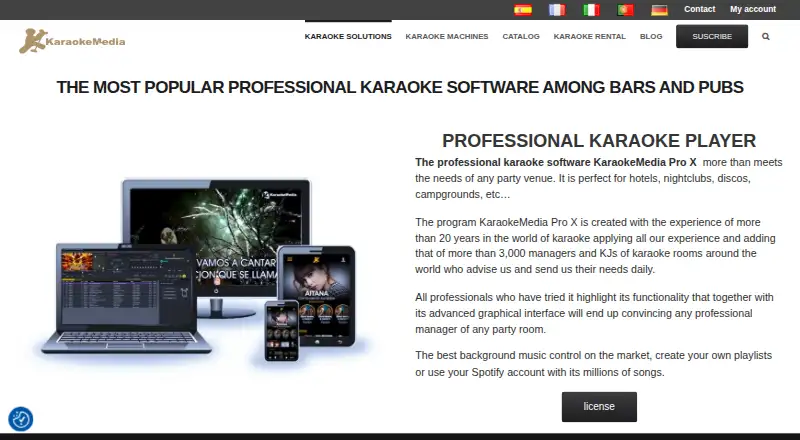
What KaraokeMedia Pro X is
KaraokeMedia Pro X is professional karaoke software for bars, karaoke rooms, event companies, hotels, nightclubs, discos, and campgrounds. It runs on Windows 10 or Windows 11, with minimum hardware requirements including an Intel Core i5 10th generation or i3 11th generation processor, 8 GB DDR4 RAM, and a 500 GB SSD. Operators can search, download, and play songs, change key, manage background music, and fade automatically between karaoke and background tracks. Premium Pro provides a catalog described as more than 30,000 songs in over seven languages, with weekly releases and automatic downloads. Users can create playlists or use Spotify songs for background music. Customers request songs by scanning a QR code in the KaraokeMedia Listings app, or through a touchscreen terminal or Windows tablet using Remote KaraokeMedia Pro, which supports six languages. Premium Pro also offers offline use without time limits and technical support.
Who it suits
It suits venues and event operators running karaoke on Windows machines. The listed customer-request tools also fit businesses that want mobile or terminal-based song selection.
What it does well
- Catalog described as over 30,000 songs
- Supports Windows 10 and Windows 11
- Offline use without time limits
- QR-code mobile song requests
- Automatic fading between music types
What to know first
- No free plan
- Recording module requires Premium Pro REC
- Per-machine licensing
- Minimum hardware requirements apply
Limits
Premium Pro excludes the recording module, which requires a Premium Pro REC account. The seven-day plan lasts seven days from contracting and is billed as a single payment per machine.
Plans
| Plan | Billed and limits | Price |
|---|---|---|
| 7 Days | Single payment; license lasts 7 days from contracting · Per machine · full songbook | €4,990, paid once |
| Yearly | Free registration · Per machine | €999 a year |
| Monthly | Automatic monthly payment; first month registration +40€ · Per machine | €9,990 a month |
As karaokemedia.com lists them, read 8 Oct 2026. The maker's own page has the final word.
Getting started
- Open the KaraokeMedia Pro X website
- Choose the available free trial or a paid plan
- Use a Windows 10 or Windows 11 computer meeting the listed hardware requirements
- Install the desktop software and activate the selected per-machine license
- Set up playlists, background music, and customer request options
Verdict
KaraokeMedia Pro X combines venue playback controls, a large licensed catalog, background music options, and several customer-request methods. Buyers should note the paid, per-machine plans and the separate account required for recording.
Questions
Does KaraokeMedia Pro X have a free plan?
No. The pricing model is paid, although a free trial is available.
What does the software cost?
Plans are €999.00 per year, €4990.00 per once for seven days, or €9990.00 per month. The monthly plan also has a first-month registration charge of €40.
Which operating systems are supported?
The software supports desktop Windows. Windows 10 and Windows 11 are the stated minimum and recommended operating systems.
Can customers request songs from phones?
Yes. Customers can scan a QR code with the KaraokeMedia Listings app to browse the venue song base and request songs.
Does it work offline?
Premium Pro supports offline use without time limits.
Is recording included?
The Premium Pro account excludes the recording module; a Premium Pro REC account is required.
Facts from KaraokeMedia Pro X's own pages
- Catalog
- The Premium Pro account provides access to a catalog described as having more than 30,000 songs in over seven languages, with weekly releases and automatic downloads. · karaokemedia.com, 8 Oct 2026
- Company
- KaraokeMedia says it produces its own karaoke songs and develops software for professionals and individuals. · karaokemedia.com, 8 Oct 2026
- Content licensing
- KaraokeMedia states that its entire Premium Pro song catalog is copyright legal and includes professional catalog licenses. · karaokemedia.com, 8 Oct 2026
- Customer requests
- Customers can scan a QR code with the KaraokeMedia Listings app to browse the venue's song base and request songs from their mobile device. · karaokemedia.com, 8 Oct 2026
- Hardware requirements
- Minimum requirements include an Intel Core i5 10th generation or i3 11th generation processor, 8 GB DDR4 RAM, and a 500 GB SSD. · karaokemedia.com, 8 Oct 2026
- Headquarters
- C/ Santiago Rusiñol 14, 02006 Albacete, Spain · karaokemedia.com, 28 Sept 2026
- Limit
- The Premium Pro account page says the recording module is excluded and requires a Premium Pro REC account. · karaokemedia.com, 8 Oct 2026
- Offline mode
- The Premium Pro account supports use without time limits and offers an offline mode. · karaokemedia.com, 8 Oct 2026
- Operating system
- The stated minimum and recommended operating systems are Windows 10 or Windows 11. · karaokemedia.com, 8 Oct 2026
- Playback
- The software can search, download, and play songs, adjust song key, manage background music, and automatically fade between karaoke and background music. · karaokemedia.com, 8 Oct 2026
- Purpose
- KaraokeMedia Pro X is professional karaoke software aimed at bars, karaoke rooms, event companies, hotels, nightclubs, discos, and campgrounds. · karaokemedia.com, 8 Oct 2026
- Remote terminal
- Remote KaraokeMedia Pro lets customers request songs from a touchscreen terminal or a Windows tablet, and supports six selectable languages. · karaokemedia.com, 8 Oct 2026
- Spotify
- The product page says users can create playlists or use Spotify songs for background music. · karaokemedia.com, 8 Oct 2026
- Support
- Premium Pro includes technical support by phone, Telegram, and email, with priority support and an emergency phone number. · karaokemedia.com, 8 Oct 2026
Where KaraokeMedia Pro X stands on Freedom251
- Karaoke Software#23 of 30