Freedom251 › Speed Reading Apps
Kairo
What Kairo is
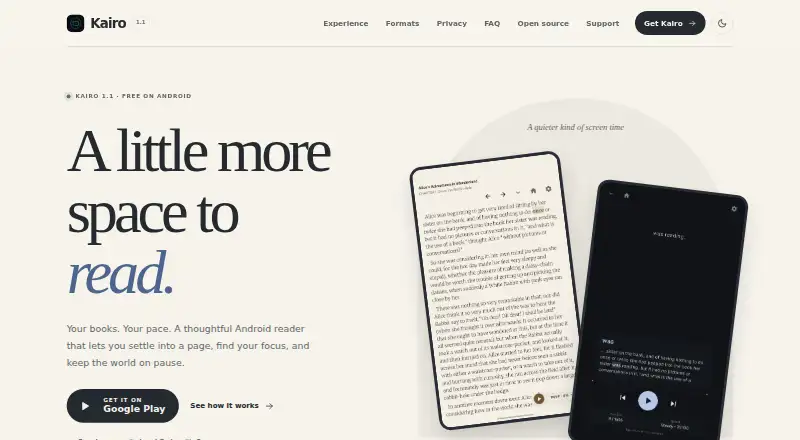
Kairo is a free Android app for reading DRM-free ebooks and documents, with standard reading, adaptive RSVP and Bionic Reading modes. Its reader includes scrollable chapters, inline images, a table of contents, bookmarks, reading progress and a movable focus word. Adaptive RSVP aligns words using ORP and varies timing according to punctuation, word length, syllables, clauses and readability. Bionic Reading presents timed text chunks with emphasized word beginnings while leaving more sentence context visible. Readers can adjust pacing, typography, brightness and focus using reading profiles, and choose from six themes. Focus mode offers a full-screen reader and can optionally turn on Android Do Not Disturb during a session. Kairo 1.1 supports EPUB, MOBI, PRC, AZW, FB2 and FB2.ZIP, DOCX, text-based PDF, TXT, Markdown, HTML and HTM files. Files must be DRM-free; PDFs need selectable text, and the app does not support scanned PDFs or OCR. Imported files and reading information stay in app-private device storage. Kairo has no account system, ads or analytics SDKs.
Who it suits
Kairo suits Android users who want to read their own DRM-free ebooks and documents with standard or accelerated reading modes. It is for readers whose PDFs contain selectable text rather than scanned pages.
What it does well
- Offers standard, adaptive RSVP and Bionic Reading modes.
- Supports EPUB, MOBI, DOCX, text-based PDF and more.
- Includes six reader themes and adjustable controls.
- Reading files and progress stay in app-private storage.
- No account system, ads or analytics SDKs.
What to know first
- Available on Android only.
- Files must be DRM-free.
- Scanned PDFs are unsupported, and the app does not perform OCR.
- Free on Android 7.0 and newer.
Limits
Kairo is free on Android 7.0 and newer, but it only accepts DRM-free files. PDFs must contain selectable text; scanned PDFs and OCR are unsupported.
Plans
| Plan | Billed and limits | Price |
|---|---|---|
| Kairo | Free on Android 7.0 and newer · DRM-free files only | Free |
As kairoreader.com lists them, read 9 Oct 2026. The maker's own page has the final word.
Getting started
- Use an Android device running Android 7.0 or newer
- Install Kairo on Android
- Import a DRM-free ebook or document in a supported format
- Choose standard, adaptive RSVP, or Bionic Reading
- Adjust reading controls or select a theme
Verdict
Kairo combines file-based reading with adjustable standard and accelerated modes, while keeping library data on the device. Its DRM-free requirement and lack of scanned-PDF support narrow which documents it can handle.
Questions
How much does Kairo cost?
Kairo is free.
Which devices support Kairo?
Kairo is for Android 7.0 and newer.
What file types can it read?
Kairo 1.1 supports EPUB, MOBI, PRC, AZW, FB2, FB2.ZIP, DOCX, text-based PDF, TXT, Markdown, HTML, and HTM.
Does Kairo support scanned PDFs?
No. PDFs need selectable text, and Kairo does not support scanned PDFs or perform OCR.
Is Kairo open source?
Kairo’s code is available on GitHub. The project is described as native Kotlin and Jetpack Compose.
Does Kairo upload reading data?
Kairo says it does not upload users’ libraries or reading activity to its server. Imported files, extracted content, reading progress, bookmarks, and preferences stay in app-private device storage.
Facts from Kairo's own pages
- Adaptive RSVP
- Adaptive RSVP uses ORP alignment and adjusts timing based on punctuation, word length, syllables, clauses and readability. · kairoreader.com, 9 Oct 2026
- Audience
- Kairo is for Android users who want to read their own DRM-free ebooks and documents using standard or accelerated reading modes. · kairoreader.com, 9 Oct 2026
- Bionic Reading
- Bionic Reading displays timed text chunks with emphasized word beginnings while keeping more sentence context visible. · kairoreader.com, 9 Oct 2026
- File formats
- Kairo 1.1 supports EPUB, MOBI, PRC, AZW, FB2 and FB2.ZIP, DOCX, text-based PDF, TXT, Markdown, HTML and HTM files. · kairoreader.com, 9 Oct 2026
- File limitations
- Files must be DRM-free; PDFs need selectable text, and Kairo does not support scanned PDFs or perform OCR. · kairoreader.com, 9 Oct 2026
- Focus mode
- Focus mode provides a full-screen reader and can optionally engage Android Do Not Disturb during reading sessions. · kairoreader.com, 9 Oct 2026
- Internet use
- Internet access supports Google Play’s flexible update flow; the site says it is not used to send reading data to a Kairo server. · kairoreader.com, 9 Oct 2026
- Local storage
- Imported files, extracted content, reading progress, bookmarks and preferences stay in app-private storage on the device. · kairoreader.com, 9 Oct 2026
- Open source
- Kairo is described as a native Kotlin and Jetpack Compose project whose code is available on GitHub. · kairoreader.com, 9 Oct 2026
- Privacy
- Kairo says it has no account system, ads or analytics SDKs and does not upload users’ libraries or reading activity to a Kairo server. · kairoreader.com, 9 Oct 2026
- Product
- Kairo is a free Android reading app for DRM-free ebooks and documents, with standard reading, adaptive RSVP and Bionic Reading modes. · kairoreader.com, 9 Oct 2026
- Reader
- The reader supports scrollable chapters, inline images, a table of contents, bookmarks, reading progress and a movable focus word. · kairoreader.com, 9 Oct 2026
- Reading controls
- Kairo offers reading profiles and controls for pacing, typography, brightness and focus, plus six reader themes. · kairoreader.com, 9 Oct 2026
- Support
- The site directs users with questions about files or features to [email protected] and links to a page to support Kairo. · kairoreader.com, 9 Oct 2026
Where Kairo stands on Freedom251
- Speed Reading Apps#11 of 27