Just a Sample
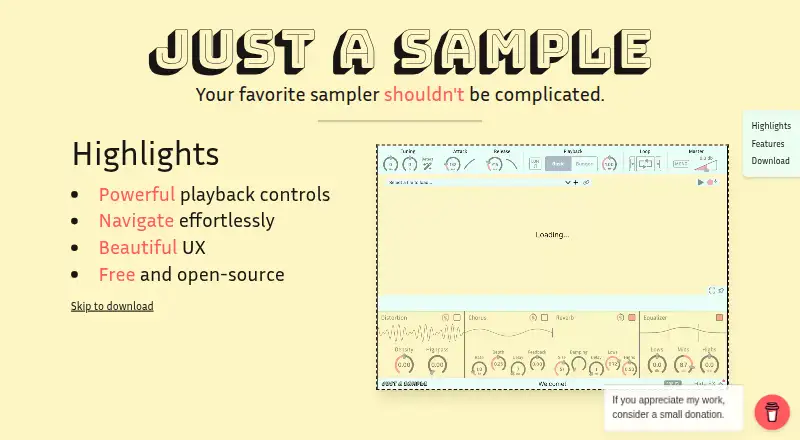
What Just a Sample is
Just a Sample is a free, open-source audio sampler for Windows, macOS and Linux. It runs only as a plugin, in VST3 or AU format, and focuses on one audio source and one region rather than a standalone application. Users can zoom into a sample to set its playback bounds, with waveform drawing designed for large samples. Its Bungee time stretcher changes pitch and timing independently and can slow playback to 0.01x. A routable effects chain includes reverb, chorus, distortion and EQ. Playback controls include waveform mode, editable attack and release curves, equal-power cross-fade looping, pitch bend and fine-tuning. Users can record samples into the plugin and experiment with auto-tuning to A440, which works best on simple sounds. Samples may be stored in the plugin state to avoid external file dependencies, or that option can be turned off. The project uses the MIT License. The maker asks for problem reports on GitHub. Installers are self-signed and may prompt operating-system warnings; Windows may show SmartScreen, while macOS may require manually opening the installer.
Who it suits
It suits musicians and audio makers on Windows, macOS or Linux who want a plugin sampler with time and pitch controls, effects and sample recording. It is less suited to anyone seeking a standalone app or multiple sample regions.
What it does well
- Free and open-source under the MIT License.
- Time and pitch can be changed independently.
- Effects chain includes reverb, chorus, distortion and EQ.
- Samples can be stored within plugin state.
- Supports up to 256 voices.
What to know first
- Plugin-only; no standalone application.
- Limited to one audio source and one region.
- Self-signed installers may trigger operating-system warnings.
- Auto-tuning works best on simple sounds.
Limits
The sampler is built around a single audio source and a single region. It is available as a plugin rather than a standalone app.
Plans
| Plan | Billed and limits | Price |
|---|---|---|
| Just a Sample | Free and open-source audio sampler · Windows, macOS, Linux · VST3/AU | Free |
As bobona.github.io lists them, read 7 Oct 2026. The maker's own page has the final word.
Getting started
- Visit the project website.
- Choose the installer for Windows, macOS, or Linux.
- Open the installer, following any operating-system prompts for its self-signed status.
- Load the plugin in a host that supports VST3 or AU.
- Report problems on GitHub.
Just a Sample is a free audio-sampler plugin for shaping and playing one sample source. It suits producers who want time and pitch control, looping, and effects without building a multi-region instrument. Its focused design is useful for quick sample work, but it is not a standalone app or a broad library sampler.
Overview
The plugin centers on a single audio source and a single region. That keeps the task narrow: users can set playback bounds, shape the sound, and route it through effects, but those seeking layered samples or a self-contained desktop application should look elsewhere. The project is open source under the MIT License.
Key features
Sample shaping and playback
Zooming to individual samples helps set precise playback bounds, and waveform drawing is optimized for large samples. Waveform mode, editable attack and release curves, equal-power cross-fade looping, pitch bend, and fine-tuning give useful control over how a source starts, sustains, and loops. It supports MP3 samples, so users should check that their existing sample format fits.
Time, pitch, and effects
The integrated Bungee time stretcher allows time and pitch to be modulated independently, with slowdowns down to 0.01x. That makes it a strong fit for extreme slowdowns or pitch-shifted material without tying the two changes together. A routable effects chain includes reverb, chorus, distortion, and EQ, covering common sound-shaping needs within the plugin.
Recording and storage
Users can record samples directly into the plugin. Experimental auto-tuning to A440 is most suitable for simple sounds, so it is not a dependable choice for tuning complex material. Samples can be stored in the plugin state to avoid external file dependencies, or that option can be disabled when users prefer not to embed them.
Pricing
Just a Sample: free. The free, open-source plan includes the sampler for Windows, macOS, and Linux in VST3/AU formats. There is no paid tier or free trial; the plugin is free to use. Its limits are about scope rather than price: plugin-only use, one source and region, and a maximum polyphony of 256 voices.
Platforms
Just a Sample runs as a plugin on Windows, macOS, and Linux, with VST3/AU formats. It has no standalone app. The maker says installers are self-signed, so Windows may show a SmartScreen warning and macOS may require manually opening the installer. Users should be prepared for those operating-system warnings during installation.
Who it's for
Choose it for focused sample editing, looping, time stretching, and effects inside a compatible plugin host, especially if a free and open-source tool is a priority. It is a poor fit for users who need a standalone sampler, multiple regions, or a broader instrument-building workflow.
Pros and cons
- Pros: Independent time and pitch modulation, including slowdowns to 0.01x, gives substantial control over a single source.
- Pros: The routable chain combines reverb, chorus, distortion, and EQ in the plugin.
- Pros: Plugin-state sample storage can remove external file dependencies, and can be disabled.
- Cons: A single source and region limits its usefulness for layered or multi-zone instruments.
- Cons: Plugin-only operation means it cannot serve users who need a standalone app.
- Cons: Self-signed installers can trigger Windows or macOS warnings and require extra steps.
Alternatives
For a broader range of sampler options, browse Sampler Software. sfizz is another free option for readers who want a sampler available across Linux, macOS, Windows, and web platforms. Choose Decent Sampler when the priority is playing sample libraries in DecentSampler format. TX16Wx Software Sampler is worth considering for readers who want a free sampler plugin with a free trial and an unrestricted licence option. Vaporizer 2 offers both standalone and plugin formats, unlike Just a Sample. LinuxSampler is another free option; commercial hardware or software use requires prior written permission. Momentum is a free app and plugin for slicing, editing, and manipulating WAV and AIFF audio. Source-to-Image is another free open-source toolkit. Subsample is another free sampler option.
Verdict
Just a Sample is a sound choice for producers who want a no-cost, open-source plugin for detailed work on one sample, particularly when independent time and pitch control matters. Its focused feature set and multi-platform plugin support are compelling; choose another sampler if you need standalone use or more than one source and region.
Verdict
Just a Sample offers sample shaping, time stretching and effects as a free plugin for three desktop operating systems. Its single-source design and installer warnings are worth considering before use.
Questions
Is Just a Sample free?
Yes. Its listed plan costs nothing, and the project is free and open-source.
Which operating systems and plugin formats are supported?
It is available for Windows, macOS, and Linux in VST3 and AU formats.
Is Just a Sample a standalone app?
No. It is plugin-only.
What license does it use?
The project is released under the MIT License.
Does it include a free trial?
No. The listed facts say there is no free trial; the product has a free plan.
Why might installation prompt a warning?
The installers are self-signed, so operating systems may flag them. Windows may show a SmartScreen warning, and macOS may require manually opening the installer.
Facts from Just a Sample's own pages
- Effects
- A routable effects chain includes reverb, chorus, distortion, and EQ. · binyaminf.itch.io, 7 Oct 2026
- Formats
- The plugin is available for Windows, macOS, and Linux in VST3/AU formats. · binyaminf.itch.io, 7 Oct 2026
- Installer signing
- The maker says installers are self-signed, so operating systems may flag them as unrecognized; Windows may show a SmartScreen warning and macOS may require manually opening the installer. · binyaminf.itch.io, 7 Oct 2026
- Open source
- The project is free and open-source under the MIT License. · binyaminf.itch.io, 7 Oct 2026
- Playback
- Features include waveform mode, editable attack and release curves, equal-power cross-fade looping, pitch bend, and fine-tuning. · binyaminf.itch.io, 7 Oct 2026
- Purpose
- Just a Sample is a modern audio sampler focused on simplicity and ease of use. · binyaminf.itch.io, 7 Oct 2026
- Recording and tuning
- Users can record samples into the plugin and try experimental auto-tuning to A440, which works best on simple sounds. · binyaminf.itch.io, 7 Oct 2026
- Sample editing
- Users can zoom to individual samples to set playback bounds, and waveform drawing is optimized for large samples. · binyaminf.itch.io, 7 Oct 2026
- Sample storage
- Samples can be stored in plugin state to remove external file dependencies, and this can be disabled. · binyaminf.itch.io, 7 Oct 2026
- Scope
- The maker describes the plugin as using a single audio source with a single region. · binyaminf.itch.io, 7 Oct 2026
- Support
- The maker asks users to report problems on GitHub and says they may not see feedback posted elsewhere. · binyaminf.itch.io, 7 Oct 2026
- Time and pitch
- Its integrated Bungee time stretcher lets users modulate time and pitch independently, with slowdowns to 0.01x. · binyaminf.itch.io, 7 Oct 2026
Where Just a Sample stands on Freedom251
- Sampler Software#5 of 26