
Jagex Launcher
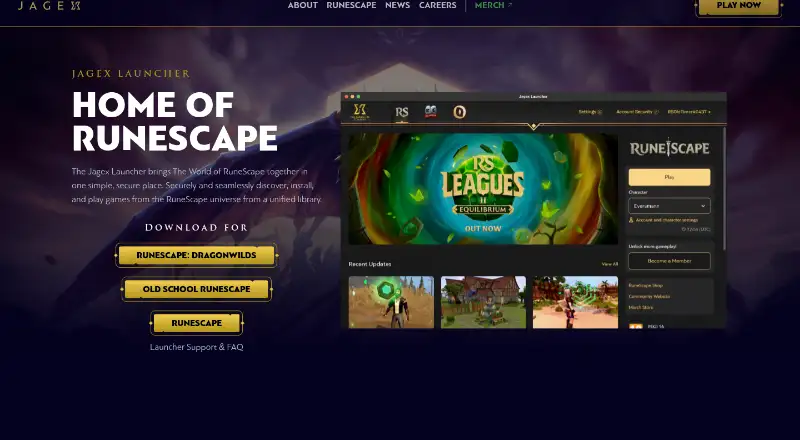
What Jagex Launcher is
Jagex Launcher is a free desktop application for finding, installing and playing games from the RuneScape universe. Its library links to RuneScape, Old School RuneScape and RuneScape: Dragonwilds, and a single Jagex Account login provides access to Jagex games. The Launcher is available for Windows and macOS. It can find existing RuneScape or Old School installations, or install them. For Old School, users can choose between RuneLite and the official game client; the Launcher can download RuneLite when needed. It can run RuneScape and Old School at the same time, including multiple instances of one game, but the same character cannot be logged into both games simultaneously. A Jagex Account is required. Jagex Accounts require two-factor authentication by default and can use email or an authenticator app for login codes, with 10 one-time backup codes available. The Launcher itself does not require administrator access to install, but installing the official Old School client through it does. A built-in Quick Launch option is unavailable; the FAQ describes a Windows-only shortcut workaround. Jagex is based in Cambridge, United Kingdom.
Who it suits
Jagex Launcher suits players looking to install and access RuneScape-universe games on Windows or macOS. It requires a Jagex Account.
What it does well
- Free to use.
- Supports Windows and macOS.
- Can find existing RuneScape or Old School installations.
- Offers a choice of RuneLite or the official Old School client.
- Jagex Accounts require two-factor authentication by default.
What to know first
- A Jagex Account is required.
- Installing the official Old School client requires administrator access.
- Built-in Quick Launch is unavailable.
- The same character cannot be logged into both games simultaneously.
Limits
The Launcher is free, but access requires a Jagex Account. Installing the official Old School client through the Launcher requires administrator access; the Launcher itself does not.
Plans
| Plan | Billed and limits | Price |
|---|---|---|
| Jagex Launcher | No paid price shown; access requires a Jagex Account | Free |
As jagex.com lists them, read 7 Oct 2026. The maker's own page has the final word.
Getting started
- Open the Jagex Launcher website.
- Use a Windows or macOS computer.
- Create or use a Jagex Account to access the Launcher.
- Install the Launcher and let it find existing RuneScape or Old School installations, or install a game through it.
- For Old School RuneScape, choose RuneLite or the official client.
Verdict
Jagex Launcher brings several RuneScape-universe games into one library and can handle existing installations. Account and installation requirements, along with the lack of built-in Quick Launch, are worth noting.
Questions
How much does Jagex Launcher cost?
The Jagex Launcher plan is free.
Which computers can run it?
It is available for Windows and macOS.
Which games does it link to?
Its library links to RuneScape, Old School RuneScape and RuneScape: Dragonwilds.
Do I need a Jagex Account?
Yes. A Jagex Account is required to access the Launcher.
Can I use RuneLite with Old School RuneScape?
Yes. You can switch between RuneLite and the official game client, and the Launcher can download RuneLite when needed.
Can I run multiple games at once?
The Launcher can run RuneScape and Old School simultaneously, including multiple instances of one game. The same character cannot be logged into both games at the same time.
Facts from Jagex Launcher's own pages
- Account protection
- Jagex says Launcher logins are better protected against brute-force attacks and Jagex Accounts require two-factor authentication by default. · support.runescape.com, 7 Oct 2026
- Account requirement
- The FAQ says a Jagex Account is required to access the Launcher. · support.runescape.com, 7 Oct 2026
- Admin access
- The Launcher itself no longer requires administrator access to install, but installing the official Old School client through it requires admin access. · support.runescape.com, 7 Oct 2026
- Authentication recovery
- Jagex Accounts can use email or an authenticator app for login codes and can generate 10 one-time backup codes. · support.runescape.com, 7 Oct 2026
- Existing installs
- The Launcher can automatically find existing RuneScape or Old School installations, or install them itself. · support.runescape.com, 7 Oct 2026
- Games
- The official page links to RuneScape, Old School RuneScape, and RuneScape: Dragonwilds. · jagex.com, 7 Oct 2026
- Headquarters
- Cambridge, United Kingdom · jagex.com, 28 Sept 2026
- Maker
- Jagex describes itself as a video game developer based in Cambridge, UK. · jagex.com, 7 Oct 2026
- Multiple instances
- The Launcher can run RuneScape and Old School at the same time, including multiple instances of one game, but the same character cannot be logged into both games simultaneously. · support.runescape.com, 7 Oct 2026
- Purpose
- The Launcher provides a unified library to discover, install, and play games from the RuneScape universe. · jagex.com, 7 Oct 2026
- Quick launch
- A built-in Quick Launch option is unavailable; the FAQ describes a Windows-only shortcut workaround. · support.runescape.com, 7 Oct 2026
- RuneLite
- Users can switch between RuneLite and the official game client from the Launcher; it can download RuneLite when needed. · support.runescape.com, 7 Oct 2026
- Single login
- The Launcher provides access to Jagex games using a single Jagex Account login. · support.runescape.com, 7 Oct 2026
- Supported systems
- Jagex says the Launcher is available for Windows and Mac. · support.runescape.com, 7 Oct 2026
Where Jagex Launcher stands on Freedom251
- Game launchers#26 of 68
- PC Game Launchers#10 of 21
- Game Launcher Software#13 of 24