Freedom251 › Educational Software
iSpring QuizMaker
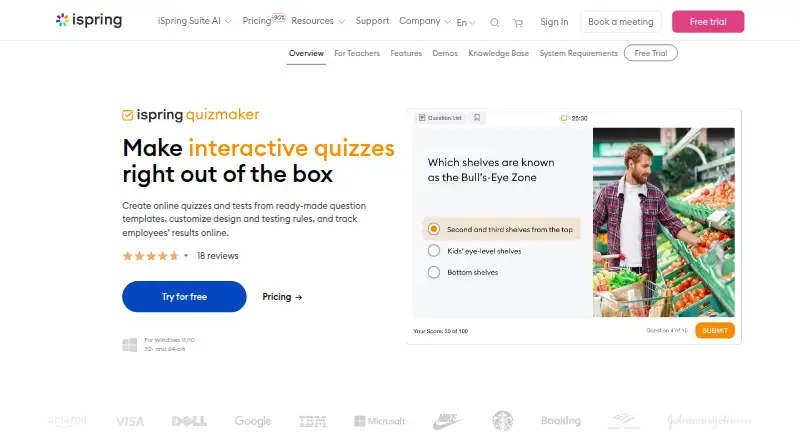
What iSpring QuizMaker is
iSpring QuizMaker creates online quizzes, tests, surveys, and skill-practice activities for employee training and assessment. It provides 14 question types, including multiple choice, matching, drag-and-drop, hotspot, Likert scale, and essay. Authors can use themes or custom colors, add media and animations, and preview quizzes on different devices. Assessment controls include custom points and penalties, time and attempt limits, randomized questions, and branching scenarios. Scoring can use passing score, percentage, points, or non-graded modes. Results include individual progress reports, quiz reviews, LMS reporting, and delivery by email or server. Finished content can be published as HTML5, sent to iSpring Learn, prepared for an LMS, or exported to Microsoft Word. SCORM, xAPI, AICC, and cmi5 are supported. Authoring runs on Windows 10 or 11 in 32-bit or 64-bit editions, while published HTML5 content can be viewed on listed desktop and mobile systems. Pricing is $470 a year per user, with a 14-day full-feature trial.
Who it suits
It suits organizations building employee training, knowledge checks, surveys, and skill practice. Windows authors can publish to websites, iSpring Learn, LMS platforms, or printable Word documents.
What it does well
- 14 question types
- Branching scenarios and flexible scoring
- SCORM, xAPI, AICC, and cmi5
- HTML5, LMS, and Word publishing
- 14-day trial includes all features
What to know first
- No free plan
- Authoring requires Windows 10 or 11
- Annual per-user price
- Published content requires supported browsers or systems
Limits
The product has no free plan. The trial lasts 14 days, and the listed plan costs $470 per user per year.
Plans
| Plan | Billed and limits | Price |
|---|---|---|
| iSpring QuizMaker | $470 /year · per user/year | $470 a year |
As ispringsolutions.com lists them, read 8 Oct 2026. The maker's own page has the final word.
Getting started
- Open the iSpring QuizMaker website
- Start the 14-day free trial or choose the paid plan
- Run the authoring application on Windows 10 or 11
- Create questions using the available formats and scoring modes
- Publish to HTML5, iSpring Learn, an LMS, or Microsoft Word
Verdict
iSpring QuizMaker covers question creation, scoring, branching, reporting, and multiple publishing routes. Its Windows-only authoring requirement and annual per-user cost are key buying considerations.
Questions
How much does iSpring QuizMaker cost?
The listed plan costs $470 per user per year.
Is there a free trial?
Yes. A 14-day trial includes all features.
Which operating systems run the authoring tool?
QuizMaker authoring runs on Microsoft Windows 10 or 11 in 32-bit or 64-bit editions.
Where can published quizzes be viewed?
Published HTML5 content can be viewed on Windows, Mac, Linux, iOS, and Android devices using supported browsers or operating systems.
Which LMS standards are supported?
The product supports SCORM, xAPI, AICC, and cmi5.
What publishing options are available?
Quizzes can be published as HTML5, sent to iSpring Learn, prepared for an LMS, or exported to Microsoft Word.
Facts from iSpring QuizMaker's own pages
- Accessibility
- An accessibility mode lets learners with visual impairments take tests. · ispringsolutions.com, 8 Oct 2026
- Assessment controls
- Quizzes can use custom points and penalties, time limits, attempt limits, question randomization, and branching scenarios. · ispringsolutions.com, 8 Oct 2026
- Authoring platform
- QuizMaker authoring runs on Microsoft Windows 11 or 10 in 32-bit or 64-bit editions. · ispringsolutions.com, 8 Oct 2026
- Company history
- iSpring says its product mindset dates to 2001 and that it has 25 years in eLearning. · ispringsolutions.com, 8 Oct 2026
- Founded
- 2001 · ispringsolutions.com, 28 Sept 2026
- Headquarters
- Alexandria, Virginia, United States · ispringsolutions.com, 28 Sept 2026
- Intended users
- The product is presented for business employee training and knowledge assessment, including quizzes, tests, surveys, and skill practice. · ispringsolutions.com, 8 Oct 2026
- Learner devices
- Published HTML5 content can be viewed on Windows, Mac, Linux, iOS, and Android devices using supported browsers or operating systems. · ispringsolutions.com, 8 Oct 2026
- LMS standards
- The product supports SCORM, xAPI, AICC, and cmi5, and iSpring says it tested compatibility with 156 LMSs. · ispringsolutions.com, 8 Oct 2026
- Publishing formats
- Quizzes can be published as HTML5, sent to iSpring Learn, prepared for an LMS, or exported to Microsoft Word for printing. · ispringsolutions.com, 8 Oct 2026
- Purpose
- iSpring QuizMaker creates online quizzes, tests, and surveys for employee training and assessment. · ispringsolutions.com, 8 Oct 2026
- Question types
- It offers 14 question types, including multiple-choice, matching, drag-and-drop, and hotspot. · ispringsolutions.com, 8 Oct 2026
- Quiz design
- Authors can apply built-in themes or custom colors, add media and animations, and preview quizzes on different devices. · ispringsolutions.com, 8 Oct 2026
- Results
- Quiz results can be configured to be sent automatically to an email, server, or learning management system. · ispringsolutions.com, 8 Oct 2026
- Security
- iSpring states that it maintains GDPR compliance and performs internal and third-party penetration tests while monitoring vulnerabilities daily. · ispringsolutions.com, 8 Oct 2026
- Support
- The QuizMaker Knowledge Base says technical support is free for customers and trial users, with phone, chat, and email availability during the week and email on weekends. · ispringsolutions.com, 8 Oct 2026
- Trial
- The product has a free 14-day trial that includes all features. · ispringsolutions.com, 8 Oct 2026
Where iSpring QuizMaker stands on Freedom251
- Educational Software#11 of 26
- E-Learning Software#18 of 28
- Quiz Maker Software#21 of 31