Freedom251 › Music Practice Software
Intrada
What Intrada is
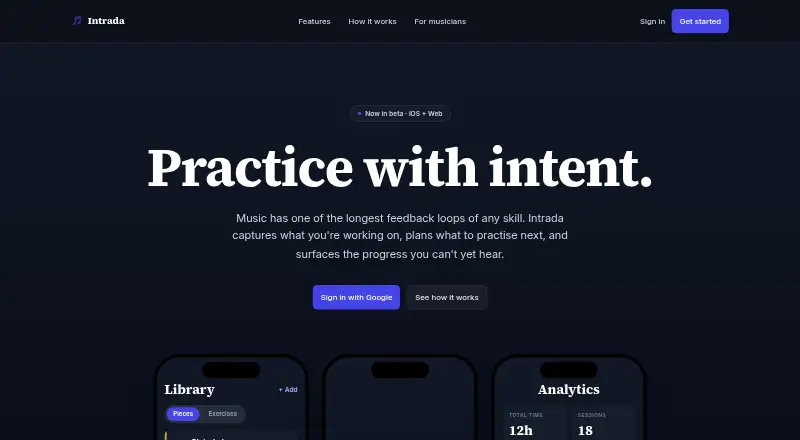
Intrada is a practice companion for musicians that organizes repertoire and helps structure practice sessions. Its library holds pieces, exercises, and patterns, which users can arrange into setlists. Sessions are timed and include a quick rating for each item; users can resume a session or adjust its duration and focus while practicing. Reusable routines support recurring warm-ups and practice blocks. Intrada says it uses spaced repetition and interleaved practice to bring weaker items forward more often and plan sessions around available time. Its analytics track mastery by piece, key, and tempo, as well as practice time and sessions over time. The service is designed with ADHD and neurodivergent musicians in mind. It is available on the web and iOS, and is free during beta with no credit card required. Users can sign in with Google. Its listed capabilities include practice plans and repertoire management, but it does not offer performance feedback or recording and review.
Who it suits
Intrada suits musicians who want to organize practice material, plan sessions, and track progress over time. The maker says it is designed with ADHD and neurodivergent musicians in mind.
What it does well
- Organizes pieces, exercises, and patterns
- Builds setlists and reusable practice routines
- Tracks mastery, tempo, time, and sessions
- Adjusts sessions for duration and focus
- Free during beta with no credit card
What to know first
- Does not provide performance feedback
- Does not include recording and review
Plans
| Plan | Billed and limits | Price |
|---|---|---|
| Free during beta | Free during beta · no credit card | Free |
As myintrada.com lists them, read 8 Oct 2026. The maker's own page has the final word.
Getting started
- Visit https://myintrada.com/ on the web or use Intrada on iOS.
- Sign in with Google.
- Add pieces, exercises, or patterns to the library.
- Build a setlist or create a reusable routine.
- Start a timed session and adjust its duration or focus as needed.
Intrada is a practice companion for musicians on the web and iOS. It suits players who need a structured way to organize repertoire, schedule recurring work, and see whether practice is covering weaker material. The main trade-off is focus: it helps plan and track practice, but it does not provide performance feedback or recording review.
Overview
Intrada brings pieces, exercises, and patterns into one library, then turns that material into setlists and timed practice sessions. Its design is particularly relevant to musicians managing a broad or changing repertoire, as well as those who benefit from explicit routines and prompts. The service is free during beta and requires no credit card, making it easy to try without a financial commitment.
The product is aimed at organization and consistency rather than diagnosis of technique. If your priority is deciding what to practice, fitting it into available time, and keeping a record of progress, Intrada addresses those needs directly. If you want to inspect recordings or receive detailed performance commentary, it is the wrong category of tool.
Key features
Library, setlists, and routines
A single library holds repertoire, exercises, and patterns. Users can assemble setlists from that collection and create reusable routines for warm-ups or recurring practice blocks. Reusing a routine avoids rebuilding familiar sessions and gives regular practice a repeatable structure. This is useful for independent players who alternate technical work and repertoire, though the system remains centered on the plan rather than the resulting sound.
Timed, adjustable sessions
Sessions include a timer and a quick rating for every item. You can resume a session or change its duration and focus while practicing, so a short day does not require abandoning the plan. Per-item ratings create a lightweight record of how work felt or went; they are not a substitute for recorded playback or expert assessment.
Scheduling and analytics
Intrada says it uses spaced repetition and interleaved practice to bring weaker items forward more often and shape sessions around available time. That approach can make a large repertoire easier to revisit systematically instead of relying on memory to choose the next task. Analytics track mastery per piece and key, plus tempo, practice time, and session history over time. The range of measures is useful for spotting coverage and change, provided you consistently rate items and maintain your practice records.
Accessibility focus
Intrada is designed with ADHD and neurodivergent musicians in mind. Its combination of routines, timed work, adjustable focus, and scheduling is therefore a natural fit for players who find unstructured practice difficult.
Pricing
Free during beta — free (free during beta; no credit card required). There are no paid tiers or seat limits stated for this beta plan. It is the straightforward choice for individual musicians who want to evaluate structured practice without paying upfront. Because access is tied to the beta period, musicians choosing a long-term workflow should keep that term in mind; the plan does not include recording or performance-review capabilities.
Platforms
Intrada supports web and iOS. That combination suits musicians who want browser access alongside an iPhone or iPad practice option. Android and desktop-native platforms are not supported.
Who it's for
Choose Intrada if you are a musician who needs repertoire management, repeatable warm-ups, timed sessions, and progress data in one place. It is especially well matched to players working on several pieces or keys and to ADHD or neurodivergent musicians who benefit from scheduled, clearly bounded tasks. Look elsewhere if your essential workflow includes recording yourself, reviewing takes, or receiving performance feedback.
Pros and cons
Pros
- Structured practice planning: spaced repetition and interleaving are intended to surface weaker material instead of leaving selection entirely to memory.
- Reusable organization: libraries, setlists, and routines cover both varied repertoire and recurring practice blocks.
- Flexible sessions: timers, resumable sessions, and adjustable duration or focus accommodate changing practice windows.
- Detailed progress dimensions: mastery by piece and key, tempo, time, and sessions provide more context than a simple streak.
- No-cost beta access: the free plan requires no credit card.
Cons
- No performance review: there is no recording or feedback feature for evaluating technique or interpretation.
- Platform limits: support is restricted to web and iOS.
- Beta pricing is temporary in nature: the current free access is explicitly tied to the beta period.
- Ratings remain self-reported: analytics depend on the user recording quick assessments rather than capturing objective performance evidence.
Alternatives
For choir-oriented management, ChoirMate offers a free plan for up to 50 people, with limits on audio files and repertoire, plus a $4.99-per-month individual premium plan. Octero is a better fit when Android support, ad-free premium access, or group features matter; its premium plan is $5.99 per month and it also has a free group option.
Practis suits musicians who want a free plan capped at five active pieces with a diary, history, streaks, goals, and limited Ask Practis. Vivid Practice is aimed at teachers and studios, with a free one-student plan and paid studio tiers. Andante is an iOS and macOS alternative with a free download.
Exerzisor is worth considering for self-hosting on iOS or the web; its self-hosted plan is free, while cloud pricing is custom. Maestro Planner targets teachers, offering a free plan for up to three active students and a $10-per-month Teacher Pro tier. Modacity is another practice-focused option with free-plan caps on items, lists, recordings, cycles, and reminders.
Browse more options in Music Practice Software.
Verdict
Intrada is a strong choice for musicians who want a free, structured practice system built around routines, scheduling, and measurable progress. Its clearest reason to choose it is the combination of adaptive practice planning and detailed tracking across pieces, keys, tempo, time, and sessions. Look elsewhere if recording review, performance feedback, Android support, or a guaranteed long-term price is central to your decision.
Verdict
Intrada focuses on organizing and tracking practice, with routines and scheduling intended to surface weaker material. It is free during beta, but does not include performance feedback or recording review.
Questions
Is Intrada free?
Yes. Intrada is free during beta, at no cost, and requires no credit card.
Which platforms does Intrada support?
Intrada is available on the web and iOS.
Can I organize repertoire in Intrada?
Yes. Its library supports pieces, exercises, and patterns, and users can arrange material into setlists.
Does Intrada provide performance feedback or recording and review?
No. Its listed capabilities do not include performance feedback or recording and review.
What progress can I track?
Analytics track mastery by piece and key, as well as tempo, practice time, and sessions over time.
How does Intrada plan practice sessions?
Intrada says it uses spaced repetition and interleaved practice to surface weaker items more often and plan around available time.
Facts from Intrada's own pages
- Accessibility
- Intrada describes its interface as designed for ADHD and neurodivergent musicians, with one-tap access to practice and no streak counters. · myintrada.com, 8 Oct 2026
- Audience
- Intrada is aimed at musicians who want help organizing practice material, planning sessions, and seeing progress. · myintrada.com, 8 Oct 2026
- Beta access
- Intrada says it is in beta and free during beta, with no credit card required. · myintrada.com, 8 Oct 2026
- Library
- The library holds pieces, exercises, and patterns, which can be tagged by composer, key, or tempo and grouped into reusable routines. · myintrada.com, 8 Oct 2026
- Platforms
- Intrada is available on the web and iOS. · myintrada.com, 7 Oct 2026
- Practice scheduling
- Intrada says it uses spaced repetition and interleaved practice to surface weaker items more often and plan sessions around available time. · myintrada.com, 8 Oct 2026
- Progress analytics
- Intrada tracks practice progress with analytics over time. · myintrada.com, 7 Oct 2026
- Progress detail
- Progress tracking includes mastery per piece and key, time, sessions, and tempo. · myintrada.com, 7 Oct 2026
- Progress tracking
- Analytics track mastery per piece, key, and tempo, as well as practice time and sessions over time. · myintrada.com, 8 Oct 2026
- Purpose
- Intrada is a practice companion for musicians that helps build setlists, run timed practice sessions with per-item scoring, and track progress over time. · myintrada.com, 8 Oct 2026
- Reusable routines
- Users can create reusable routines for recurring warm-ups and practice blocks. · myintrada.com, 7 Oct 2026
- Scheduling
- Intrada says it uses spaced repetition and interleaved practice to surface weaker items more often. · myintrada.com, 7 Oct 2026
- Session controls
- Sessions include a timer and quick rating for each item, and users can resume a session or adjust its duration and focus while practicing. · myintrada.com, 8 Oct 2026
- Setlists
- Users can build setlists from a library of pieces and exercises. · myintrada.com, 7 Oct 2026
- Sign-in
- The site offers sign-in with Google. · myintrada.com, 8 Oct 2026
- Timed sessions
- Practice sessions are timed and include per-item scoring. · myintrada.com, 7 Oct 2026
Where Intrada stands on Freedom251
- Music Practice Software#9 of 23