Freedom251 › Music Practice Software
Maestro Planner
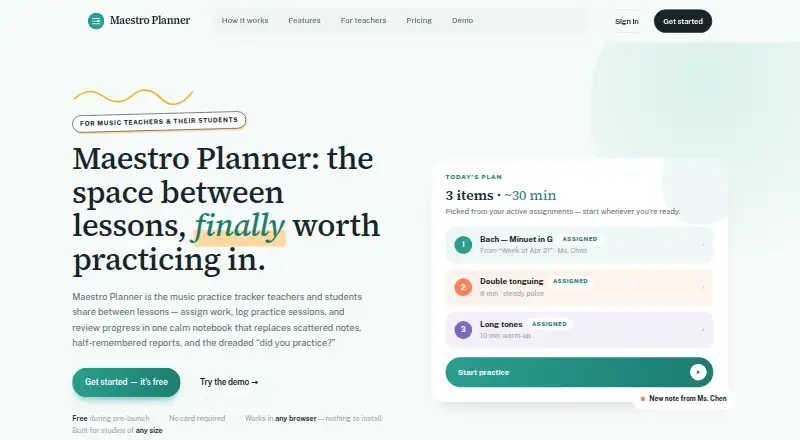
What Maestro Planner is
Maestro Planner helps music teachers assign practice work and follow students’ progress between lessons. Teachers can create weekly assignments around each student’s active practice items. Students log sessions with details such as duration, tempo reached, improvements, weak spots, and notes. Teachers can review recent sessions alongside recurring weak spots, notes for individual items, and assignment context. The service also tracks practice history, item trends, practice-day streaks, and whether assignments are followed through.
It is designed for independent teachers, students, and larger organizations with multiple teachers. Maestro Planner runs in a browser on a laptop, tablet, or phone without an app download; recording requires a supported browser and microphone permission. A free plan supports up to 3 active students, 1 pending invite at a time, and 500 MB of media storage. Teacher Pro costs $10 a month, billed $10 /month or $100/year. Studio costs $79 a month, billed $79 /month or $790/year. Google or Apple can be connected as sign-in methods when available.
Who it suits
Maestro Planner suits music teachers and students who want to organize assignments and track practice between lessons. Its plans also address independent teachers and multi-teacher organizations, with Studio supporting up to 500 students per organization.
What it does well
- Weekly assignments link to active practice items.
- Session logs capture tempo, duration, and weak spots.
- Teachers can review sessions and assignment context together.
- Practice history includes trends and day streaks.
- Browser access needs no app installation.
What to know first
- Teacher Free allows only 3 active students.
- Teacher Free permits 1 pending invite at a time.
- Recording requires a supported browser and microphone permission.
- No standalone age-verification or parental-consent workflow is described.
Limits
Teacher Free allows up to 3 active students, 1 pending invite at a time, and 500 MB of media storage. Teacher Pro costs $10/mo or $100/year and includes 25 GB of media storage with no student roster cap; Studio costs $79/mo or $790/year and supports up to 500 students with 100 GB of media storage.
Plans
| Plan | Billed and limits | Price |
|---|---|---|
| Teacher Free | Up to 3 active students · 1 pending invite at a time · 500 MB media storage | Free |
| Teacher Pro | $10 /month or $100/year · No student roster cap · 25 GB media storage · Includes all current teacher workflows | $10 a month |
| Studio | $79 /month or $790/year · Up to 500 students per organization · 100 GB media storage · Includes all Teacher Pro capabilities | $79 a month |
As maestroplanner.com lists them, read 8 Oct 2026. The maker's own page has the final word.
Getting started
- Open https://maestroplanner.com/ in a browser on a laptop, tablet, or phone.
- Choose the Teacher Free plan or a paid plan.
- Connect Google or Apple sign-in if available.
- Create weekly assignments tied to students’ active practice items.
- Have students log practice sessions; allow microphone permission when recording.
Verdict
Maestro Planner brings assignments, practice logs, and teacher review into one workflow for music lessons. The free tier has small roster and storage limits, while paid plans expand capacity.
Questions
Is there a free plan?
Yes. Teacher Free costs nothing and includes up to 3 active students, 1 pending invite at a time, and 500 MB of media storage.
How much do the paid plans cost?
Teacher Pro is $10/month or $100/year. Studio is $79/month or $790/year.
What devices can I use?
Maestro Planner runs in a browser on a laptop, tablet, or phone and requires no app download or installation.
Can I use Google or Apple to sign in?
The help page says Google or Apple can be connected as sign-in methods when available.
Can I export or delete my account data?
Users can request a JSON export and delete their account from account settings.
Facts from Maestro Planner's own pages
- Assignment workflow
- Teachers create focused weekly assignments tied to students’ active practice items. · maestroplanner.com, 8 Oct 2026
- Browser access
- Maestro Planner runs in a browser on a laptop, tablet, or phone and requires no app download or installation. · maestroplanner.com, 8 Oct 2026
- Children's data
- The privacy policy says the product does not currently describe a standalone age-verification or parental-consent workflow in the product itself. · maestroplanner.com, 8 Oct 2026
- Data controls
- Users can request a JSON export and self-service account deletion from account settings. · maestroplanner.com, 8 Oct 2026
- Hosting and transport
- The privacy policy says the app uses hosted infrastructure including Render and PostgreSQL-backed storage, and that data is intended to be transmitted over HTTPS. · maestroplanner.com, 8 Oct 2026
- Integrations
- The help page says users can connect Google or Apple as sign-in methods when available. · maestroplanner.com, 8 Oct 2026
- Intended users
- The product is designed for music teachers and their students, including independent teachers and larger multi-teacher organizations. · maestroplanner.com, 8 Oct 2026
- Practice history
- The product tracks session history, item trends, practice-day streaks, and assignment follow-through. · maestroplanner.com, 8 Oct 2026
- Purpose
- Maestro Planner is a shared music practice tracker for teachers and students to assign work, log practice sessions, and review progress between lessons. · maestroplanner.com, 8 Oct 2026
- Recording requirement
- Recording requires a supported browser and microphone permission. · maestroplanner.com, 8 Oct 2026
- Session logs
- Practice sessions can record duration, tempo reached, improvements, weak spots, and notes. · maestroplanner.com, 8 Oct 2026
- Support
- The help center directs users to email [email protected] for human support. · maestroplanner.com, 8 Oct 2026
- Teacher review
- Teachers can review recent sessions, repeated weak spots, item-level notes, and assignment context in one view. · maestroplanner.com, 8 Oct 2026
Where Maestro Planner stands on Freedom251
- Music Practice Software#6 of 23