Freedom251 › Embedded Analytics Software
InfuseBI
What InfuseBI is
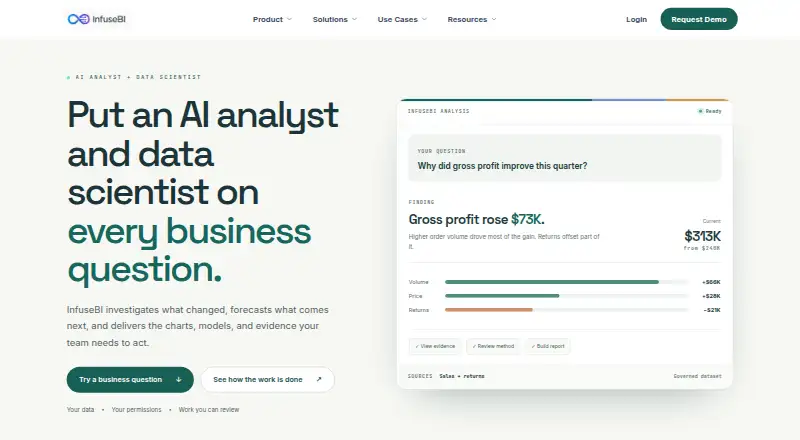
InfuseBI is a web analytics platform that combines AI analysis and data science with governed datasets, dashboards, reports, pivots, and controlled sharing. Its AI agents support different parts of analytics work: Analyst helps investigate data, Composer creates charts and reports, Dashboard Agent drafts dashboards, and Designer refines visuals. For data modeling, the platform can propose joins, field names, and measures from selected tables. Before publishing, it checks datasets for duplicate rows, missing links, and access rules. Users can customize dashboards, reports, and pivots, schedule their delivery, and export them as Excel or PDF files. Data connections include SQL Server, Azure SQL, PostgreSQL, MySQL, Oracle, and warehouses; CSV and Excel uploads are also supported. InfuseBI describes dedicated Odoo ETL sync, semantic blueprint packages, and dashboards and reports embedded in Odoo menus. It can also embed analytics and AI assistance in SaaS applications through an iframe, with short-lived tokens carrying tenant and role claims. Security and AI controls include SSO, role-based permissions, dataset and field access controls, tenant-aware row filtering, export controls, and audit logs. The maker offers a demo request with a 30-minute walkthrough tailored to the requester’s use case.
Who it suits
InfuseBI suits SaaS product teams, corporations, and regulated organizations that need to share analytics with customers, partners, vendors, or internal teams. It is relevant to teams that want governed data modeling, embeddable analytics, and controls over dataset and AI access.
What it does well
- AI agents support investigation, reporting, dashboard drafting, and visual refinement.
- Data modeling checks for duplicate rows, missing links, and access rules.
- Dashboards, reports, and pivots can be scheduled and exported to Excel or PDF.
- Embeds analytics and AI assistance in SaaS applications using iframe mode.
- Includes SSO, role-based access, row filtering, export controls, and audit logs.
What to know first
- Paid product with pricing available on request.
- Runs on web; no other platform is listed.
- Accounting and SaaS source access and setup need confirmation.
Limits
InfuseBI is paid, with pricing available on request. Access and setup for accounting and SaaS data sources need confirmation.
Plans
| Plan | Billed and limits | Price |
|---|---|---|
| Custom pricing | Request a demo for pricing | On request |
As infusebi.ai lists them, read 9 Oct 2026. The maker's own page has the final word.
Getting started
- Visit the InfuseBI website.
- Request a demo and describe your use case.
- Join the offered 30-minute tailored walkthrough.
- Discuss pricing and confirm the data source setup you need.
InfuseBI is a web analytics platform that combines governed data modeling, AI-assisted analysis, reporting, and embedded dashboards. It suits product teams, data leaders, portal owners, and regulated organizations that need to share analytics while enforcing tenant, role, and field-level controls. Its strongest case is controlled embedded analytics with an AI team behind it; buyers should be prepared for custom pricing and source-specific setup decisions.
Overview
InfuseBI brings dataset preparation, dashboards, reports, pivots, data science, and embedding into one workflow. Teams can use it internally or place analytics inside a SaaS application, portal, or Odoo interface. Governance is central rather than an add-on: permissions, visibility rules, export controls, tenant-aware filtering, and audit logs are designed to constrain both ordinary analytics and AI-assisted work.
The website walkthrough uses prepared synthetic examples and neither connects to visitor data nor calls a live AI model. A tailored 30-minute demo is therefore the practical route to judging the product against a real workflow.
Key features
AI modeling and analysis
AI proposes joins, field names, and measures from selected tables, then checks for duplicate rows, missing links, and access rules before publication. That can accelerate dataset design, but teams still need to review the proposed relationships and permissions before relying on the results.
The AI team includes an Analyst, Composer, Dashboard Agent, and Designer for investigation, chart and report creation, dashboard drafting, and visual refinement. The AI data scientist adds forecasting, regression, classification, clustering, and anomaly detection, with notebooks and output files that users can inspect. Administrators can restrict AI to approved datasets and fields, apply role-based AI permissions, and retain tenant-aware row filtering.
Reporting and sharing
Customizable dashboards, reports, and pivots support scheduled delivery plus Excel and PDF export, subject to permissions. Analyses can also be shared as PowerPoint, PDF, or interactive-HTML storyboards. These formats suit recurring operational reporting and presentation-ready handoffs, while export controls help organizations limit uncontrolled redistribution.
Connections and embedding
Connections cover SQL Server, Azure SQL, PostgreSQL, MySQL, Oracle, and data warehouses, with CSV and Excel uploads as additional paths. Other connectors can be configured or added on request. InfuseBI describes dedicated Odoo ETL synchronization, semantic blueprint packages, and dashboards and reports embedded in Odoo menus.
For SaaS products, the iframe embedding mode can place dashboards, reports, pivots, charts, and AI assistance inside an application. Short-lived tokens carry tenant and role claims, supporting tenant-aware access rather than a single shared view. White-label analytics, row-level security, and SSO support strengthen the case for customer-facing deployments.
Pricing
Custom pricing
InfuseBI has one published plan, Custom pricing, with no public price. Request a demo for pricing. The maker describes the session as a 30-minute walkthrough tailored to the requester’s use case, so buyers should use that conversation to establish connector setup, embedding scope, governance requirements, and any deployment conditions relevant to their project.
Custom pricing fits organizations that need a designed analytics implementation rather than a fixed self-serve package. It is less suitable for a buyer who needs an immediately comparable monthly fee or clearly published seat and usage limits.
Platforms
InfuseBI runs on the web. Its embedding mode is iframe, enabling dashboards and related analytics experiences to appear inside another application. SSO, role-based access, tenant-aware row filtering, and field visibility controls are relevant to teams operating browser-based analytics for multiple audiences.
Who it's for
Product teams building analytics features can use the embedding and white-label capabilities to deliver customer-facing views. Data leaders standardizing metrics benefit from governed datasets, model checks, and controlled AI access. Portal owners sharing data with customers, partners, or vendors get tenant and role claims in embedded sessions, while regulated or security-conscious analytics teams gain export controls, field restrictions, and audit logs.
It is a weaker fit for a small user seeking a simple charting workspace, or for an organization that requires a named, ready-made accounting connector without confirming setup first. QuickBooks and Temenos connectors are not claimed as ready-made options.
Pros and cons
Pros
- Governed embedded analytics: tenant-aware tokens, row-level filtering, role and field controls, SSO, and audit logs address customer- and partner-facing access.
- Broad AI coverage: separate agents span modeling, investigation, data science, charting, dashboard drafting, and design.
- Inspectable data science: notebooks and output files let users examine forecasting, regression, classification, clustering, and anomaly-detection work.
- Useful delivery formats: scheduled dashboards and reports, Excel and PDF exports, and storyboard sharing support both operations and presentations.
- Odoo specialization: ETL sync, semantic blueprints, and embedded Odoo menus offer a defined path for Odoo users.
Cons
- Custom pricing: there is no public price for budgeting or direct plan comparison.
- Demo-led evaluation: the online walkthrough is synthetic and not a live AI or data connection.
- Connector qualification required: accounting and SaaS source access and setup need confirmation, and ready-made QuickBooks or Temenos connectors are not claimed.
- Web and iframe focus: buyers wanting a native desktop or mobile analytics client should consider alternatives with broader platform coverage.
Alternatives
Sisense is a better candidate when you want warehouse, database, and cloud-app connections with natural-language queries and an assistant, plus API, self-hosted, and web options and a free trial.
ClicData suits buyers seeking a freemium product with a free plan and broad desktop, server, API, and web platform coverage; its Basic plan offers yearly or monthly billing, with yearly terms requiring a 12-month commitment.
Bold BI is worth choosing when you need either fully managed cloud hosting with no per-user or per-viewer fee or an on-premises edition, across web, Windows, Linux, iOS, and Android.
Logi Composer is an alternative paid analytics product with API, self-hosted, desktop, and web availability; contact insightsoftware for pricing.
Logi Symphony is another paid option with API, self-hosted, Linux, Windows, and web platforms; pricing comes from insightsoftware.
Embeddable fits projects wanting a flat monthly, project-scoped subscription with unlimited usage and every feature included, quoted after scoping.
Jaspersoft is suitable when a freemium route and a free Community edition with JasperReports Library and Jaspersoft Studio matter.
Toucan is a web-only freemium alternative with unlimited users; its Start plan is €445 a month for 50,000 credits and Grow is €990 a month for 100,000 credits, both billed monthly.
See the Embedded Analytics Software list for more products in this category.
Verdict
Choose InfuseBI if you are building governed analytics into a SaaS product, Odoo environment, or external portal and need AI-assisted modeling and analysis alongside tenant-aware controls. Look elsewhere if transparent pricing, a free tier, native client platforms, or confirmed off-the-shelf accounting connectors are more important than a tailored embedded deployment.
Verdict
Choose InfuseBI if you need governed analytics, AI-supported analysis, or embedded dashboards with tenant-aware access controls. Its listed data connections include several databases and warehouses, with CSV and Excel uploads as additional options. Request a demo to discuss your use case and pricing; confirm source-specific access and setup for accounting or SaaS data.
Questions
How much does InfuseBI cost?
InfuseBI is paid, and pricing is available on request.
Which platforms does InfuseBI support?
The listed platform is web.
Can InfuseBI connect to databases or spreadsheets?
Supported connections include SQL Server, Azure SQL, PostgreSQL, MySQL, Oracle, and warehouses. CSV and Excel uploads are also described.
Can InfuseBI embed analytics in another application?
Yes. It can embed dashboards, reports, pivots, charts, and AI assistance in SaaS applications using iframe mode.
Does InfuseBI support Odoo?
It describes dedicated Odoo ETL sync, semantic blueprint packages, and embedded dashboards and reports in Odoo menus.
How can I see a product walkthrough?
The maker offers a demo request and a 30-minute walkthrough tailored to the requester’s use case. The website’s interactive example uses prepared synthetic examples and does not connect to visitor data or a live AI model.
Facts from InfuseBI's own pages
- AI agents
- Its AI agents include an Analyst, Composer, Dashboard Agent, and Designer for investigation, chart and report creation, dashboard drafting, and visual refinement. · infusebi.ai, 9 Oct 2026
- AI controls
- Administrators can restrict AI to approved datasets and fields and apply role-based AI permissions and tenant-aware row filtering. · infusebi.ai, 9 Oct 2026
- AI team
- The maker describes agents for data modeling, analysis, data science, chart and report creation, dashboard drafting, and design. · infusebi.ai, 9 Oct 2026
- Analysis
- The AI data scientist supports forecasting, regression, classification, clustering, and anomaly detection, with notebooks and output files users can inspect. · infusebi.ai, 9 Oct 2026
- Analytics
- The platform offers customizable dashboards, reports, and pivots, with scheduled delivery and Excel or PDF export. · infusebi.ai, 9 Oct 2026
- Connector limits
- The site says source-specific access and setup for accounting and SaaS data need confirmation, and it does not claim ready-made QuickBooks or Temenos connectors. · infusebi.ai, 9 Oct 2026
- Data modeling
- AI proposes joins, field names, and measures from selected tables, then checks datasets for duplicate rows, missing links, and access rules before publishing. · infusebi.ai, 9 Oct 2026
- Demo
- The maker offers a demo request and describes a 30-minute walkthrough tailored to the requester’s use case. · infusebi.ai, 9 Oct 2026
- Embedding
- InfuseBI can embed dashboards, reports, pivots, charts, and AI assistance into SaaS applications, using short-lived tokens carrying tenant and role claims. · infusebi.ai, 9 Oct 2026
- Integrations
- Supported data connections include SQL Server, Azure SQL, PostgreSQL, MySQL, Oracle, and warehouses; CSV and Excel uploads are also described. · infusebi.ai, 9 Oct 2026
- Intended users
- The platform is presented for product teams building analytics features, data leaders standardizing metrics, portal owners sharing data externally, and security-conscious analytics teams. · infusebi.ai, 9 Oct 2026
- Interactive example
- The website walkthrough uses prepared synthetic examples, does not call a live AI model, and does not connect to the visitor’s data. · infusebi.ai, 9 Oct 2026
- Odoo
- InfuseBI describes dedicated Odoo ETL sync, semantic blueprint packages, and embedded dashboards and reports in Odoo menus. · infusebi.ai, 9 Oct 2026
- Other data sources
- Users can upload CSV or Excel files, and the maker says other connectors can be configured or added on request. · infusebi.ai, 9 Oct 2026
- Product
- InfuseBI combines AI analysis and data science with governed datasets, dashboards, reports, pivots, and controlled sharing. · infusebi.ai, 9 Oct 2026
- Reporting
- InfuseBI supports dashboards, reports, pivots, Excel and PDF exports, and scheduled delivery subject to permissions. · infusebi.ai, 9 Oct 2026
- Security
- Listed controls include SSO, role-based access, dataset permissions, field visibility controls, tenant-aware row filtering, export controls, and audit logs. · infusebi.ai, 9 Oct 2026
- Storyboards
- Analysis can be shared as storyboards in PowerPoint, PDF, or interactive HTML. · infusebi.ai, 9 Oct 2026
- Use cases
- The site targets SaaS product teams, corporations, and regulated organizations sharing analytics with customers, partners, vendors, or internal teams. · infusebi.ai, 9 Oct 2026
- Website demo limitation
- The interactive website walkthrough uses prepared synthetic examples, does not call a live AI model, and does not connect to the visitor’s data. · infusebi.ai, 9 Oct 2026
Where InfuseBI stands on Freedom251
- Embedded Analytics Software#21 of 24