Freedom251 › Photo Slideshow Makers

Icecream Slideshow Maker
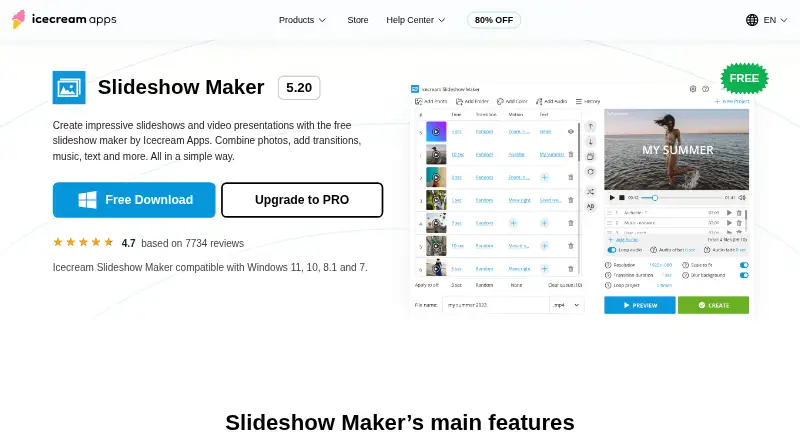
What Icecream Slideshow Maker is
Icecream Slideshow Maker turns photos into video slideshows and presentations on Windows. Users can add background music in MP3, M4A, or WAV format, including playlists, and customize slide text by font, color, animation, background, and position. The maker offers more than 25 transitions as well as a random-transition option. The free version allows unlimited use and creates videos without a watermark. Export formats include WebM, MOV, AVI, and MP4, with output support up to 4K. Finished videos can be downloaded, uploaded to YouTube, Google Drive, or Dropbox, or burned to DVD; playback can also loop a set number of times. The app restores the previous project on launch and keeps projects accessible through its History panel. It is a Windows desktop program compatible with Windows 7 through 11 and Windows Server 2008. The Free plan costs nothing. PRO is $30, paid once for a lifetime license; the maker also describes a one-year license that auto-renews but can be canceled anytime.
Who it suits
It suits Windows users making photo-based presentations or slideshows with music, captions, and transitions. The no-watermark free version may suit people who need basic slideshow creation without a paid license.
What it does well
- Free version supports unlimited use without a watermark.
- Offers more than 25 transitions.
- Supports output up to 4K.
- Projects can be reopened from the History panel.
What to know first
- Available as a Windows desktop program only.
- The one-year license auto-renews unless canceled.
- Minimum listed disk space ranges up to 5 GB.
Limits
The Free plan lists main features, unlimited use, and no watermark. Full HD, 2K, 4K support, quick preview, and project history are listed with PRO at $30, paid once.
Plans
| Plan | Billed and limits | Price |
|---|---|---|
| Free | Main features · unlimited use · no watermark | Free |
| PRO | Lifetime license; page shows $30 ~~$49.94~~ · 25+ transitions · Full HD, 2K, 4K support · quick preview · project history | $30, paid once |
As icecreamapps.com lists them, read 3 Oct 2026. The maker's own page has the final word.
Getting started
- Open the Icecream Slideshow Maker website.
- Download the Windows .exe installer.
- Install the app on a compatible Windows version.
- Start with the Free plan or choose PRO at $30, paid once for a lifetime license.
Icecream Slideshow Maker builds photo-based videos and presentations with music, captions, transitions, and several delivery routes. It is most suitable for Windows users making family films, event recaps, or straightforward presentations who want substantial styling control without a watermark. The free edition is unusually capable for unlimited personal slideshow work, while the platform restriction is decisive for Mac, Linux, mobile, and browser users.
Overview
The application is a focused slideshow studio rather than a general-purpose video editor. Its workflow centres on arranging photos, adding motion between them, composing readable captions, and matching the sequence to music. That narrow remit keeps it appropriate for photo-led projects, but users seeking extensive timeline editing or a cross-platform workflow should choose another category of tool.
Key features
More than 25 transitions, together with a random-transition mode, provide enough variety for different pacing and visual moods. Random selection is useful for quickly avoiding repetitive cuts, while deliberate choices suit presentations where consistency matters. Caption controls cover font, colour, animation, background colour, and position, allowing labels and explanations to be designed into each slide instead of added as a fixed afterthought.
Audio imports support MP3, M4A, and WAV files, including playlists. A multi-song soundtrack can therefore be assembled inside the project rather than prepared as one combined file. On relaunch, the previous project is restored, and the History panel reopens earlier projects; those recovery features are valuable when a slideshow is revised over several sessions.
Exports are available in WebM, MOV, AVI, and MP4, with output up to 4K. Videos can be downloaded locally, uploaded to YouTube, Google Drive, or Dropbox, burned to DVD, or configured to loop a chosen number of times. That range covers online sharing, local playback, disc delivery, and display installations. The PRO edition adds quick preview and project history, alongside Full HD, 2K, and 4K support.
Pricing
The Free plan costs nothing, allows unlimited use, and creates videos without a watermark. It is the sensible starting point for occasional creators and anyone testing the workflow; there is no trial period because the free edition itself is permanent.
PRO is shown at 30.00 USD once for a lifetime license, discounted from 49.94 USD. The license does not expire and adds 25+ transitions, Full HD, 2K, and 4K output, quick preview, and project history. A separate one-year license auto-renews but can be canceled at any time; its price is custom pricing. Lifetime PRO is the clearer fit for regular users who want the premium tools without recurring renewal, while the free plan already covers watermark-free unlimited creation.
Platforms
This is a Windows desktop program installed with an .exe file. Supported systems are Windows 7, 8, 8.1, 10, 11, and Windows Server 2008. Minimum requirements include a 2.66 GHz compatible processor, 4 GB of RAM, a 1280×720 display, and 100 MB to 5 GB of disk space. There is no macOS, Linux, mobile, or web edition, so operating-system choice should come before purchase.
The privacy policy describes administrative and technical safeguards, access to personal data limited to authorised personnel, and GDPR-related procedures. Help Center direct support is provided in English only, which may matter to users needing assistance in another language.
Who it's for
Choose it for Windows-based family slideshows, event montages, captioned photo presentations, or projects that need playlist audio and multiple export destinations. The free plan is particularly well suited to users who require unlimited, watermark-free output at no cost. It is a poor fit for teams working across different operating systems, browser-first creators, or editors whose projects extend well beyond photo sequencing.
Pros and cons
- Pros: unlimited free use with no watermark; detailed caption styling; MP3, M4A, and WAV playlists; 4K export and common video formats; direct uploads, DVD burning, and loop playback; project restoration and History access.
- Cons: Windows-only distribution excludes other platforms; the product is specialised for slideshows rather than broad video editing; direct support is English-only; the annual licence renews automatically unless canceled.
Alternatives
Photo Slideshow Makers is the broader starting point when you want to compare slideshow applications rather than select one Windows program.
4K Video Downloader+ is a better alternative when you need Android, Linux, macOS, and Windows coverage alongside a free plan and trial. Zno suits users who want a freemium service spanning mobile, desktop, and web. Cofeshow is preferable when both Windows and macOS desktop downloads are required. PhotoStage is another freemium choice available on Android, iOS, macOS, and Windows. FotoMagico fits Apple users who need macOS or iOS support. Smilebox offers slideshow creation across Android, iOS, and the web. MAGIX Music Maker is a Windows alternative centred on music production features. Memoriam is designed for web-based memorial pages with slideshow building.
Verdict
Icecream Slideshow Maker is a strong recommendation for Windows users who want unlimited watermark-free photo videos, flexible captions, playlist audio, and high-resolution exports. Its lifetime PRO option adds useful preview and project-management tools without an expiry. Look elsewhere if you need macOS, Linux, mobile, or browser access, or if your work demands a full video-editing environment.
Verdict
Icecream Slideshow Maker covers photo slideshows with audio, text styling, and multiple export and sharing options. Its Windows-only availability is the main platform constraint.
Questions
Is Icecream Slideshow Maker free?
Yes. The Free plan costs nothing and lists unlimited use with no watermark.
What does PRO cost?
PRO is listed at $30, paid once for a lifetime license. The maker also describes a one-year license that auto-renews and can be canceled anytime.
Which platforms does it support?
It is a Windows desktop program compatible with Windows 7 through 11 and Windows Server 2008.
What video formats can it export?
The listed formats are WebM, MOV, AVI, and MP4.
Where can I send or play slideshow videos?
Videos can be downloaded to a device, uploaded to YouTube, Google Drive, or Dropbox, or burned to DVD. Playback can be set to loop a chosen number of times.
Facts from Icecream Slideshow Maker's own pages
- Audio
- Supports MP3, M4A, and WAV background music, including audio playlists. · icecreamapps.com, 3 Oct 2026
- Founded
- 2014 · icecreamapps.com, 28 Sept 2026
- Headquarters
- Limassol, Cyprus · icecreamapps.com, 28 Sept 2026
- No watermark
- The free version can create videos from photos without a watermark. · icecreamapps.com, 3 Oct 2026
- Other output
- The maker can burn slideshows to DVD and loop playback a set number of times. · icecreamapps.com, 3 Oct 2026
- Output and sharing
- It supports 4K output and lists Google Drive, YouTube, and Dropbox for uploading slideshow videos. · icecreamapps.com, 3 Oct 2026
- Platform limit
- The maker is a Windows desktop program compatible with Windows 7 through 11; the download instructions use an .exe installer. · icecreamapps.com, 3 Oct 2026
- Privacy and security
- The privacy policy says it uses administrative and technical safeguards, limits personal-data access to authorized personnel, and applies GDPR-related procedures. · icecreamapps.com, 3 Oct 2026
- Project editing
- The app restores the previous project on launch and lets users reopen projects from its History panel. · icecreamapps.com, 3 Oct 2026
- Purchase terms
- The PRO page describes a lifetime license that does not expire and a one-year license that auto-renews but can be canceled anytime. · icecreamapps.com, 3 Oct 2026
- Purpose
- Creates video slideshows and presentations from photos with transitions, music, and text. · icecreamapps.com, 3 Oct 2026
- Support
- The Help Center accepts direct messages and states that direct support is provided in English only. · icecreamapps.com, 3 Oct 2026
- System requirements
- The listed minimums include a 2.66 GHz compatible processor, 4 GB RAM, 1280×720 display resolution, and 100 MB–5 GB disk space. · icecreamapps.com, 3 Oct 2026
- Text
- Slide text can be customized with font, color, animation, background color, and position settings. · icecreamapps.com, 3 Oct 2026
- Transitions
- The maker offers more than 25 transitions and a random-transition option. · icecreamapps.com, 3 Oct 2026
Where Icecream Slideshow Maker stands on Freedom251
- Photo Slideshow Makers#6 of 24