Freedom251 › Video Downloaders
iBeVid
What iBeVid is
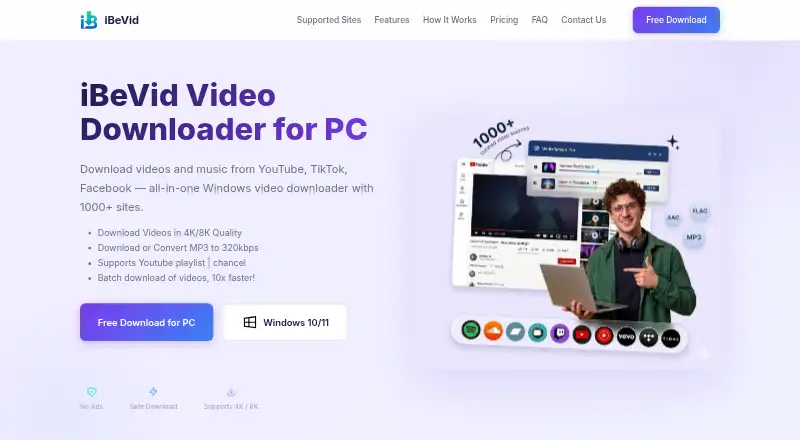
iBeVid is a Windows desktop app for downloading and converting video and audio from more than 1,000 websites. It supports Windows 10 and 11, playlist downloads, and batch downloads. Listed sources include YouTube, Facebook, Instagram, TikTok, X/Twitter, Vimeo, Twitch, Bilibili, Prime Video, HBO Max, Netflix, Disney+, and Hulu. Video downloads can reach 8K when the source provides that quality. Output options include MP4 and MKV video, plus MP3, M4A, AAC, FLAC, WAV, and OGG audio. Audio quality options range from 64 kbps to 320 kbps depending on the source and platform. A built-in browser can help with links that require login or do not work through direct downloads. iBeVid also converts files already stored on the computer. The Free plan costs nothing and limits daily video, playlist or channel, and conversion tasks. Pro removes those daily limits and adds unlimited playlist and channel downloads and format conversion access. The app is Windows-only.
Who it suits
iBeVid suits Windows 10 or 11 users who want to download playlists, process batches, or convert local media. It also fits users needing multiple video and audio output formats.
What it does well
- Supports more than 1,000 websites
- Downloads video up to 8K
- Playlist and batch downloads
- Converts locally stored files
- Free plan available
What to know first
- Windows only
- Free plan has daily limits
- Quality depends on source and platform
Plans
| Plan | Billed and limits | Price |
|---|---|---|
| Free | Daily limits on video downloads · playlist/channel downloads · conversion tasks | Free |
| Pro | Removes daily limits · unlimited playlist and channel downloads · format conversion access | On request |
As ibevid.com lists them, read 12 Oct 2026. The maker's own page has the final word.
Verdict
iBeVid combines broad source support with playlist, batch, and local conversion tools. Windows users can start with the limited free plan, while Pro removes listed download and conversion limits.
Facts from iBeVid's own pages
- Audio
- It can extract audio and convert formats, with audio quality options from 64 kbps to 320 kbps depending on the source and platform. · ibevid.com, 12 Oct 2026
- Batch downloads
- Yes · ibevid.com, 22 Sept 2026
- Built-in browser
- The app includes a built-in browser that can be used when direct link downloads do not work or a video requires login. · ibevid.com, 12 Oct 2026
- Compatibility limit
- The maker says available video and audio quality options depend on the platform and specific video. · ibevid.com, 12 Oct 2026
- Device licensing
- The maker says personal license device limits depend on the plan and directs purchasers to their purchase email or License Agreement for exact terms. · ibevid.com, 12 Oct 2026
- Device platforms
- Windows 10/11 · ibevid.com, 22 Sept 2026
- Free plan
- Yes · ibevid.com, 22 Sept 2026
- Local conversion
- iBeVid can convert video and audio files already stored on the user's computer. · ibevid.com, 12 Oct 2026
- Maximum video quality
- 8k · ibevid.com, 22 Sept 2026
- Output formats
- MP4,MKV,MP3,M4A,AAC,FLAC,WAV,OGG · ibevid.com, 22 Sept 2026
- Payment and refunds
- The FAQ says eligible purchases made through the official website have a 30-day money-back guarantee and that checkout accepts major credit cards, PayPal, and other payment methods. · ibevid.com, 12 Oct 2026
- Playlist downloads
- Yes · ibevid.com, 22 Sept 2026
- Product
- iBeVid is a Windows desktop app for downloading and converting video and audio from more than 1,000 websites. · ibevid.com, 12 Oct 2026
- Safety statement
- The maker says the locally installed desktop app does not bundle adware or toolbars and advises downloading it from its official website. · ibevid.com, 12 Oct 2026
- Support
- iBeVid says support typically replies within 1–2 business days and offers best-effort help with installation, activation, and general use. · ibevid.com, 12 Oct 2026
- Supported sites
- The maker lists YouTube, Facebook, Instagram, TikTok, Twitter, Vimeo, and Twitch among its supported websites. · ibevid.com, 12 Oct 2026
- Supported sources
- YouTube,Facebook,Instagram,TikTok,X/Twitter,Vimeo,Twitch,Bilibili,Prime Video,HBO Max,Netflix,Disney+,Hulu,and 1,000+ websites · ibevid.com, 22 Sept 2026
- Video quality
- It offers video downloads up to 8K (4320p), depending on the source. · ibevid.com, 12 Oct 2026
- Windows only
- The maker says iBeVid is currently available only for Windows; Mac and Linux versions may be considered in the future. · ibevid.com, 12 Oct 2026
Where iBeVid stands on Freedom251
- Video Downloaders#70 of 135