hx
What hx is
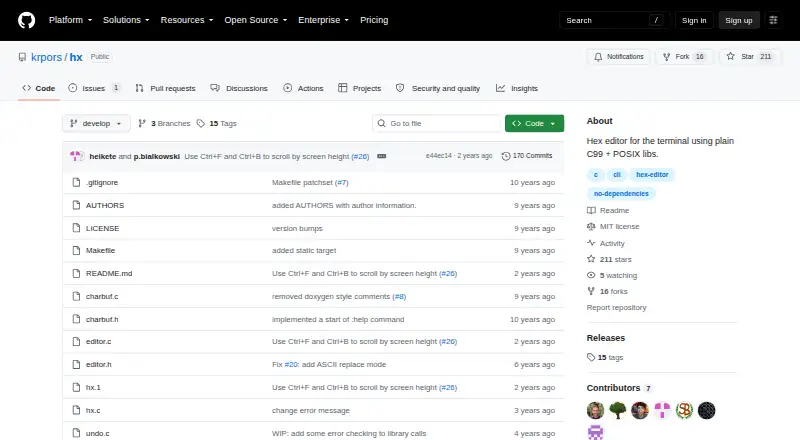
hx is a free hex editor for Linux that runs in a terminal. Written in plain C99 with POSIX libraries, the project says it has no library dependencies, including no need for curses. It supports appending, inserting, replacing, and deleting bytes, with undo and redo commands. Navigation includes Vim-like hjkl keys, arrow keys, page scrolling, and jumps to the beginning or end of a file. Search locates byte values and moves between occurrences. Command mode can jump to decimal or hexadecimal offsets, write changes, quit, and set bytes per line and byte grouping. The interface uses ANSI escape sequences and puts the terminal into raw mode. Build the source with `make`; `make all` also gzips the man page. The README describes `make install` as placing the binary in `/usr/local/bin/` and the man page in `/usr/local/man/man1/`, while warning that portability across distributions is uncertain. The repository identifies an MIT license and links to GitHub Issues and Discussions. The README also notes that cursor movement is unavailable in command mode.
Who it suits
hx suits Linux users who want a terminal-based tool for editing and searching file bytes. It is appropriate for people comfortable building software with make and working in a terminal.
What it does well
- No library dependencies, including curses.
- Supports byte insertion, replacement, and deletion.
- Searches byte values and includes undo and redo.
- Navigation includes Vim-like keys and arrow keys.
What to know first
- Linux is the only listed platform.
- Cursor movement is unavailable in command mode.
- Portability across distributions is uncertain.
- A configuration file is only a possible future addition.
Limits
The project supports Linux, and its README says portability across distributions is uncertain. Cursor movement is not available in command mode.
Getting started
- Open the project website at https://github.com/krpors/hx
- Compile the source with make
- Use make all if you also want the man page gzipped
- Run make install to place the binary and man page in the documented system paths
Verdict
hx provides core byte editing, navigation, search, and history features in a dependency-free terminal program. Its Linux-only listing and command-mode cursor limitation are important considerations for users choosing an editor.
Questions
What does hx cost?
hx is free and has a free plan.
Which platforms does hx support?
The listed supported platform is Linux.
Does hx require curses or other libraries?
The project says it has no library dependencies, including no dependency on curses.
How is hx installed?
Compile it with make, then make install places the binary under /usr/local/bin/ and the man page under /usr/local/man/man1/.
What license does hx use?
The repository identifies an MIT license.
Where can users get support?
The repository provides GitHub Issues and Discussions links.
Facts from hx's own pages
- Build
- The source can be compiled by running `make`. · github.com, 10 Oct 2026
- Command mode
- Command mode supports jumping to decimal or hexadecimal offsets, writing, quitting, and setting bytes per line and byte grouping. · github.com, 4 Oct 2026
- Configuration
- The README wishlist mentions a configuration file for colors or default settings as a possible future addition. · github.com, 4 Oct 2026
- Dependencies
- The project says it has no library dependencies, including curses. · github.com, 10 Oct 2026
- Display settings
- The README documents commands to set octets per line and byte grouping. · github.com, 10 Oct 2026
- Editing
- The editor supports byte append, insert, replace, and delete operations. · github.com, 4 Oct 2026
- Editing features
- The editor supports byte insertion, appending, replacement, and deletion. · github.com, 10 Oct 2026
- Install
- The README says `make install` installs the binary under `/usr/local/bin/` and the man page under `/usr/local/man/man1`. · github.com, 10 Oct 2026
- License
- The project uses the MIT License, which permits use, copying, modification, distribution, sublicensing, and sale subject to its conditions. · github.com, 10 Oct 2026
- Maker
- The repository AUTHORS file lists Kevin Pors among the contributors. · github.com, 10 Oct 2026
- Maker profile
- Kevin Pors's GitHub profile lists the Netherlands. · github.com, 10 Oct 2026
- Navigation
- The editor supports Vim-like `hjkl` movement, arrow keys, and commands to jump to decimal or hexadecimal offsets. · github.com, 10 Oct 2026
- Notable limitation
- The README says cursor movement is not available in command mode. · github.com, 10 Oct 2026
- Planned feature
- The wishlist mentions a possible configuration file for colors or default settings. · github.com, 10 Oct 2026
- Product
- hx is a hex editor for the terminal written in plain C and POSIX libraries. · github.com, 10 Oct 2026
- Search
- The editor can search for byte values and move to the next or previous occurrence. · github.com, 4 Oct 2026
- Search and history
- The editor supports searching for byte values, undo, and redo. · github.com, 10 Oct 2026
- Support
- The repository provides GitHub Issues and Discussions links. · github.com, 4 Oct 2026
- Terminal interface
- The program uses ANSI escape sequences and initializes the terminal in raw mode. · github.com, 4 Oct 2026
- Undo and redo
- The listed keyboard commands include undo and redo. · github.com, 4 Oct 2026
Where hx stands on Freedom251
- Hex Editors#27 of 32