Freedom251 › AI Presentation Software
Huggle
What Huggle is
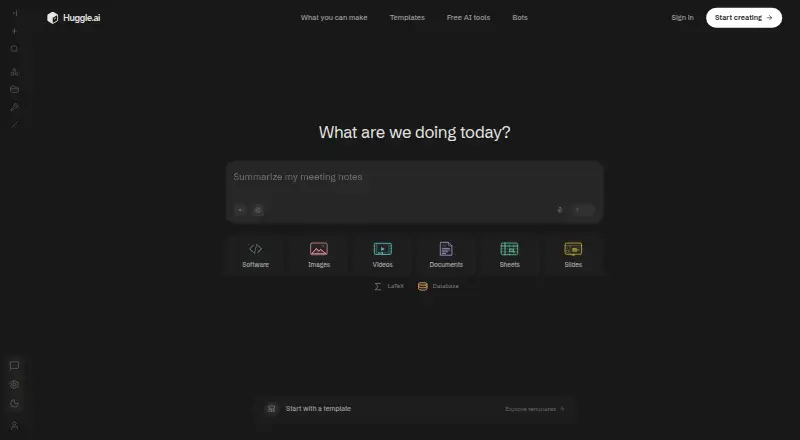
Huggle is an AI workspace for creating editable documents, slides, spreadsheets, videos, images, websites, apps, research papers, and databases. Users describe what they need, provide notes or files, and can then ask Huggle to revise the result. Documents such as proposals, reports, SOPs, and business plans can be edited, downloaded, or shared. Huggle can also produce slide decks from a topic, outline, or document, and build budgets, forecasts, and trackers with formulas and charts.
For technical work, it can write and run websites or apps and publish them to a URL. Its research tools can find and compare sources and create papers in LaTeX with a PDF preview. Export formats include PDF, DOCX, Google Docs, and Markdown, depending on the artifact. The maker lists integrations including GitHub, Slack, Notion, Gmail, and Google Sheets. Huggle is available on web and macOS, with early access requested for Bots. The AI app builder says generated apps run in a secure workspace sandbox during development. A free plan is available; paid plans include monthly credit allowances, and work continues through wallet credits when those allowances are used.
Who it suits
Huggle is presented for students and researchers, consultants, marketers, and operators who want to create or revise different kinds of work in one workspace. It may suit users who need documents, spreadsheets, presentations, or websites and apps.
What it does well
- Free plan available.
- Creates several kinds of editable work.
- Websites and apps can be published to a URL.
- Exports include PDF, DOCX, and Markdown.
- Integrations include GitHub, Slack, and Notion.
What to know first
- Paid plans have monthly credit allowances.
- Wallet credits are used after the allowance runs out.
- Bots page invites visitors to request early access.
Limits
The Free plan includes a Starter usage allowance. Paid plans have monthly credit allowances, and work continues through wallet credits when the allowance is used.
Plans
| Plan | Billed and limits | Price |
|---|---|---|
| Flash | $10 per month; launch price ($25/month list) · Every frontier model included · usage billed from the plan allowance and wallet | $10 a month |
| Starter | $20 per month; $200 a year on annual billing · $35/month included credits · every frontier model included | $20 a month |
| Pro | $40 per month; $400 a year on annual billing · $60/month included credits · every frontier model included | $40 a month |
| Ultra | $100 per month; $1,000 a year on annual billing · $120/month included credits · every frontier model included | $100 a month |
| Free | $0 per month · Starter allowance to try the product · no card required | Free |
As huggle.ai lists them, read 11 Oct 2026. The maker's own page has the final word.
Getting started
- Visit https://huggle.ai/.
- Use the web version or the macOS app.
- Start with the Free plan or select a paid plan.
- Describe what you want to create and add notes or files.
- Ask Huggle to revise the generated work, then edit, download, share, or publish it as appropriate.
Verdict
Huggle brings a wide range of creative and business outputs into one AI workspace, with options to revise, export, or publish work. Check the plan’s credit allowance and wallet-credit terms if you expect ongoing use.
Questions
Is Huggle free?
Yes. The Free plan costs nothing, billed monthly, and includes a Starter usage allowance.
What do paid plans cost?
Flash is listed at $25 a month; its details also display a $10/month launch price. Starter is $20 a month, Pro is $40 a month, and Ultra is $100 a month.
Which platforms does Huggle support?
Huggle is available on the web and macOS.
What can I create with Huggle?
It creates documents, slides, spreadsheets, videos, images, websites, apps, research papers, and databases.
What services are listed as integrations?
Huggle Bots lists GitHub, Slack, Notion, Gmail, Google Calendar, Google Docs, Google Sheets, Google Analytics, Sentry, Vercel, and Supabase.
How do usage credits work?
Paid plans include monthly credit allowances. When an allowance is used, work continues through wallet credits.
Facts from Huggle's own pages
- Bot availability
- The Bots page says Huggle is available on web and macOS and invites visitors to request early access. · huggle.ai, 11 Oct 2026
- Documents
- Huggle creates proposals, reports, SOPs, and business plans that users can edit, download, or share. · huggle.ai, 11 Oct 2026
- Exports
- The homepage lists PDF, DOCX, Google Docs, and Markdown among export formats, and says available formats depend on the artifact. · huggle.ai, 11 Oct 2026
- Free plan
- Yes · huggle.ai, 19 Sept 2026
- Integrations
- Huggle Bots lists integrations including GitHub, Slack, Notion, Gmail, Google Calendar, Google Docs, Google Sheets, Google Analytics, Sentry, Vercel, and Supabase. · huggle.ai, 11 Oct 2026
- Product
- Huggle is an AI workspace for creating editable documents, slides, spreadsheets, videos, images, websites, apps, research papers, and databases. · huggle.ai, 11 Oct 2026
- Research
- Huggle can find and compare sources, then create research papers in LaTeX with a PDF preview. · huggle.ai, 11 Oct 2026
- Security feature
- The AI app builder page says generated apps run in a secure sandbox inside the workspace during development. · huggle.ai, 11 Oct 2026
- Slides
- Huggle creates slide decks from a topic, outline, or document and designs their layouts. · huggle.ai, 11 Oct 2026
- Spreadsheets
- Huggle builds budgets, forecasts, and trackers with formulas and charts. · huggle.ai, 11 Oct 2026
- Usage limits
- Paid plans include monthly credit allowances, and work continues through wallet credits when the allowance is used. · huggle.ai, 11 Oct 2026
- Websites and apps
- Huggle can write and run websites or apps and publish them to a URL. · huggle.ai, 11 Oct 2026
- Who it is for
- The homepage presents Huggle for students and researchers, consultants, marketers, and operators. · huggle.ai, 11 Oct 2026
- Workflow
- Users describe what they want, add notes or files, then ask Huggle to revise the generated work. · huggle.ai, 11 Oct 2026
Where Huggle stands on Freedom251
- AI Presentation Software#33 of 84
- AI App Builders#20 of 39
- AI Presentation Makers#90 of 109