Freedom251 › Employee Recognition Software
HuddleCard
What HuddleCard is
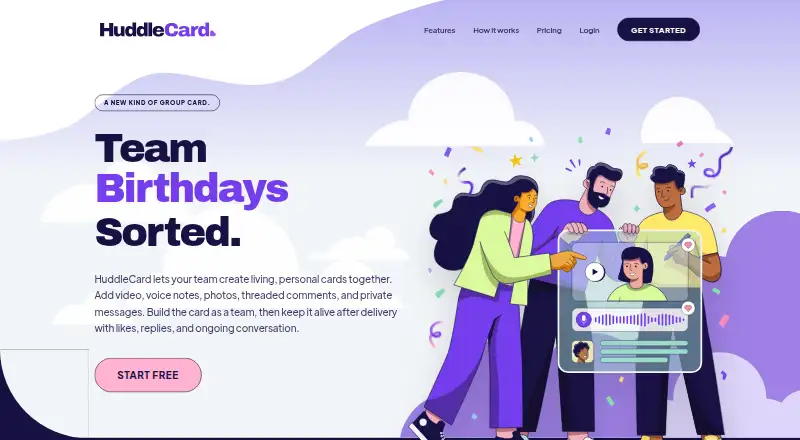
HuddleCard is a web app for creating shared greeting cards for teams. Cards can combine video, voice notes, photos, threaded comments, private messages, likes, and replies. They can be sent from a team to one person, from one person to a team, between teams, or to the same team, with delivery by email, Slack, or Microsoft Teams. Birthday and work anniversary cards can be automated with a Monday digest and scheduled delivery. Teams can sync a roster through Slack or Microsoft Teams, or import people from CSV or Excel; only one chat platform can be connected at a time. A signer can make a message visible only to the recipient. The free plan covers up to 10 people and unlimited cards. Pro starts at $2.50 per active user per month, with the first 10 active users each month free; Lite costs $5, paid once card credit. Self-serve tiers support up to 500 active participants, with larger teams directed to request pricing.
Who it suits
HuddleCard suits teams sharing workplace birthday, anniversary, farewell, promotion, or thank-you cards. It may also fit teams that want scheduled occasion cards and delivery through email or a chat platform.
What it does well
- Free plan includes unlimited cards for up to 10 people.
- Cards support video, voice notes, photos, and threaded comments.
- Birthday and work anniversary cards can be automated.
- Messages can be private to the card recipient.
- Cards can be delivered by email, Slack, or Teams.
What to know first
- Only one chat platform can be connected at a time.
- Self-serve tiers top out at 500 active participants.
- BambooHR, Rippling, and Gusto integrations are not available yet.
Limits
The free plan covers up to 10 people. Pro billing is based on active users, with the first 10 active users each month free; self-serve tiers cap at 500 active participants.
Plans
| Plan | Billed and limits | Price |
|---|---|---|
| Free | Free forever · up to 10 people · Unlimited cards · All card features · Birthday huddle automation · Ad-hoc cards · Private messages · Email, Slack, or Teams delivery | Free |
| Pro | per active user / month; starting at · Everything in Free · Unlimited people · Volume rates · Priority support · First 10 active users each month free | $2.50 a month |
| Lite | One prepaid credit per card · Unlimited people · Video, voice & photos · Cards in any direction · Email, Slack, or Teams delivery · Occasion cards only | $5, paid once |
As huddlecard.com lists them, read 10 Oct 2026. The maker's own page has the final word.
Getting started
- Open the HuddleCard website.
- Choose the free plan, Pro, or the one-time Lite card credit.
- Add people by syncing a roster through Slack or Microsoft Teams, or import a CSV or Excel file.
- Choose email, Slack, or Microsoft Teams for card delivery.
- Create a card or set up birthday and work anniversary automation.
HuddleCard is a web service for making collaborative workplace greeting cards. It fits teams that want a focused way to mark birthdays, anniversaries and milestones, rather than a full employee-recognition platform. The free tier works for small groups; participation-based billing and the self-serve size ceiling become important as usage expands.
Overview
Cards support four directions: a team can address one person, one person can address a team, one team can address another, or a team can create a card for itself. Contributors can combine video, voice notes, photos, threaded comments, private messages, likes and replies. That range supports personal messages and group discussion, while keeping the product centered on a single card instead of a continuing recognition feed.
Birthday and work-anniversary cards can be automated. A Monday digest and scheduled delivery help collect contributions before sending, and ad-hoc cards cover farewells, promotions and team thanks. Delivery works through email, Slack or Microsoft Teams. A signer can mark a message private so only the recipient can read it, which is useful for a personal note inside an otherwise shared card.
Key features
Automation and participation
Recurring occasion automation removes repeated organizing work for birthdays and work anniversaries. The digest gives contributors a regular prompt, while scheduled delivery keeps the card from going out before the occasion. Teams still have to create ad-hoc cards for events outside those automations.
Roster and chat connections
Teams can sync a roster through Slack or Microsoft Teams, or import people from CSV or Excel. HuddleCard connects to one chat platform at a time, so organizations that actively use both Slack and Teams cannot connect both simultaneously. BambooHR, Rippling and Gusto integrations are not available, making the service less suitable when HRIS-driven employee data is essential.
Privacy and security
Private signer messages provide a clear separation between a group card and a recipient-only note. Security measures include HTTPS/TLS encryption in transit, bcrypt password hashing, role-based access controls and regular security updates. Stripe handles payment details; HuddleCard keeps Stripe customer and subscription identifiers rather than full card numbers.
Pricing
Free
The Free plan costs nothing, billed Free forever, for up to 10 people. It includes unlimited cards, all card features, birthday huddle automation, ad-hoc cards, private messages and delivery by email, Slack or Teams. It is the sensible starting point for a small team, but the 10-person cap limits wider rollouts.
Pro
Pro starts at $2.50 a month, billed per active user / month. It adds unlimited people, volume rates and priority support, includes everything in Free, and makes the first 10 active users each month free. HuddleCard defines active participants as people who sign a card, open one or comment; recipients who ignore a card are not billable. Self-serve tiers top out at 500 active participants, with larger teams directed to custom pricing.
Lite
Lite costs $5, paid once, billed as one prepaid credit per card. It allows unlimited people and includes video, voice and photos, cards in any direction, and email, Slack or Teams delivery. It is restricted to occasion cards, so teams needing birthday automation or broader ad-hoc use should choose Free or Pro instead.
A 30-day trial is available. Pro is the better fit for ongoing participation across a larger roster; Lite suits occasional, pay-per-card use.
Platforms
HuddleCard is available on the web. Cards can be delivered through email, Slack or Microsoft Teams.
Who it's for
Choose HuddleCard for a workplace that wants shared cards for birthdays, work anniversaries, farewells, promotions and team appreciation. It is particularly practical for small groups using Slack or Teams and for organizations that value multimedia contributions and recipient-only messages. Look elsewhere if you need HRIS integrations, simultaneous Slack and Teams connections, or a recognition program built around rewards and ongoing points.
Pros and cons
Pros
- Multiple card directions support team-to-person, person-to-team and cross-team occasions.
- Video, voice, photos, threaded discussion and private messages make contributions more expressive than plain text.
- Birthday and anniversary automation, Monday digests and scheduled delivery reduce recurring coordination.
- The Free plan includes unlimited cards and all card features for up to 10 people.
- Active-user billing excludes recipients who ignore a card, and Pro includes the first 10 active users each month free.
Cons
- Only one chat platform can be connected at a time.
- BambooHR, Rippling and Gusto integrations are unavailable, so HRIS-based workflows require another method.
- Self-serve plans stop at 500 active participants, after which pricing is custom.
- Lite is limited to occasion cards and does not provide the broader scope of Pro.
Alternatives
For a broader recognition product with peer recognition, guidance, Slack and Teams integrations and iOS and Android apps, consider Bonusly; its free plan supports up to eight users. Kudosky is another freemium option with a free tier for up to 10 users and apps across major desktop and mobile platforms.
If recognition is tied to rewards, Guusto offers a free plan with no minimum reward spend, mobile access and more than 100 merchant options. Tradler provides a free tier up to 10 users and paid plans for unlimited teams. Assembly suits teams seeking peer recognition with points and budget controls. ELEV8 focuses on coupon creation using credited points, while Bucketlist uses a setup fee, annual employee-based fee and separately billed rewards. Culture Cloud is a paid alternative.
Browse employee recognition software if your priority is a wider recognition program rather than collaborative cards.
Verdict
HuddleCard is a strong choice for small and midsize teams that want expressive, automated occasion cards delivered through the tools they already use. Its main advantages are flexible participation, multimedia messages and a generous free tier. Choose another product when HRIS connectivity, dual chat-platform integration, rewards or self-serve support beyond 500 active participants is central to your requirements.
Verdict
HuddleCard brings multiple ways to contribute together in shared team cards, with automation for birthdays and work anniversaries. Check the participant billing rules and integration limits if your team is larger or relies on HRIS connections.
Questions
Does HuddleCard have a free plan?
Yes. The free plan is free forever for up to 10 people and includes unlimited cards and all card features.
How much does HuddleCard cost?
Pro starts at $2.50 per active user per month, with the first 10 active users each month free. Lite costs 5.00 USD for one prepaid card credit.
How are active users counted?
People who sign a card, open one, or comment are active participants. Recipients who ignore a card are not billable.
Which platforms can deliver cards?
Cards can be delivered by email, Slack, or Microsoft Teams. Teams can connect one chat platform at a time.
Can teams import or sync a roster?
Yes. A roster can be synced through Slack or Microsoft Teams, or imported from CSV or Excel.
Does HuddleCard integrate with HR systems?
BambooHR, Rippling, and Gusto integrations are not available yet.
Facts from HuddleCard's own pages
- Audience
- The maker describes HuddleCard as group greeting cards for teams, including workplace birthdays, anniversaries, farewells, promotions, and team thanks. · huddlecard.com, 10 Oct 2026
- Automation
- Birthday and work anniversary cards can be automated, with a Monday digest and scheduled delivery. · huddlecard.com, 10 Oct 2026
- Card directions
- Cards can go from a team to one person, one person to a team, one team to another, or a team to itself. · huddlecard.com, 10 Oct 2026
- Delivery
- Cards can be delivered by email, Slack, or Microsoft Teams. · huddlecard.com, 10 Oct 2026
- HRIS availability
- The homepage FAQ says BambooHR, Rippling, and Gusto integrations are not available yet. · huddlecard.com, 10 Oct 2026
- Integrations
- The Help Center says teams can sync a roster through Slack or Microsoft Teams, or import people from CSV or Excel; it says HuddleCard connects to one chat platform at a time. · huddlecard.com, 10 Oct 2026
- Payments
- The Privacy Policy says Stripe processes payment details and HuddleCard stores Stripe customer and subscription identifiers, not full card numbers. · huddlecard.com, 10 Oct 2026
- Privacy
- A signer can mark a message private so only the card recipient can see it. · huddlecard.com, 10 Oct 2026
- Product
- HuddleCard lets teams create shared greeting cards with video, voice notes, photos, threaded comments, private messages, likes, and replies. · huddlecard.com, 10 Oct 2026
- Scale limit
- The homepage says self-serve tiers top out at 500 active participants and directs larger teams to contact HuddleCard for pricing. · huddlecard.com, 10 Oct 2026
- Security
- The Privacy Policy describes HTTPS/TLS encryption in transit, bcrypt password hashing, role-based access controls, and regular security updates. · huddlecard.com, 10 Oct 2026
- Support
- The Pro plan includes priority support. · huddlecard.com, 10 Oct 2026
- Usage billing
- The homepage says active participants are people who signed a card, opened one, or commented, while recipients who ignore a card are not billable. · huddlecard.com, 10 Oct 2026
Where HuddleCard stands on Freedom251
- Employee Recognition Software#8 of 35