Freedom251 › Web Design Software
HTMLhouse
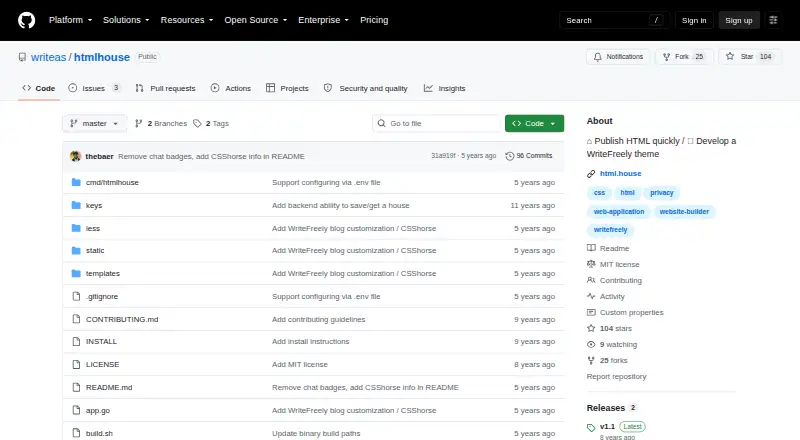
What HTMLhouse is
HTMLhouse is a free, MIT-licensed tool for publishing HTML anonymously. It works in a browser, requires no signup, and is also available as an Android app. The ACE editor lets you change HTML while a live iframe preview appears beside the source. After publication, permission to modify an individual page is kept in the creator’s device storage as a server-generated ID and JWT. HTMLhouse can be self-hosted, with Go, Node.js, and MySQL listed for development. Server settings include ALLOW_PUBLISH, enabled by default, and AUTO_APPROVE, disabled by default. A comma-separated blacklist can stop posts containing specified terms from becoming public. Configuration also supports Twitter credentials for a posting account. WF_MODE can run CSShorse for customizing WriteFreely blogs. The repository welcomes contributions through Write.as. HTMLhouse is intended for people who want account-free HTML publishing or control over a self-hosted installation and its moderation settings.
Who it suits
HTMLhouse suits users who want to publish HTML without registering, as well as developers who want to self-host and configure publishing or moderation controls. Its Android app provides another access option.
What it does well
- Anonymous publishing without user signup
- ACE editing with live iframe preview
- Available in browser and on Android
- Self-hosting support with listed development requirements
- MIT-licensed open-source repository
What to know first
- Edit authorization depends on device local storage
- Self-hosting requires Go, Node.js, and MySQL
- AUTO_APPROVE defaults to false
- Publishing controls require server configuration
Limits
Published-page editing authorization is stored in the creator’s device local storage as a server-generated ID and JWT. Self-hosting requires Go, Node.js, and MySQL, while publication and approval behavior depend on server settings.
Getting started
- Open the HTMLhouse website in a browser
- Edit HTML with the ACE editor
- Review the live iframe preview beside the source
- Publish without creating a user account
- Self-host the project with Go, Node.js, and MySQL if required
- Configure publishing, approval, blacklist, and Twitter settings
Verdict
HTMLhouse offers a focused way to publish editable HTML anonymously, with an in-page preview and optional self-hosting. Its device-held edit credentials and developer-oriented setup are important considerations for publishing workflows.
Questions
Is HTMLhouse free?
Yes. HTMLhouse is free and open source under the MIT license.
Which platforms does HTMLhouse support?
It is available on the web, Android, and as a self-hosted deployment.
Do I need an account?
No user signup is required to publish.
How does page editing authorization work?
The creator’s device stores an ID and server-generated JWT in local storage for modifying the published page.
Can publication be moderated?
Yes. Server settings include approval control and a blacklist of terms that can block posts from becoming public.
Can it connect to Twitter?
The server configuration includes Twitter credentials for a posting account.
Facts from HTMLhouse's own pages
- Android
- The project says HTMLhouse is also available as an Android app. · github.com, 4 Oct 2026
- Android app
- The README says HTMLhouse is also available as an Android app. · github.com, 11 Oct 2026
- Content moderation
- The server supports a comma-separated blacklist of terms that prevent a post from being made public. · github.com, 11 Oct 2026
- Contributions
- Write.as says it welcomes contributions to its open-source projects. · write.as, 4 Oct 2026
- Editing access
- Authorization to modify a published page is stored on the creator’s device in local storage as a server-generated ID and JWT. · github.com, 4 Oct 2026
- Editor
- HTMLhouse uses the ACE editor to modify HTML. · github.com, 4 Oct 2026
- HTML editor
- It uses the ACE editor to modify HTML. · github.com, 11 Oct 2026
- Integration
- The server configuration includes Twitter credentials for a posting account. · github.com, 11 Oct 2026
- Integrations
- The server configuration includes Twitter credentials for a posting account. · github.com, 4 Oct 2026
- License
- The repository identifies its license as MIT. · github.com, 4 Oct 2026
- Live preview
- It displays a live preview in an iframe alongside the HTML source. · github.com, 11 Oct 2026
- Moderation
- The server configuration includes AUTO_APPROVE, which defaults to false, and BLACKLIST_TERMS for blocking posts containing specified terms. · github.com, 4 Oct 2026
- Open source
- The repository identifies an MIT license. · github.com, 11 Oct 2026
- Page authorization
- Permission to modify an individual published page is stored on the creator’s device in local storage as an ID and a server-generated JWT. · github.com, 11 Oct 2026
- Preview
- It shows a live preview in an iframe alongside the source code. · github.com, 4 Oct 2026
- Publishing controls
- The server can be configured to allow publishing and to automatically approve public posts. · github.com, 11 Oct 2026
- Purpose
- HTMLhouse is for publishing HTML quickly and developing WriteFreely themes. · github.com, 11 Oct 2026
- Related project
- The repository says WF_MODE runs CSShorse instead of HTMLhouse to customize WriteFreely blogs. · github.com, 11 Oct 2026
- Self-hosting
- The development requirements listed are Go, Node.js, and MySQL. · github.com, 4 Oct 2026
- Self-hosting requirements
- The development setup lists Go, Node.js, and MySQL as requirements. · github.com, 11 Oct 2026
- Signup
- Users do not need to sign up to publish or modify a page. · github.com, 11 Oct 2026
Where HTMLhouse stands on Freedom251
- Web Design Software#36 of 41