Freedom251 › Photo Storage Services

HomeGallery
What HomeGallery is
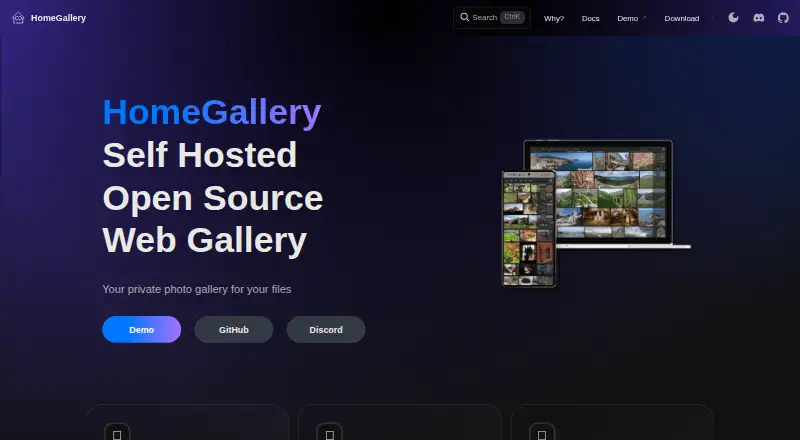
HomeGallery is a free, open-source web gallery for serving private photos and videos from home. It works with the files and folder structure you already have, adding a mobile-friendly way to browse images and videos. Its web app includes photo-stream browsing, search, tag editing, and PWA support for mobile use. Search can match text without regard to case, combine terms with boolean operators, and filter or sort results using media metadata and tags. For image discovery, HomeGallery can find similar pictures without manual tagging, apply tags to one or several images, and find people by similar faces. Photos with GPS data can be linked to locations and browsed on a map.
HomeGallery runs on Linux, macOS, and Windows, as well as through web, API, and self-hosted setups. It can be installed with Docker Compose, Docker containers, prebuilt binaries, application bundles, generic bundles, or from source. By default, low-resolution previews go to its public API for image similarity, object detection, and face recognition; that API says it retains neither images nor privacy data. The lookup and detection server can also run locally or in Docker. HomeGallery is a spare-time project that requires terminal or CLI interaction. Authentication is optional and limited to browser-based Basic Auth, which its documentation describes as insecure without HTTPS.
Who it suits
HomeGallery suits people who want to browse private home photo and video collections while keeping their existing files and folders in place. It is a fit for users comfortable with terminal-based setup and self-hosting, especially on Linux or Debian, the platform described as most tested.
What it does well
- Free and open source, with a self-hosted option.
- Keeps existing media files and folder structure in place.
- Find similar images without manual tagging.
- Supports tags, similar-face discovery, and map browsing for GPS photos.
- Offers Docker, binaries, bundles, and source installation options.
What to know first
- Setup and maintenance require CLI or terminal interaction.
- Mobile photo synchronization and backups are not supported.
- macOS and Windows are described as barely tested.
- Browser Basic Auth is insecure without HTTPS.
Limits
The HomeGallery plan is free and is open source and self-hosted. It does not include mobile photo synchronization or photo backups.
Plans
| Plan | Billed and limits | Price |
|---|---|---|
| HomeGallery | Open source · self-hosted · CLI/terminal setup | Free |
As home-gallery.org lists them, read 9 Oct 2026. The maker's own page has the final word.
Getting started
- Choose an installation route: Docker Compose, Docker container, prebuilt binary, application bundle, generic bundle, or source.
- For prebuilt desktop binaries, select Linux x64, Mac x64, or Windows x64.
- Run HomeGallery on a supported system or self-hosted setup.
- Open the web app to browse the photo stream, search, and edit tags.
- If desired, run the image lookup and detection API server locally or in Docker.
Verdict
Choose HomeGallery if you want a free, self-hosted gallery that browses your existing media and provides search, tagging, and image discovery. Look elsewhere if you need photo synchronization or backups, or prefer a setup that does not require terminal work.
Questions
How much does HomeGallery cost?
The HomeGallery plan is free. It is open source and self-hosted.
Is there a free plan or trial?
Yes. HomeGallery is free; there is no free trial.
Which platforms does it support?
Its listed platforms are API, Linux, macOS, self-hosted, web, and Windows. Prebuilt desktop binaries are listed for Linux x64, Mac x64, and Windows x64.
Is HomeGallery open source?
Yes. HomeGallery is open source.
Does HomeGallery back up or sync mobile photos?
No. Mobile photo synchronization and photo backups are not supported.
How does image discovery handle privacy?
By default, low-resolution previews are sent to a public API for image similarity, object detection, and face recognition. The API says it keeps no images or privacy data; the lookup and detection server can also be run locally or in Docker.
Facts from HomeGallery's own pages
- AI discovery
- Similar-image search helps find images without manual tagging. · home-gallery.org, 9 Oct 2026
- Authentication
- User authentication is optional and limited to browser-based Basic Auth; the documentation says it is insecure without HTTPS. · home-gallery.org, 9 Oct 2026
- Files
- It keeps the existing files and folder structure and provides a gallery to browse images and videos. · home-gallery.org, 9 Oct 2026
- Founded
- 2019 · home-gallery.org, 28 Sept 2026
- Geolocation
- It resolves locations for GPS-tagged photos and lets users browse photo history on a map. · home-gallery.org, 9 Oct 2026
- Geolocation service
- Reverse geolocation queries OpenStreetMap's Nominatim service and transmits only geo coordinates. · home-gallery.org, 9 Oct 2026
- Install options
- HomeGallery runs through Docker Compose, Docker containers, prebuilt binaries, application bundles, generic bundles, or from source. · home-gallery.org, 9 Oct 2026
- Local processing option
- The API server used for image lookups and detection can also be run locally or as a Docker container. · home-gallery.org, 9 Oct 2026
- Not included
- HomeGallery does not support mobile photo synchronization or photo backups; its FAQ recommends separate tools for those tasks. · home-gallery.org, 9 Oct 2026
- Public API data
- By default, low-resolution preview images are sent to HomeGallery's public API for similar-image search, object detection, and face recognition; the site says the API keeps no images or privacy data. · home-gallery.org, 9 Oct 2026
- Purpose
- HomeGallery is a mobile-friendly web gallery for serving private photos and videos from home. · home-gallery.org, 9 Oct 2026
- Search
- Search supports case-insensitive text matching, boolean operators, filters, and sorting across media metadata and tags. · home-gallery.org, 9 Oct 2026
- Setup and maintenance
- HomeGallery is a spare-time pet project that requires CLI or terminal interactions; Linux/Debian is the most tested platform, while Mac and Windows are described as barely tested. · home-gallery.org, 9 Oct 2026
- Supported desktop systems
- Prebuilt binaries are listed for Linux x64, Mac x64, and Windows x64. · home-gallery.org, 9 Oct 2026
- Tags and faces
- The product supports single and multiple-image tagging and finding people by similar faces. · home-gallery.org, 9 Oct 2026
- Web app
- The web app provides photo-stream browsing and search, tag editing, and PWA support for mobile use. · home-gallery.org, 9 Oct 2026
Where HomeGallery stands on Freedom251
- Photo Storage Services#14 of 71
- Photo Sharing Software#9 of 34