
Homebrew
What Homebrew is
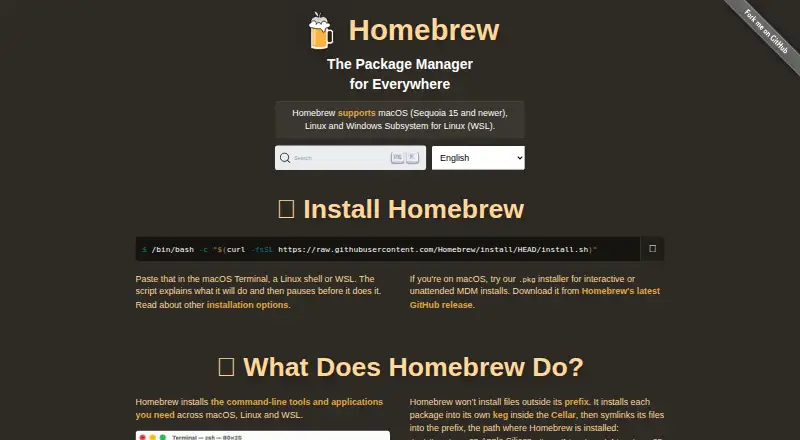
Homebrew is a free, open-source package manager for installing command-line tools and applications on macOS, Linux, and Windows Subsystem for Linux. It uses formulae to define command-line tools, libraries, and services built from upstream source code, while casks install pre-built software such as applications, fonts, and plugins. When a matching bottle is available, `brew install` downloads and installs it. Homebrew resolves dependencies and supports offline installation, but not lockfiles. Homebrew Bundle uses Brewfiles to describe a desired package setup for repeatable installation, with integrations that include Mac App Store apps, WinGet packages on WSL, VS Code extensions, and several programming ecosystems. Official formulae and casks receive human review; taps let third parties maintain other packages. In version 6.0.0, third-party taps must be trusted before their code is evaluated or run, while official taps are trusted by default. The project applies download cooldowns to selected ecosystems. On macOS, cask downloads receive quarantine attributes for Gatekeeper checks, which do not guarantee an application is harmless. Homebrew is run by volunteers and accepts donations.
Who it suits
It suits people who want to install command-line tools and applications on supported macOS, Linux, or WSL systems. Its Brewfile workflow may also suit those setting up packages consistently across projects or machines.
What it does well
- Free and open source.
- Handles formulae, casks, and dependencies.
- Supports offline installation.
- Brewfiles describe desired package setups.
What to know first
- Lockfile support is absent.
- Windows support is through WSL.
- FreeBSD and macOS Catalina 10.15 and earlier are unsupported.
- Support tiers do not guarantee every third-party package remains runnable.
Limits
The listed supported systems are macOS Sequoia 15 and newer, Linux and WSL; FreeBSD and macOS Catalina 10.15 and earlier are unsupported. The macOS .pkg installer supports Apple Silicon only, and Homebrew does not support lockfiles.
Plans
| Plan | Billed and limits | Price |
|---|---|---|
| Homebrew | Free to use · Command-line package manager · macOS, Linux and WSL | Free |
As brew.sh lists them, read 12 Oct 2026. The maker's own page has the final word.
Getting started
- Visit https://brew.sh/ for installation instructions.
- On macOS, check that the system meets the listed support requirements; the .pkg installer supports Apple Silicon.
- Use the terminal installation script, or the macOS package installer for an interactive or unattended MDM install.
- Use formulae for command-line tools, libraries and services, or casks for pre-built software.
- Use Brewfiles with Homebrew Bundle to describe packages for an environment.
Verdict
Homebrew offers package installation across macOS, Linux, and WSL, with formulae, casks, and Brewfile-based setup. Its lack of lockfiles and limits on supported systems are worth considering.
Questions
How much does Homebrew cost?
Homebrew is free to use and open source.
Which systems does Homebrew support?
The site lists macOS Sequoia 15 and newer, Linux and Windows Subsystem for Linux. FreeBSD and macOS Catalina 10.15 and earlier are unsupported.
Does Homebrew support offline installation?
Yes, offline installation is supported.
Does Homebrew support lockfiles?
No, lockfile support is not available.
Can I use third-party repositories?
Yes. Anyone can create a tap for formulae, casks or external commands. In Homebrew 6.0.0, third-party taps must be explicitly trusted before their code is evaluated or run.
Who created Homebrew?
Homebrew was originally created by Max Howell. The project is now run entirely by volunteers.
Facts from Homebrew's own pages
- Anonymous analytics
- Homebrew displays a notice before enabling aggregate anonymous usage analytics, which users can opt out of; events are retained for 365 days. · docs.brew.sh, 12 Oct 2026
- Binary packages
- When a matching bottle is available, Homebrew downloads and installs it automatically with brew install. · docs.brew.sh, 11 Oct 2026
- Bundle integrations
- Homebrew Bundle supports formulae, casks, taps, Mac App Store apps, WinGet packages on WSL, VS Code extensions, Go, Cargo, npm, uv, Flatpak, krew and background services. · docs.brew.sh, 12 Oct 2026
- Casks
- Casks install upstream pre-built binaries such as applications, fonts and plugins. · brew.sh, 12 Oct 2026
- Creator
- Homebrew was originally created by Max Howell. · brew.sh, 12 Oct 2026
- Custom repositories
- Taps let anyone maintain formulae and casks outside Homebrew’s officially supported repositories. · brew.sh, 12 Oct 2026
- Dependency resolution
- Yes · brew.sh, 21 Sept 2026
- Environment setup
- Homebrew Bundle uses Brewfiles to describe packages for setting up an environment. · docs.brew.sh, 11 Oct 2026
- Formulae
- Formulae define how to build command-line tools, libraries and services from upstream source code. · brew.sh, 12 Oct 2026
- Installation requirement
- The macOS .pkg installer supports Apple Silicon only; the installation page lists macOS Sequoia 15 or higher for officially supported hardware. · docs.brew.sh, 11 Oct 2026
- Install options
- The site provides a terminal installation script and links to a macOS package installer for interactive or unattended MDM installs. · brew.sh, 12 Oct 2026
- Linux support
- Homebrew installs on Linux under the default prefix /home/linuxbrew/.linuxbrew. · docs.brew.sh, 11 Oct 2026
- Lockfile support
- No · brew.sh, 21 Sept 2026
- macOS security
- Homebrew applies macOS quarantine attributes to cask downloads so Gatekeeper can perform its checks, but says these controls do not guarantee an application is harmless. · docs.brew.sh, 11 Oct 2026
- Offline installation
- Yes · brew.sh, 21 Sept 2026
- Package formats
- formulae,casks · brew.sh, 21 Sept 2026
- Package manager
- Homebrew installs UNIX tools on macOS and software not packaged for a Linux distribution. · docs.brew.sh, 11 Oct 2026
- Package review
- Formulae and casks in the official repositories require human review before acceptance, changes or updates. · brew.sh, 12 Oct 2026
- Packages
- Homebrew packages are formulae and casks; formulae define command-line tools, libraries and services built from upstream source code. · brew.sh, 11 Oct 2026
- Platform limits
- The site lists macOS Sequoia 15 and newer, Linux and WSL as supported; FreeBSD and macOS Catalina 10.15 and earlier are unsupported. · brew.sh, 12 Oct 2026
- Project model
- Homebrew is a non-profit project run entirely by volunteers, not employees, and donations support its software, hardware and hosting costs. · brew.sh, 12 Oct 2026
- Purpose
- Homebrew installs command-line tools and applications across macOS, Linux and Windows Subsystem for Linux (WSL). · brew.sh, 12 Oct 2026
- Repeatable setup
- A Brewfile describes the desired package state so projects or machines can install dependencies consistently. · docs.brew.sh, 12 Oct 2026
- Supply-chain security
- Homebrew applies download cooldowns to selected ecosystems, including Bundler, npm and pip defaults, PyPI resource resolution, and npm and PyPI bump operations. · docs.brew.sh, 11 Oct 2026
Where Homebrew stands on Freedom251
- App Installation#3 of 24
- Package Managers#27 of 93
- Cli Tools#10 of 32
- Command Line Tools#9 of 27