Freedom251 › History Learning Apps
History Timeline
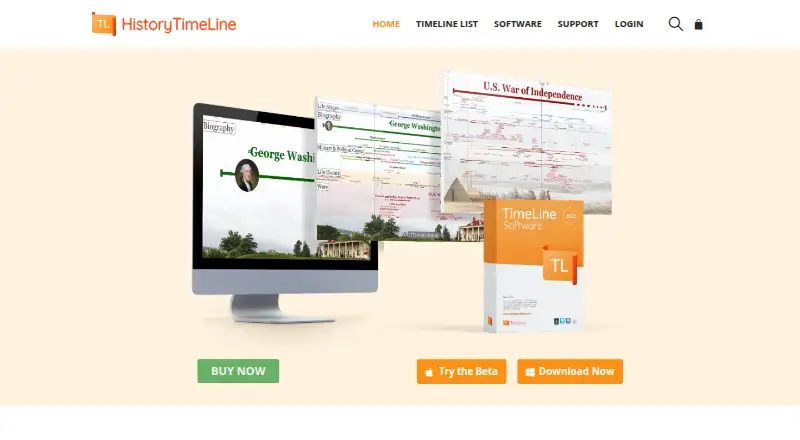
What History Timeline is
History Timeline is desktop software for creating and exploring interactive timelines on Windows and macOS. Its time-zoom interface covers broad historical spans through events measured in yoctoseconds. Users can start with an Excel template, import data as CSV, and add events, icons, hyperlinks, styles, and event hierarchies. Timeline entries can link to online articles and original documents. The site offers timelines on world and United States history, geology, science and technology, biographies, and art history. Finished timelines can be saved as JPG or PNG images, or printed across multiple pages with configurable paper size, orientation, and margins. Online display and website embedding, including for customized timelines, are available by request. The free version is listed as free, with limited features and content. Personal is $24.50 a year; Professional is $49.50 a year; and Perpetual is 119.50 USD once. Professional includes timeline creation and professional and teacher use, while Perpetual includes five years of support and updates. Requirements include Windows 11, 10, or 8, or macOS 10.15 or later, plus at least 2 GB RAM and 400 MB free storage.
Who it suits
It suits researchers, learners, historians, educators, and people doing digital humanities work. It can also serve users who need to create, print, or publish interactive historical timelines.
What it does well
- Imports timeline data from CSV.
- Exports timelines as JPG or PNG.
- Prints multi-page timelines with configurable layout.
- Entries can link to articles and original documents.
What to know first
- Free version has limited features and content.
- Online display and embedding are by request.
- Commercial distribution of Timeline Files needs permission.
Limits
The Free Version is limited in features and content. The Personal plan includes premium timelines but does not list timeline creation; timeline creation is included in Professional and Perpetual.
Plans
| Plan | Billed and limits | Price |
|---|---|---|
| Free Version | no time limit · 1 user · no activation required · free timelines only · install and use free | Free |
| Perpetual | $119.50 one-time purchase · 1 user · 2 activations · free and premium timelines · timeline creation · professional and teacher use · support and updates for 5 years | $119.50, paid once |
| Personal | $24.50/year ($2.05/month), renewed yearly · 1 user · 1 activation · free and premium timelines · support and updates | $24.50 a year |
| Professional | $49.50/year ($4.12/month), renewed yearly · 1 user · 2 activations · free and premium timelines · timeline creation · professional and teacher use · support and updates | $49.50 a year |
As historytimeline.com lists them, read 15 Oct 2026. The maker's own page has the final word.
Getting started
- Visit the History Timeline website.
- Choose the free version or a paid plan.
- Use the desktop program on Windows or macOS.
- Start with an Excel template or import timeline data as CSV.
- Add events and other timeline details, then save or print the result.
History Timeline is desktop software for exploring existing timelines and building interactive ones from structured data. It suits researchers, educators and learners who need control over chronology and presentation; it is less compelling for people seeking a mobile-first history course or instant web publishing.
Overview
The time-zoom interface moves between broad historical spans and events measured in yoctoseconds. That range is useful when one project needs to show both long-term change and tightly timed events. Timeline items can link to online articles and original documents, keeping sources alongside the events they support.
Users can explore collections in world and United States history, geology, science and technology, biographies, and art history. The software is also built for creating timelines, but its publishing route is less direct: online display and website embedding are available by request, including for customized timelines.
Key features
- Structured timeline building: Start with an Excel template, import its data as CSV, then add events, icons, hyperlinks, styles and event hierarchies. This gives researchers and teachers a path from organized data to a more developed presentation; it is not a substitute for a ready-made mobile lesson.
- Adjustable time scale: The interface spans from very long historical periods to yoctosecond-scale events. That flexibility serves work across very different chronologies, though the value depends on whether a project needs that range.
- Export and print: Save timelines as JPG or PNG, or print multi-page versions with configurable paper size, orientation and margins. The print controls are useful for classroom or reference materials, while image export offers a straightforward way to share a finished timeline.
- Web display by request: Online display and embedding can be arranged, including for custom timelines. Since this is request-based, users who need immediate self-service web publishing should choose another tool.
Pricing
The free version costs nothing, has no time limit, and allows one user to access free timelines, with limited features and content. It is a sensible way to explore the software, but the limits make it a poor fit for someone who needs full creation capabilities.
Personal costs $24.50 a year, billed $24.50/year ($2.05/month). It covers one user and one activation, access to free and premium timelines, support and updates. This is the lowest-cost paid plan, suited to an individual exploring or using the timeline collection; it does not include the creation rights stated for the higher tiers.
Professional costs $49.50 a year, billed $49.50/year ($4.12/month). It includes one user, two activations, access to free and premium timelines, timeline creation, professional and teacher use, support and updates. A multiple-user option is also offered. For educators or professionals making custom timelines, this is the clearest fit, though the base plan remains for one user.
Perpetual costs $119.50, paid once, billed $119.50 One-Time Purchase. It includes one user, two activations, access to free and premium timelines, creation rights, professional and teacher use, and support and updates for five years. It suits buyers preferring a one-time purchase, but support and updates are specified for five years rather than indefinitely.
Platforms
History Timeline runs on Windows 11, 10 and 8, or macOS 10.15 or later, with at least 2 GB RAM and 400 MB free storage. That makes it a desktop choice rather than an option for Android or iOS users. The privacy policy says personal data is processed in a manner compatible with the EU General Data Protection Regulation (GDPR). Technical support and feature requests are handled by email at [email protected]. Timeline Files may not be distributed commercially without express written permission.
Who it's for
Researchers, historians, educators and digital humanities practitioners are the strongest audience, particularly when they need to assemble events from structured data, attach source links or produce a printable timeline. Learners can use the existing topic collections, but anyone looking primarily for a guided, phone-based learning experience will find more suitable alternatives.
Pros and cons
- Pro: The time scale covers both long historical spans and extremely short intervals, giving unusual flexibility to projects with different chronological needs.
- Pro: CSV import, event hierarchies and source links support structured work that needs context and traceable references.
- Pro: Image export and configurable multi-page printing accommodate both digital sharing and physical classroom materials.
- Con: The free edition limits features and content, and the Personal plan does not include creation rights; custom timeline makers need a higher tier.
- Con: Web display and embedding require a request, making the product less convenient for immediate online publishing.
- Con: It is limited to Windows and macOS, so it does not serve users who need a mobile app.
Alternatives
For a wider set of history-learning options, browse History Learning Apps. Choose History Adventures instead if you want a free history app spanning Android, iOS, macOS and web. Aurelius: Learn History is the mobile alternative for Android or iOS learners willing to consider a Pro subscription for the full learning experience. DocsTeach is a free option across iOS, macOS and web, hosted with funding from the National Archives Foundation.
Histopia suits mobile learners who prefer a free-to-start game format, with minigame energy and coins used to unlock more courses and customizations. HistoryBytes offers a free-forever mobile tier with a daily card-swipe and battle allowance, making it a better match for short, structured sessions than custom timeline building. Learn History: Timeline Quiz is an iOS and macOS option for quiz-based learning, with 27 free topics and no subscription or account needed for that tier. Stele is worth considering for Android or web users who want to explore its free Rise and Fall of Rome timeline. Histia: World History Facts is an iOS alternative centered on world-history stories, with optional in-app purchases.
Verdict
Choose History Timeline if you need desktop software to organize, source-link, zoom through and print custom historical timelines. Its strongest case is the combination of flexible chronology and structured creation tools; look elsewhere if you need mobile access, unrestricted free creation or self-service web publishing.
Verdict
History Timeline supports both exploring existing subject timelines and building custom ones from imported data. Review the free version’s limits and the system requirements before choosing a paid plan.
Questions
Is there a free plan?
Yes. The Free Version costs nothing and includes one user, free timelines, and limited features and content, with no time limit.
How much do the paid plans cost?
Personal is $24.50 a year, Professional is $49.50 a year, and Perpetual is $119.50, paid once.
Which platforms does it support?
History Timeline is available for macOS and Windows. The listed requirements include macOS 10.15 or later, or Windows 11, 10, or 8.
Can I create my own timelines?
Yes. Professional and Perpetual include timeline creation. Users can begin with an Excel template or import data as CSV.
Can timelines be published online?
Online display and website embedding are available by request, including for customized timelines.
Can I use timeline files commercially?
The maker says Timeline Files may not be distributed commercially without its express written permission.
Facts from History Timeline's own pages
- API and SDK
- The reviewed maker pages describe no public API, SDK or developer documentation. · historytimeline.com, 15 Oct 2026
- Company founder
- A History Stack Exchange profile identifies James Noguera as founder of HistoryTimeline.com and places him in Barcelona, Spain. · history.stackexchange.com, 15 Oct 2026
- Company founding record
- SourceForge lists HistoryTimeline as founded in 2018 and headquartered in Barcelona. · sourceforge.net, 15 Oct 2026
- Company legal information
- The maker identifies itself as HistoryTimeline.com with Spanish tax number ES-47854736-Q and an address on Av. Republica Argentina in Barcelona. · historytimeline.com, 15 Oct 2026
- Custom timeline creation
- Professional and Perpetual licenses allow unlimited timeline files and events, icons, hyperlinks, multiple dates, styled lines and event hierarchies. · historytimeline.com, 15 Oct 2026
- Documentation
- Support provides FAQs and says a user guide is forthcoming; the release-history section lists an upcoming major update and older releases. · historytimeline.com, 15 Oct 2026
- Dynamic zoom
- Its canvas supports live zooming from extremely long timespans to subsecond units, with a continuously visible time ruler and grid. · historytimeline.com, 15 Oct 2026
- Export and print
- The software can save timelines as JPG or PNG images and print multi-page timelines with configurable paper size, orientation, and margins. · historytimeline.com, 8 Oct 2026
- Installation limitation
- The FAQ warns that Windows SmartScreen or antivirus software may block the installer and may require bypassing the warning or administrator permissions. · historytimeline.com, 15 Oct 2026
- Integrations
- The maker documents links from timeline items to external articles and primary sources, but does not list named third-party software integrations. · historytimeline.com, 15 Oct 2026
- Intended users
- The maker describes its audience and goals in terms of researchers, learners, historians, educators, and digital humanities work. · historytimeline.com, 8 Oct 2026
- Known bug
- The maker acknowledges that the time ruler incorrectly displays a year zero between 1 BCE and 1 CE. · historytimeline.com, 15 Oct 2026
- Licence
- The EULA grants non-exclusive, non-transferable proprietary rights; it is not an open-source licence, although bundled components include Python, PySide2, Qt, OpenSSL, Boost, GMP, MPFR, MPIR and Howard Hinnant Date Library. · historytimeline.com, 15 Oct 2026
- Licence restrictions
- The EULA limits simultaneous use, restricts commercial distribution of timeline files without written permission and provides a five-year update and support period for perpetual purchases. · historytimeline.com, 15 Oct 2026
- License limits
- The maker says Timeline Files may not be distributed commercially without its express written permission. · historytimeline.com, 8 Oct 2026
- Limit: Google Play language and zoom
- Reviewers request Spanish or other language support and touch-based pinch zoom for the timeline scale. · play.google.com, 15 Oct 2026
- Limit: SourceForge integrations
- SourceForge lists no integrations and marks collaboration tools, project-management use and percent-complete tracking as unsupported. · sourceforge.net, 15 Oct 2026
- macOS status
- A macOS beta is available, while the site describes the full Apple version as forthcoming. · historytimeline.com, 15 Oct 2026
- Navigation
- Users can pan by dragging, use mouse and modifier keys, operate time-control buttons, change the reference point, use a minimap and enter full-screen mode. · historytimeline.com, 15 Oct 2026
- Notable news
- The maker's site announced a macOS beta in July 2026, inviting users to test it and help shape the final release. · historytimeline.com, 15 Oct 2026
- Online embedding
- The maker offers an embedding service that displays timeline files on websites by copying code and uploading the files, with details supplied on request. · historytimeline.com, 15 Oct 2026
- Online publishing
- Online display and website embedding are available by request, including for customized timelines. · historytimeline.com, 8 Oct 2026
- Ownership record
- Scam Detector's domain and company data names James Noguera as owner and records the Barcelona address. · scam-detector.com, 15 Oct 2026
- Platforms
- The download page offers a Windows installer and a macOS beta; the maker describes macOS as a beta version. · historytimeline.com, 8 Oct 2026
Where History Timeline stands on Freedom251
- History Learning Apps#13 of 26