Freedom251 › History Learning Apps
DocsTeach
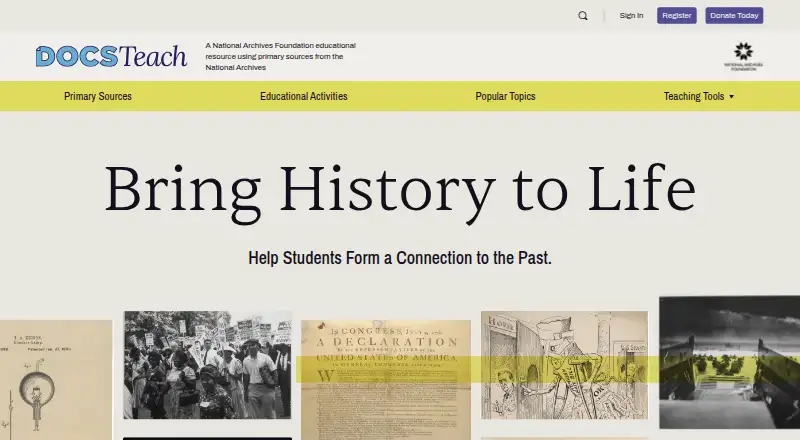
What DocsTeach is
DocsTeach is an interactive teaching website built around primary sources held by the National Archives. Its collection includes thousands of letters, photographs, speeches, posters, maps, and videos. Teachers can create activities by choosing a tool, selecting sources, and writing instructions. Activity formats include document analysis, discussion, compare and contrast, zoom and crop, sequencing, mapping, and interpreting data. Students can save and submit responses for teachers to review in My Students’ Responses, or send their work to a teacher by email. Teachers can share activities to Google Classroom, where students can turn in work through the activity button. For lessons using other materials, teachers may upload JPG, PNG, GIF, or JPEG files up to 8 MB each. The redesigned site supports exploration and activity creation on computers and tablets; students can also turn in work through the DocsTeach App for iPad. The free account costs nothing and includes creating, saving, and sharing activities and sources, plus access to hundreds more educator activities. DocsTeach is hosted by the National Archives Foundation, a nonprofit partner of the National Archives.
Who it suits
DocsTeach suits teachers and students working with historical primary sources, as well as people exploring history. Its activity formats and response tools support lessons that involve analyzing and discussing documents.
What it does well
- Includes thousands of National Archives primary sources.
- Offers several activity formats, including mapping and sequencing.
- Students can submit work through Google Classroom.
- Free account includes activity creation and sharing.
What to know first
- Teacher uploads are limited to JPG, PNG, GIF, or JPEG.
- Each uploaded file can be no larger than 8 MB.
- Creating an account requires a name, email, and password.
Limits
The free account is listed as free. Uploaded outside documents or images must be JPG, PNG, GIF, or JPEG files and may not exceed 8 MB per file.
Plans
| Plan | Billed and limits | Price |
|---|---|---|
| Free account | Create, save and share activities · save and share primary sources · access hundreds of additional member activities | Free |
As docsteach.org lists them, read 15 Oct 2026. The maker's own page has the final word.
Getting started
- Open https://www.docsteach.org/ on the web.
- Create an account with a name, email address, and password.
- Choose an activity tool and select primary sources.
- Customize the instructions, then save or share the activity.
- Have students submit responses through the site, by email, or Google Classroom.
DocsTeach is a history teaching resource that turns National Archives documents into interactive assignments. It suits teachers who want students to work directly with historical evidence, and its free account makes that approach accessible without a subscription.
Overview
The collection spans thousands of primary sources, including letters, photographs, speeches, posters, maps, and videos. Teachers can build an activity by choosing a tool, selecting sources, and writing instructions, which gives archival material a clear purpose in a lesson. The result is a focused resource for source-based learning rather than a general course platform.
Its range of activity formats supports several kinds of historical inquiry: students can analyze documents, discuss, compare and contrast, zoom or crop an image, sequence events, map information, or interpret data. That variety helps teachers shape work around the material at hand, though the organizing principle remains close engagement with documents.
Key features
Teachers can create, save, and share activities, and can also save and share primary sources. Students may save their responses for a teacher to access in My Students’ Responses or send them by email. Google Classroom sharing offers another assignment route, with students able to turn in work using the DocsTeach button.
Teachers can bring in outside documents or images in JPG, PNG, GIF, or JPEG format, up to 8 MB per file. That supports lessons using teacher-selected material alongside the archival collection, while the per-file cap may rule out larger images. The site supports exploring and creating activities on computers and tablets; the FAQ also describes an iPad app through which students can turn in work.
Pricing
The Free account costs nothing. It includes creating, saving, and sharing activities; saving and sharing primary sources; and access to hundreds of additional educator activities. With no free trial or paid tier presented in this pricing model, teachers can use the core activity workflow without a subscription commitment. The account setup requires a name, email address, and password.
Platforms
DocsTeach is available on the web and listed for iOS and macOS. The redesigned site supports browsing and building activities on computers and tablets, and students can submit work through the iPad app. Its desktop and tablet support suits classroom preparation and student use across those devices.
Who it's for
DocsTeach is best for teachers planning lessons around historical documents and other archival material, as well as students and history explorers who want to engage with primary sources. Its activity formats and response options are useful when a lesson calls for students to interpret evidence and return their work to a teacher. It is a less natural fit for instruction that does not center on historical sources.
Pros and cons
- Pro: Thousands of varied primary sources give teachers substantial material for evidence-based lessons.
- Pro: Multiple activity formats let teachers vary how students examine, discuss, compare, and interpret sources.
- Pro: The free account includes activity creation and sharing, source sharing, and hundreds of educator activities.
- Pro: Students can return work through saved responses, email, Google Classroom, or the iPad app.
- Con: Uploaded images and documents are capped at 8 MB per file, which can constrain use of larger materials.
- Con: Its document-centered history focus makes it less suited to broader teaching workflows.
Alternatives
History Learning Apps is a useful category page for readers comparing history-learning options. Consider History Adventures for a free history app available on Android, iOS, macOS, and web. Aurelius: Learn History is another option, with a free entry point and a Pro subscription for the full learning experience; its monthly plan is $9.99 a month.
Histopia offers a free start with minigame energy and coins used to unlock courses and customizations. For timeline creation, History Timeline has a free version for one user with limited features and content and no time limit, plus a Personal plan at $24.50 a year. HistoryBytes suits readers interested in its free first season, which includes a 10-hour-plus story and daily limits on card swipes and battles.
Learn History: Timeline Quiz gives access to 27 free topics without a subscription or account. Stele lets users explore the Rise and Fall of Rome for free, with a single purchase unlocking its other timelines. Histia: World History Facts is a free download with optional in-app purchases, and some stories or features may require payment.
Verdict
Choose DocsTeach if you teach history through primary sources and want students to respond to structured activities without paying for an account. Its strongest reason to choose it is the combination of a substantial archival collection, varied activity tools, and several ways to collect student work. Look elsewhere if your teaching needs extend beyond document-centered history lessons or depend on uploading files larger than 8 MB.
Verdict
DocsTeach brings primary sources, activity-building tools, and student response options together in a free teaching resource. It is especially suited to lessons built around historical documents and other archival materials.
Questions
How much does DocsTeach cost?
The Free account costs nothing.
Is there a free plan or trial?
DocsTeach has a free plan and no free trial.
Which platforms does it support?
Its platforms are web, iOS, and macOS. The redesigned site supports exploring and creating activities on computers and tablets, and students can turn in work through the DocsTeach App for iPad.
Who makes DocsTeach?
It is hosted by and made possible with funding from the National Archives Foundation, a nonprofit partner of the National Archives.
Can teachers use their own materials?
Teachers can upload JPG, PNG, GIF, or JPEG documents or images up to 8 MB per file.
Facts from DocsTeach's own pages
- Accessibility stated
- DocsTeach says it is designed for visitors with disabilities and to comply with federal accessibility guidelines. · docsteach.org, 15 Oct 2026
- Account information
- Creating an account requires a name, email address, and password. · docsteach.org, 8 Oct 2026
- Activity creation
- Users create activities by selecting a tool, choosing primary sources and customizing instructions. · docsteach.org, 15 Oct 2026
- Activity reuse
- Teachers can borrow, copy and modify activities created by educators and the National Archives. · docsteach.org, 15 Oct 2026
- Activity tools
- Available tools include discussion, compare and contrast, zoom/crop, white out/black out, spotlight, sequencing, connections, mapping, big-picture analysis, weighing evidence and interpreting data. · docsteach.org, 15 Oct 2026
- App compatibility
- The App Store listing requires iPadOS 13.6 or later; Mac use requires macOS 11 or later with Apple silicon, and visionOS is also listed. · apps.apple.com, 15 Oct 2026
- App maintenance
- The latest App Store version shown is 3.1.1, released December 22, 2020. · apps.apple.com, 15 Oct 2026
- Assignments
- Students can submit work through a DocsTeach account, Google Classroom or a learning-management system such as Canvas, Blackboard or Schoology. · docsteach.org, 15 Oct 2026
- Audience
- DocsTeach is presented as a resource for teachers, students, and history explorers. · docsteach.org, 8 Oct 2026
- Content library
- The site provides letters, photographs, speeches, posters, maps, videos and other records spanning American history. · docsteach.org, 15 Oct 2026
- Content licence
- Except where noted, site content is under Creative Commons Attribution-NonCommercial-ShareAlike 4.0; teaching activities have CC0 dedication. · docsteach.org, 15 Oct 2026
- Copyright limitation
- The privacy policy warns that some archival items have donor or other rights restrictions and that users must assess rights themselves. · docsteach.org, 15 Oct 2026
- Create activities
- Members can create activities by selecting a tool, choosing primary sources, and customizing instructions. · docsteach.org, 8 Oct 2026
- Current collection counts
- The homepage displays 63,773 registered members, 294 visitor activities, 427 member activities and 13,639 primary-source documents. · docsteach.org, 15 Oct 2026
- Custom uploads
- Activity authors may upload outside JPG, PNG, GIF or JPEG files up to 8 MB, provided they have permission to use them. · docsteach.org, 15 Oct 2026
- Funding partner
- LinkedIn identifies the National Archives Foundation as an independent Washington, DC nonprofit founded in 1992 with 11–50 employees that supports National Archives educational initiatives. · linkedin.com, 15 Oct 2026
- Google Classroom
- The FAQ says activities can be sent directly to Google Classroom and returned through its Classroom button. · docsteach.org, 15 Oct 2026
- Independent listing
- Learnamic describes browsing and published-activity use as free without an account, while saving and assigning require a free account. · learnamic.com, 15 Oct 2026
- iPad app
- The free National Archives DocsTeach app lets students enter classroom codes, complete assigned or era-based activities and inspect high-resolution sources. · apps.apple.com, 15 Oct 2026
- Launch news
- The National Archives announced DocsTeach on September 20, 2010, describing a partnership with the Foundation for the National Archives and Second Story Interactive. · archives.gov, 15 Oct 2026
- Licensing
- The site says DocsTeach is generally licensed under Creative Commons Attribution-NonCommercial-ShareAlike 4.0 and teaching activities have a CC0 dedication. · docsteach.org, 8 Oct 2026
- Limit: accessibility details
- The EdTech Books evaluation reported confusing mouse-free navigation and said document images appeared to lack alt text or screen-reader descriptions. · edtechbooks.s3.us-west-2.amazonaws.com, 15 Oct 2026
- Limit: app usability
- Apple reviewers report sluggish performance, poor tablet optimization, clipped screen areas, orientation problems, an upside-down keyboard and no self-evaluation feature. · apps.apple.com, 15 Oct 2026
- Limit: audience fit
- Learnamic notes that navigation may overwhelm some users and that younger learners may need substantial parental guidance. · learnamic.com, 15 Oct 2026
Where DocsTeach stands on Freedom251
- History Learning Apps#1 of 26