Freedom251 › Course Evaluation Software
High-Resolution Course Feedback
What High-Resolution Course Feedback is
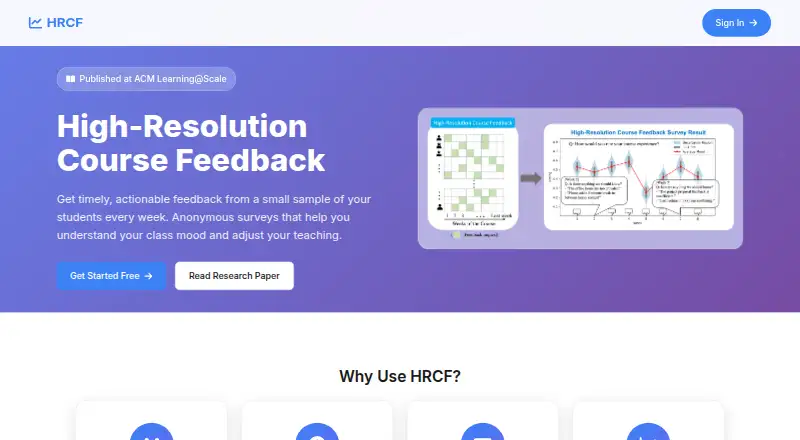
High-Resolution Course Feedback (HRCF) is a web service that gives instructors weekly anonymous feedback about class mood. It randomly selects students each week, with the aim of gathering representative responses while reducing survey fatigue. Students receive survey requests in their inboxes through unique links. The default survey asks what they liked, what remains confusing, what the teaching team should know, and for a course experience rating on a five-point scale. Instructors can add questions for particular topics. Surveys open Monday at noon PT, reminders are sent Thursday at noon PT, and instructors receive a digest Sunday at 4pm PT. The digest includes participation rates, responses grouped by question with visualizations, and a graph of class mood over time. HRCF says it does not track which student submitted which feedback. To get started, users create an account with an institutional email, submit a course survey form, and send a school profile page and generated course ID for review and approval. While approval is pending, they can prepare the course roster, custom questions, and admin list. The Free course survey plan costs nothing.
Who it suits
HRCF suits educators and instructors seeking regular anonymous feedback about student experience and class mood. It is web-based and requires an institutional email to get started.
What it does well
- Randomly selects students each week.
- Instructors can add custom weekly questions.
- Digest includes participation rates and response visualizations.
- Includes a graph of class mood over time.
- Free course survey costs nothing.
What to know first
- Course setup requires review and approval.
- An institutional email is required to create an account.
- The service is web-only.
Limits
A course survey must be reviewed and approved. While it is under review, users can prepare the roster, custom questions, and admin list.
Plans
| Plan | Billed and limits | Price |
|---|---|---|
| Free course survey | course survey · course roster · custom questions · admin list | Free |
As coursefeedback.org lists them, read 15 Oct 2026. The maker's own page has the final word.
Getting started
- Create an account using an institutional email.
- Submit a course survey form.
- Send a school profile page and generated course ID for review and approval.
- While the survey is under review, set up the course roster, custom questions, and admin list.
High-Resolution Course Feedback (HRCF) is a web service for instructors collecting student feedback during a course. It is best for educators who want a recurring read on class experience and questions, rather than a one-time evaluation. Its focused weekly cycle costs nothing for a course survey, though approval is a setup hurdle.
Overview
HRCF uses weekly, anonymous surveys to help instructors understand class mood and adjust teaching. Students are randomly selected each week, a design intended to gather representative feedback while limiting survey fatigue. That makes it suited to ongoing course check-ins; it is a narrower fit for institutions seeking feedback beyond the course context.
Key features
Scheduled feedback with flexible questions
Surveys open Monday at noon PT, reminders are sent Thursday at noon PT, and instructors receive a digest Sunday at 4pm PT. Students receive requests in their inboxes through unique survey links. Four default questions cover what students liked, what is still confusing, what the teaching team should know, and a five-point course experience rating. Instructors can add questions each week, keeping a recurring baseline while focusing on a particular issue.
Digest and anonymity
The weekly digest includes participation rates, responses grouped by question with visualizations, and a class mood graph showing sentiment over time. That combination gives instructors both response-level detail and a view of changing sentiment. HRCF says each student gets a unique, secure link and that it does not track which student submitted which feedback. This supports anonymous responses, though the stated approach should not be read as a guarantee about every aspect of a student's privacy.
Pricing
The Free course survey plan costs free. It lets users create a course survey and set up a course roster, custom questions, and an admin list. The free plan makes HRCF a straightforward option for instructors who need its course-feedback workflow without a subscription charge. No seat or response cap is stated for this plan.
Free does not mean immediate use: instructors create an account with an institutional email, submit a course survey form, and send a school profile page and generated course ID for review and approval. While approval is pending, they can prepare the roster, questions, and admin list. The review step adds lead time, so HRCF is less suitable when a survey needs to launch without institutional setup.
Platforms
HRCF is available on the web. Students access surveys through links sent to their inboxes.
Who it's for
HRCF is aimed at educators who want to respond to student experience as a course progresses. Its weekly sampling, custom questions, and mood trend are most useful when an instructor can act on feedback between survey cycles. It is less appropriate for one-off evaluations or for users who cannot complete the course approval process.
Pros and cons
- Pros: The recurring survey combines four consistent prompts with weekly custom questions, so instructors can track familiar themes while exploring a timely concern.
- Pros: The digest pairs participation and question-level responses with a mood trend, giving instructors more than a simple score.
- Pros: The course survey plan is free and includes roster, question, and admin setup.
- Cons: Institutional email and course review are part of onboarding, which can delay a course before surveys begin.
- Cons: The weekly schedule is designed for course feedback; it is not a general-purpose survey workflow.
Alternatives
Course Evaluation Software is a useful place to compare tools in the category. Consider FrontCore if you need a learning-management option with a free plan for up to 30 participants or a paid tier for up to 300. IASystem is worth considering for campus use: it offers a free one-term pilot and an enrollment-based annual plan. Choose Qualtrics if a broader survey tool fits better; its free individual plan allows one user, three active surveys, and 500 total responses. SmartEvals has a free Lite option for schools currently using paper that want an on-the-go version.
Perspective AI Intelligent Intake offers a free allowance of 100 credits toward AI-powered conversations, a different starting point for users seeking that approach. QuestionPro has a free Essentials plan with one user, 200 responses per survey, and 30 question types. HelioCampus Course Evaluations & Surveys is another paid option for course evaluations and surveys. IOTA360 Evaluations uses customized pricing based mostly on annual faculty and student users, with possible extra charges for custom reports.
Verdict
Choose HRCF if you teach a course and want a free, weekly feedback cycle with customizable prompts and a digest that tracks class mood. Its main advantage is the combination of a regular course-specific pulse check and no plan charge; look elsewhere if institutional approval would slow your launch or you need a broader evaluation system.
Verdict
HRCF provides a recurring feedback cycle with customizable questions and a digest for instructors. Its course survey plan is free, but getting a course approved is part of setup.
Questions
How much does HRCF cost?
It is free. The listed Free course survey plan costs nothing.
Which platform does it support?
HRCF is available on the web.
How does the service handle anonymity?
HRCF says students receive unique, secure response links and that it does not track which student provided each response.
What is included in the weekly digest?
It includes participation rates, responses grouped by question with visualizations, and a graph of class mood over time.
How do instructors get started?
They create an account with an institutional email, submit a course survey form, and send a school profile page and generated course ID for review and approval.
Can instructors add their own survey questions?
Yes. Instructors can add custom questions each week.
Facts from High-Resolution Course Feedback's own pages
- 2026 study sample
- A 2026 observational study examined 103 HRCF course offerings, 42 computer-science courses, and 24,216 enrollments across four years. · arxiv.org, 15 Oct 2026
- Account onboarding
- Getting started requires an account created with an institutional email address. · coursefeedback.org, 15 Oct 2026
- Anonymity
- The site says each student receives a unique, secure response link and that it does not track which student provided which feedback. · coursefeedback.org, 7 Oct 2026
- Anonymous access
- Students receive anonymous survey requests directly in their email inboxes. · coursefeedback.org, 15 Oct 2026
- Audience
- The site describes the service as built for educators and invites instructors to use it for course feedback. · coursefeedback.org, 7 Oct 2026
- Authentication
- The reference configuration supports Firebase email authentication and Google OAuth, with institution-specific OAuth settings recommended. · github.com, 15 Oct 2026
- Class sentiment
- Weekly mood graphs show how reported class sentiment changes over time. · coursefeedback.org, 15 Oct 2026
- Course approval
- Users submit a school profile page and generated course ID for review and approval of a course survey. · coursefeedback.org, 15 Oct 2026
- Course settings
- The course settings page manages weekly custom questions, student rosters, and course staff. · github.com, 15 Oct 2026
- Custom questions
- Instructors can add topic-specific questions each week. · coursefeedback.org, 15 Oct 2026
- Default question 1
- The standard survey asks students what they have liked about the course so far. · coursefeedback.org, 15 Oct 2026
- Default question 2
- The standard survey asks whether anything from class remains confusing. · coursefeedback.org, 15 Oct 2026
- Default question 3
- The standard survey asks whether there is anything the teaching team should know. · coursefeedback.org, 15 Oct 2026
- Default question 4
- The standard survey asks students to rate their weekly course experience on a five-point scale. · coursefeedback.org, 15 Oct 2026
- Default questions
- Surveys include four default questions about what students liked, what remains confusing, what the teaching team should know, and a five-point course experience rating. · coursefeedback.org, 7 Oct 2026
- Digest participation metric
- The digest reports the number of students surveyed and the number of responses received. · coursefeedback.org, 15 Oct 2026
- Digest response collection
- Responses are grouped by question and accompanied by visualizations. · coursefeedback.org, 15 Oct 2026
- Digest timing
- Instructors receive the weekly feedback digest Sunday at 4 p.m. Pacific Time. · coursefeedback.org, 15 Oct 2026
- Getting started
- Users create an account with an institutional email, submit a course survey form, and send a school profile page and generated course ID for review and approval. · coursefeedback.org, 7 Oct 2026
- Instructor dashboard
- The repository describes an instructor dashboard for requesting surveys and managing approved surveys. · github.com, 15 Oct 2026
- Instructor interviews
- The original study interviewed nine instructors about their experiences using HRCF. · web.stanford.edu, 15 Oct 2026
- Limit: first-use effects
- The 2026 study found no measurable change in average student ratings after first-time HRCF use. · arxiv.org, 15 Oct 2026
- Limit: large classes
- The 2026 study found no statistically significant association for courses enrolling 250 or more students. · arxiv.org, 15 Oct 2026
- Limit: scope of improvement
- Repeated use was associated with small learning-related rating gains in courses below 250 students, but not with instructional-quality or course-organization ratings. · arxiv.org, 15 Oct 2026
Where High-Resolution Course Feedback stands on Freedom251
- Course Evaluation Software#1 of 21