Freedom251 › Digital Painting Software

HEAVYPAINT
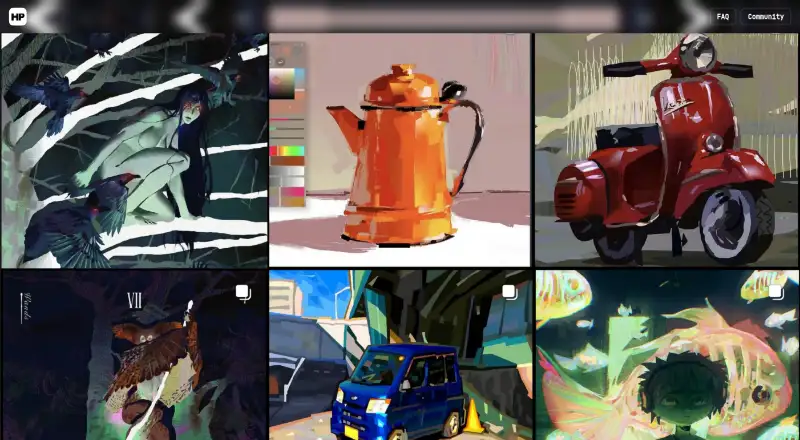
What HEAVYPAINT is
HEAVYPAINT is a digital painting app focused on a raw, digital-impressionist style. Its listed tools include Color Jitter, Fan Fill, Lasso Fill, Rake, Line Blend, and Liquify, as well as shape design and customizable tools. The interface is described as minimalist, and a gallery helps users review and organize their creations. Brush customization, layers, and pressure sensitivity are supported.
The app is intended for plein air painting, quick color studies and concept sketches, figure and gesture work, and artists seeking a digital aesthetic. HEAVYPAINT is available as a web app, through App Store and Play Store versions, and as Classic downloads for Windows, macOS, and Linux. HEAVYPAINT 3+ accounts work across multiple devices. There is a free plan, Gallery Sync Monthly at $2.99 a month, Unlock Full Version at $9.99, paid once, and Gallery Sync Yearly at $19.99 a year. Classic remains available but will not receive new features or bug fixes. Exports are pixel-based, with pixel dimensions used to calculate print resolution.
Who it suits
HEAVYPAINT suits plein air painters, people making quick color studies or concept sketches, and figure and gesture artists. It also fits artists looking for a digital-impressionist aesthetic across web, desktop, or mobile.
What it does well
- Includes Color Jitter, Fan Fill, and Liquify tools.
- Supports brush customization, layers, and pressure sensitivity.
- Available on web, desktop, and mobile.
- HEAVYPAINT 3+ accounts work across multiple devices.
- Offers a free plan.
What to know first
- Classic will not receive new features or bug fixes.
- Exports are pixel-based.
- Full Version unlock costs $9.99, paid once.
- Gallery Sync costs $2.99 a month or $19.99 a year.
Limits
Classic remains available but will not receive new features or bug fixes. Exports are pixel-based, with pixel dimensions serving as the basis for print resolution.
Plans
| Plan | Billed and limits | Price |
|---|---|---|
| Gallery Sync Yearly | $19.99 yearly · Gallery Sync | $19.99 a year |
| Gallery Sync Monthly | $2.99 monthly · Gallery Sync | $2.99 a month |
| Unlock Full Version | Full version unlock | $9.99, paid once |
As heavypaint.com lists them, read 5 Oct 2026. The maker's own page has the final word.
Getting started
- Open the HEAVYPAINT web app, or get the app through the App Store or Play Store.
- For Classic, download the Windows, macOS, or Linux version.
- Choose the free plan or a listed paid option.
- Use a HEAVYPAINT 3+ account across multiple devices.
Verdict
HEAVYPAINT combines specialized painting tools with web, mobile, and desktop availability. Note that Classic is no longer receiving updates, and exports use pixel dimensions for print-resolution calculations.
Questions
Is HEAVYPAINT free?
Yes. A free plan is available.
What paid plans are listed?
Gallery Sync Monthly is $2.99 a month, Unlock Full Version is $9.99, paid once, and Gallery Sync Yearly is $19.99 a year.
Which platforms does HEAVYPAINT support?
It is available on web, Android, iOS, Windows, macOS, and Linux.
Does HEAVYPAINT support multiple devices?
HEAVYPAINT 3+ accounts work across multiple devices.
Is HEAVYPAINT Classic still supported?
Classic remains available, but it will not receive new features or bug fixes.
How does HEAVYPAINT handle print resolution?
Exports are in pixels, and pixel dimensions are used to calculate print resolution.
Facts from HEAVYPAINT's own pages
- Account access
- The FAQ says HEAVYPAINT 3+ accounts work across multiple devices. · heavypaint.com, 5 Oct 2026
- Android data safety
- Google Play says the app may collect personal, financial, and files-and-docs data, encrypts data in transit, and allows deletion requests. · play.google.com, 5 Oct 2026
- Classic desktop availability
- The official Classic downloads page provides Windows, macOS, and Linux downloads. · heavypaint.com, 5 Oct 2026
- Classic support status
- The FAQ says HEAVYPAINT Classic remains available but will not receive new features or bug fixes. · heavypaint.com, 5 Oct 2026
- Export limit
- The FAQ says HEAVYPAINT exports pixels and gives pixel dimensions as the basis for calculating print resolution. · heavypaint.com, 5 Oct 2026
- Headquarters
- Glendale, California, United States · heavypaint.com, 28 Sept 2026
- Integrations
- The opened product pages do not state integrations with third-party software or services. · heavypaint.com, 5 Oct 2026
- Intended users
- The listing names plein air painters, people making quick color studies or concept sketches, figure and gesture artists, and people seeking a digital aesthetic. · apps.apple.com, 5 Oct 2026
- Mobile availability
- The official homepage links to App Store and Play Store versions. · heavypaint.com, 5 Oct 2026
- Painting tools
- The app listing describes Color Jitter, Fan Fill, Lasso Fill, Rake, Line Blend, and Liquify tools. · apps.apple.com, 5 Oct 2026
- Product
- HEAVYPAINT describes itself as a raw digital painting app focused on digital impressionism. · heavypaint.com, 5 Oct 2026
- Support
- The official site lists bug reports, feature requests, and support by email at [email protected]. · heavypaint.com, 5 Oct 2026
- Web app
- The official homepage links to a HEAVYPAINT webapp. · heavypaint.com, 5 Oct 2026
- Workflow
- The listing says the app has a minimalist interface, customizable tools, shape design tools, and a gallery for reviewing and organizing creations. · apps.apple.com, 5 Oct 2026
Where HEAVYPAINT stands on Freedom251
- Digital Painting Software#5 of 46
- Sketching Software#4 of 20