Freedom251 › Game Build Planners

GrimTools
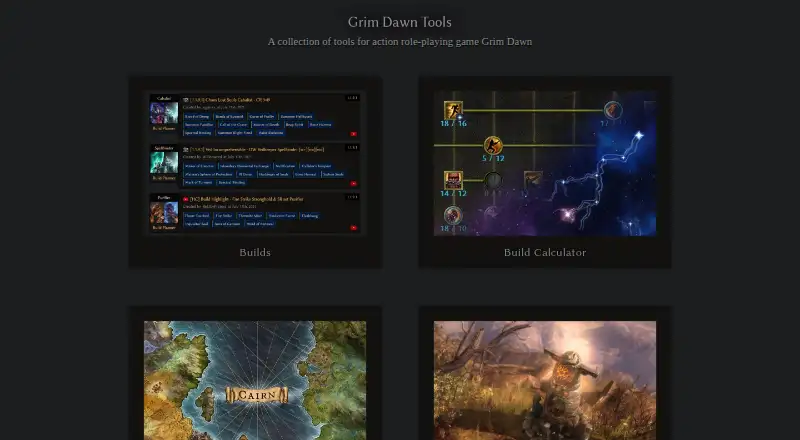
What GrimTools is
GrimTools is a free website for creating and sharing character builds for Grim Dawn. Its calculator covers attributes, combat stats, and resistances, with options to import and share builds. Users can upload a completed build to get a shareable link, or load a character save for further editing. Equipment slots allow selection of items, prefixes, suffixes, components, and augments, with combined item stats displayed. The calculator offers Base Game and mod options, including Diablo 3 Classes and Reign Of Terror. GrimTools also provides an item database for searching game items and affixes, along with a skill tree planner. An offline desktop version includes the online version’s functionality plus build-list management. The save-upload feature does not support character saves from mods. GrimTools also notes that its dual-wield ranged attacks-per-second values are higher than in-game values because it uses a different formula. The site works in modern browsers and does not support Internet Explorer versions below 11. It is created by Dammitt and is not affiliated with Crate Entertainment.
Who it suits
GrimTools suits Grim Dawn players who want to plan, edit, and share character builds or search game items and affixes. The offline desktop version may suit players who also want build-list management.
What it does well
- Build calculator covers attributes, combat stats, and resistances
- Completed builds can be shared by link
- Equipment selections show combined item stats
- Offline version includes build-list management
- Includes item database and skill tree planner
What to know first
- Save upload does not support character saves from mods
- Dual-wield ranged attack speeds differ from in-game values
- Does not support Internet Explorer versions below 11
Limits
The save upload feature does not support character saves from mods. The calculator’s dual-wield ranged attacks-per-second values are higher than in-game values because it uses a different formula.
Getting started
- Visit the GrimTools website in a modern browser.
- Open the build calculator or item database.
- Choose Base Game or an available mod option in the calculator.
- Select equipment and edit the character build, or load a supported character save.
- Upload a completed build to get a shareable link, or use the offline desktop version for build-list management.
Verdict
GrimTools offers build planning, equipment selection, item lookup, and sharing for Grim Dawn, with an offline desktop option as well. Keep its save-upload and dual-wield calculation caveats in mind when using the calculator.
Questions
Is GrimTools free?
Yes. GrimTools has a free plan.
What platforms can I use GrimTools on?
GrimTools is available on the web and Windows. An offline desktop version is available and includes build-list management.
Can I import and share builds?
Yes. The calculator can load a character from a save file for editing, and uploading a completed build provides a shareable link.
Does GrimTools support mods?
The calculator offers Base Game and mod options, including Diablo 3 Classes and Reign Of Terror. Its save upload feature does not support character saves from mods.
Who created GrimTools?
The calculator page identifies Dammitt as its creator and says GrimTools is not affiliated with Crate Entertainment.
Can I remove ads?
The calculator page includes a Remove Ads option.
Facts from GrimTools's own pages
- Ads
- The calculator page includes a “Remove Ads” option. · grimtools.com, 29 Sept 2026
- Browser support
- The calculator post says the site works in modern browsers and does not support Internet Explorer versions below 11. · forums.crateentertainment.com, 30 Sept 2026
- Build audience
- Crate describes GrimTools as a resource for players creating and sharing builds. · grimdawn.com, 29 Sept 2026
- Build calculator
- The build calculator includes attributes, combat stats, resistances, and build import and sharing controls. · grimtools.com, 29 Sept 2026
- Build sharing
- Users can upload a completed build and receive a link to share it. · forums.crateentertainment.com, 30 Sept 2026
- Calculation caveat
- The calculator post notes that dual-wield ranged attacks-per-second values are higher than in game because it uses a different formula. · forums.crateentertainment.com, 30 Sept 2026
- Character limits
- The calculator post says character saves from mods are not supported by the save upload feature. · forums.crateentertainment.com, 30 Sept 2026
- Community builds
- Crate says new build ideas are posted almost daily in the official forum’s Builds section. · grimdawn.com, 29 Sept 2026
- Data source
- The calculator post says the tool is built automatically from game resources. · forums.crateentertainment.com, 30 Sept 2026
- Founded
- 2017 · grimtools.com, 28 Sept 2026
- Game versions
- The calculator page offers Base Game and mod options, including Diablo 3 Classes and Reign Of Terror. · grimtools.com, 29 Sept 2026
- Item database
- The official Grim Dawn guide describes Grim Tools Item Database as a fan-created resource for searching game items and affixes. · grimdawn.com, 30 Sept 2026
- Item reference
- Crate Entertainment describes GrimTools as a resource for finding items in Grim Dawn. · grimdawn.com, 29 Sept 2026
- Item selection
- Equipment slots support choosing items, prefixes, suffixes, components and augments, with combined item stats displayed. · forums.crateentertainment.com, 30 Sept 2026
- Offline use
- An offline desktop version is available and includes the online version’s functionality plus build-list management. · forums.crateentertainment.com, 30 Sept 2026
- Ownership and affiliation
- The calculator page says GrimTools is created by Dammitt and is not affiliated with Crate Entertainment. · grimtools.com, 29 Sept 2026
- Purpose
- The build calculator lets users customize a character’s equipment, masteries, skills and devotions while calculating character stats. · forums.crateentertainment.com, 30 Sept 2026
- Save import
- The calculator can load a character from a save file for further build editing. · forums.crateentertainment.com, 30 Sept 2026
- Support
- The maker invites questions, suggestions and bug reports in the forum thread and links to a Discord server for discussion, feedback and bug reports. · forums.crateentertainment.com, 30 Sept 2026
Where GrimTools stands on Freedom251
- Game Build Planners#10 of 22