Freedom251 › Game Build Planners

Elden Ring Build Planner
What Elden Ring Build Planner is
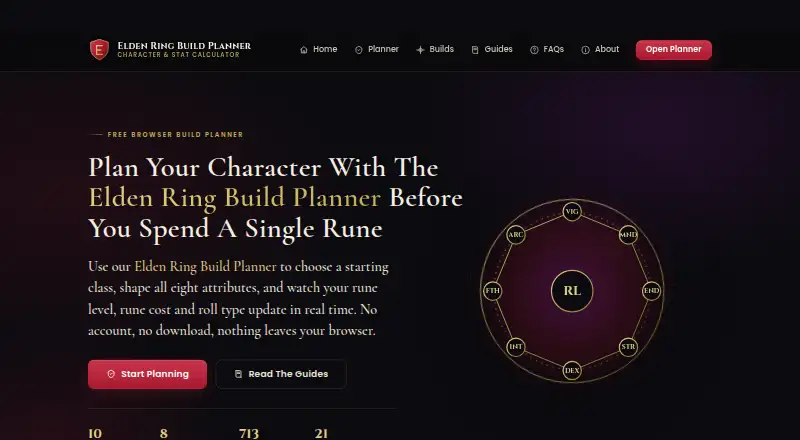
Elden Ring Build Planner is a free web tool for planning character attributes, rune level, rune cost, and equip load before spending runes. It includes all ten base-game starting classes with their starting levels and attributes. Adjusting Vigor, Mind, Endurance, Strength, Dexterity, Intelligence, Faith, or Arcane updates the resulting rune level and the total runes needed to reach it from level one. Enter an equipped-weight percentage to see whether the character has a light, medium, or heavy roll, or is overloaded. Ready-made templates cover Strength, Dexterity, quality, sorcery, Faith, and bleed builds. Builds can be saved in browser local storage, and a text summary can be copied to share in guides, group chats, or notes. The site says saved builds stay in local storage and are not uploaded. It is intended for PvE builds, respecs, and common co-op and PvP rune levels. It does not calculate weapon attack rating, spell damage, or per-item scaling; game updates may also change mechanics or values, and the site does not guarantee every figure matches the current version.
Who it suits
It suits Elden Ring players planning attributes, equip load, or rune levels for PvE, respecs, and common co-op or PvP play. It is a browser-based planning aid, not a tool for calculating weapon attack ratings, spell damage, or item scaling.
What it does well
- Covers all ten base-game starting classes
- Tracks eight character attributes
- Calculates rune level and total runes from level one
- Shows roll category from equipped-weight percentage
- Builds can be saved locally or copied to share
What to know first
- Does not calculate weapon attack rating
- Does not calculate spell damage or per-item scaling
- Game updates may make figures differ from the current version
Limits
The free plan is browser based and requires no account or download. The planner does not calculate weapon attack rating, spell damage, or per-item scaling, and game updates may affect the accuracy of its figures.
Plans
| Plan | Billed and limits | Price |
|---|---|---|
| Free | Browser based · no account or download | Free |
As eldenringbuildplanner.com lists them, read 8 Oct 2026. The maker's own page has the final word.
Getting started
- Open https://eldenringbuildplanner.com/ in a web browser.
- Choose a starting class or a ready-made build template.
- Adjust the character’s attributes and enter equipped weight percentage as needed.
- Save the build in browser local storage or copy its text summary to share.
Overview
Elden Ring Build Planner is a browser-based tool for mapping character attributes, levels, rune costs and equip-load roll categories. It suits players planning a build or respec before committing runes, especially those who want a quick shareable summary. Its scope is deliberately focused on planning stats, not evaluating a weapon or spell’s damage.
Key features
The planner includes all ten base-game starting classes and their initial attributes and levels. It tracks Vigor, Mind, Endurance, Strength, Dexterity, Intelligence, Faith and Arcane; adjust an attribute and it recalculates the rune level and total runes needed to reach it from level one. That makes it useful for comparing stat allocations and estimating the cost of a target level, though it cannot tell you whether a particular weapon’s scaling makes that allocation effective.
Enter equipped weight as a percentage to see whether the build lands in light, medium or heavy roll territory, or is overloaded. Ready-made templates for Strength, Dexterity, quality, sorcery, Faith and bleed builds give players a starting point rather than requiring every build to begin from scratch.
Builds can be saved in browser local storage or copied as a text summary for guides, group chats or notes. The site says saved builds stay in the browser and are not uploaded, a useful privacy property for players who want to keep their planning local. Build sharing is text-based; the planner does not provide equipment or loadout management.
Its important limitation is the boundary of its calculations: it does not cover weapon attack rating, spell damage or per-item scaling. Game updates may also change mechanics or values, and the project does not guarantee every figure will match the current version. Treat its output as a planning aid, not a complete damage simulator or a definitive source for patch-sensitive values.
Pricing
The Free plan costs nothing and runs in a browser with no account or download. It includes the planner’s build-sharing capability, but not equipment and loadout management; there is no mobile app. For players who only need attribute, rune-cost and roll-category planning, the free offering covers the central use case without a paid tier to weigh against it.
Platforms
Elden Ring Build Planner is available on the web. It requires no download or account, but it has no mobile app, so it is a browser tool rather than a dedicated phone application.
Who it's for
This is a good fit for Elden Ring players planning PvE builds, respecs, or common co-op and PvP rune levels who want to understand stat and rune requirements before spending. It is less suitable for players deciding between specific weapons, spells or item combinations, since those damage and scaling calculations are outside its remit. The project identifies itself as an independent fan-made resource and is unaffiliated with FromSoftware and Bandai Namco Entertainment.
Pros and cons
- Pros: Covers all ten starting classes and eight tracked attributes, so players can map a broad range of character plans.
- Pros: Live rune-level and total-rune calculations make the cost of changing a target allocation visible as it changes.
- Pros: Local browser saves and copyable text summaries support private planning and straightforward sharing without uploading builds.
- Cons: No attack-rating, spell-damage or per-item scaling calculations; players must look elsewhere to compare actual damage outcomes.
- Cons: No equipment or loadout management, limiting its usefulness for planning a full gear setup.
- Cons: Values may be affected by game updates, so patch-sensitive planning calls for independent verification.
Alternatives
For a broader directory of tools in this category, browse Game Build Planners. Choose D4Planner if you need a free build planner across Android, iOS and web rather than an Elden Ring-focused web tool. PoB Redux is a free desktop option for Linux, macOS and Windows, with an optional assistant available through a supported plan or Ollama. Choose Arrow to the Build if you want a free, open-source Windows 10/11 planner. GW2Skills offers a free website and build editor for players looking beyond Elden Ring. Last Epoch Building is a free web and Windows alternative; Last Epoch Tools is a free web-based fan-site option. LoadoutDB is a free public reference site with no accounts or subscriptions. Starfield Build Planner is a free web planner for players planning in Starfield instead.
Verdict
Choose Elden Ring Build Planner if you want a free, account-free way to plan Elden Ring attributes, rune costs and roll categories, then keep a build locally or share it as text. Its focused scope is the main reason to choose it; the lack of damage, scaling and equipment calculations is the main reason to look elsewhere if your decision depends on how a complete gear setup performs.
Verdict
The planner helps map attributes, rune costs, and equip-load categories without uploading locally saved builds. Its calculations do not cover attack rating, spell damage, or per-item scaling, and game updates can affect accuracy.
Questions
How much does Elden Ring Build Planner cost?
The listed Free plan costs nothing.
Is there a free plan or trial?
Yes. It has a free plan and no free trial.
What platforms does it support?
The listed platform is web. There is no mobile app.
Can I save or share builds?
Yes. You can save builds in browser local storage or copy a text summary to share. The site says saved builds are not uploaded.
What calculations does it provide?
It updates rune level and the total runes required from level one when attributes change, and classifies roll category from equipped weight percentage. It does not calculate weapon attack rating, spell damage, or per-item scaling.
Who makes Elden Ring Build Planner?
The project describes itself as an independent fan-made resource unaffiliated with FromSoftware or Bandai Namco Entertainment.
Facts from Elden Ring Build Planner's own pages
- Accuracy caveat
- The site says game updates may change mechanics or values and does not guarantee every figure will always match the current game version. · eldenringbuildplanner.com, 8 Oct 2026
- Affiliation
- The project describes itself as an independent fan made resource unaffiliated with FromSoftware or Bandai Namco Entertainment. · eldenringbuildplanner.com, 8 Oct 2026
- Calculation limits
- The planner does not calculate weapon attack rating, spell damage or per item scaling. · eldenringbuildplanner.com, 8 Oct 2026
- Integrations
- The site describes copying build summaries to the clipboard for use in guides, group chats or notes. · eldenringbuildplanner.com, 8 Oct 2026
- Intended users
- The site describes planning for PvE builds, respecs, and common co-op and PvP rune levels. · eldenringbuildplanner.com, 8 Oct 2026
- Live calculations
- Changing an attribute updates rune level and the total runes required to reach that level from level one. · eldenringbuildplanner.com, 8 Oct 2026
- Privacy
- The site says saved builds remain in the browser's local storage and nothing is uploaded. · eldenringbuildplanner.com, 8 Oct 2026
- Purpose
- The planner helps players plan Elden Ring character attributes, rune level, rune cost and equip load before spending runes. · eldenringbuildplanner.com, 8 Oct 2026
- Roll categories
- Users can enter their equipped weight percentage to see whether they have a light, medium or heavy roll, or are overloaded. · eldenringbuildplanner.com, 8 Oct 2026
- Save and share
- Users can save builds in browser local storage or copy a text summary to share. · eldenringbuildplanner.com, 8 Oct 2026
- Starting classes
- It includes all ten base game starting classes with their starting attributes and level. · eldenringbuildplanner.com, 8 Oct 2026
- Support
- The disclaimer directs questions and corrections to its contact page or [email protected]. · eldenringbuildplanner.com, 8 Oct 2026
- Templates
- Ready made starting templates cover Strength, Dexterity, quality, sorcery, Faith and bleed builds. · eldenringbuildplanner.com, 8 Oct 2026
- Tracked attributes
- It tracks Vigor, Mind, Endurance, Strength, Dexterity, Intelligence, Faith and Arcane. · eldenringbuildplanner.com, 8 Oct 2026
Where Elden Ring Build Planner stands on Freedom251
- Game Build Planners#6 of 22