Freedom251 › Game Build Planners

Arrow to the Build
What Arrow to the Build is
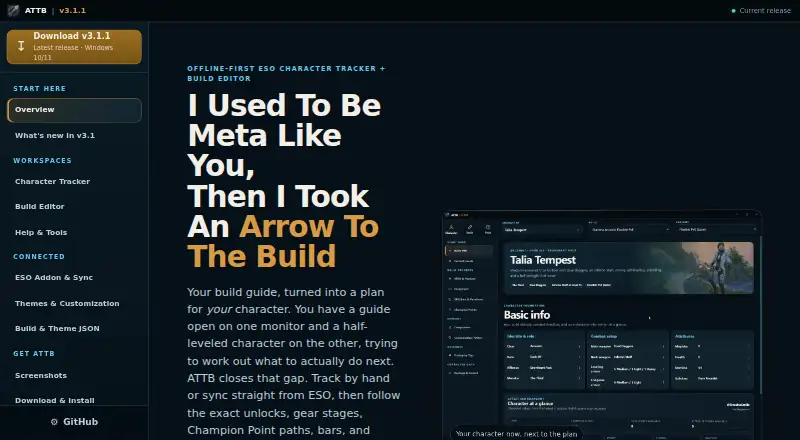
Arrow to the Build is a free, offline-first Windows app for tracking Elder Scrolls Online characters and turning build guides into progression plans. Its tracker brings character identity, attributes, skills, equipment, Champion Points, skill bars, rotations, companion setups, and build progress together. The build editor supports guided builds, forks of bundled builds, community JSON imports, and manual edits. It includes autosave, undo and redo, validation, and revision review. Champion Point routes account for connector stages and prerequisites, and an offline constellation map is included. An optional bundled ESO addon writes character snapshots through ESO SavedVariables to a local file; the app can also be used manually without the addon. Snapshots can include identity, level, attributes, line ranks, purchases, both skill bars, gear, and Champion Points. Character data, settings, snapshots, overrides, and progress are stored in a local SQLite database in the Windows app-data folder, without an ATTB account or cloud database. Builds use readable Schema 4 JSON, and themes use exportable and importable Theme Schema 1 JSON. The app includes 20 themes, an editor with simple 28-color and advanced 57-token modes, and seven class builds. Its maker describes it as an unofficial community project unaffiliated with ZeniMax Media, Bethesda Softworks, or The Elder Scrolls Online.
Who it suits
It suits ESO players who want to track character details and plan build progression on Windows, including offline. It also fits players who want to edit builds, import community JSON, or optionally sync snapshots through the bundled addon.
What it does well
- Tracks character details, equipment, skills, and build progress.
- Build editor includes validation, undo and redo, and revision review.
- Champion Point routes account for connectors and prerequisites.
- Works manually or with an optional bundled ESO addon.
- Stores app data locally in a SQLite database.
- Includes 20 themes and seven class builds.
What to know first
- Available for Windows 10/11 only.
- No mobile app is listed.
- Character snapshot syncing through ESO requires the optional bundled addon.
Limits
The app is free and open source, with no paid-plan limits listed. Character snapshots through ESO require the optional addon; the app can also be used manually. It runs on Windows 10/11, with no mobile app listed.
Plans
| Plan | Billed and limits | Price |
|---|---|---|
| Arrow to the Build | Free and open source · Windows 10/11 | Free |
As arrowtothebuild.com lists them, read 7 Oct 2026. The maker's own page has the final word.
Getting started
- Visit the Arrow to the Build website.
- Get the Windows 10/11 installer.
- Install and open the app; no separate runtime, account, database setup, or Minion is needed.
- Use the app manually, or add the bundled ESO addon for character snapshots.
- Import or create a build and track its progress.
Arrow to the Build is a free Windows companion for tracking Elder Scrolls Online characters and shaping builds into progression plans. It suits ESO players who want detailed planning and local data storage on a PC. The combination of character snapshots, build editing and Champion Point routes makes it a capable all-in-one planner, provided Windows and an offline workflow fit.
Overview
Arrow to the Build connects a character’s current state with progress toward a build: identity, attributes, skills, equipment, Champion Points, skill bars, rotations and companion setups appear alongside build progress. That broad view is useful for players who want to manage a character’s development as well as plan skills or equipment.
Seven class builds come bundled, which gives new planners a place to start. The maker says they were reviewed for the current Champion Point model and skill guidance. Players can also fork those builds, use guided builds, import community JSON or make manual edits, so the bundled choices need not dictate the final setup.
Key features
Character tracking and build editing
An optional bundled ESO addon writes character snapshots through ESO SavedVariables to a local file. Snapshots can include identity, level, attributes, line ranks, purchases, both skill bars, gear and Champion Points. Manual character management is also supported, giving players who prefer not to install the addon another way to use the tracker.
The editor autosaves and supports undo, redo, validation and revision review. Those safeguards make experimentation and revisiting changes more practical, especially when adapting an imported or bundled build.
Champion Point routes and local data
Champion Point planning accounts for connector stages and prerequisites, with an offline constellation map to help navigate the route. That makes it a stronger fit for players planning a sequence of unlocks than a basic point allocation view.
Character data, settings, snapshots, overrides and progress stay in a local SQLite database in the Windows app-data folder. There is no ATTB account or cloud database, which suits players who want their build data on their own PC; it also means the setup is centered on that Windows installation rather than a synced account.
Imports and themes
Builds use readable Schema 4 JSON, while themes use Theme Schema 1 JSON, and both formats can be moved through export and import. Imported build, character and theme files are treated as data, validated, and prevented from supplying arbitrary CSS. This offers room to share and customize without accepting executable code as a theme.
Twenty themes are included, and the theme editor offers a simple 28-color mode and an advanced 57-token mode. That range will appeal to players who want control over the interface, though it is a customization feature rather than a reason to choose the app over a planner on another platform.
Pricing
Arrow to the Build: free. The free and open-source Windows 10/11 app includes the tracker, build editor, Champion Point planner, bundled builds, addon option and theme tools. There are no lower paid tiers or seat limits to weigh; its main cost is the requirement to use the Windows app and keep data locally.
The maker lists a Windows 10/11 installer with no separate runtime, account, database setup or Minion required. That keeps installation requirements modest for a desktop tool, while the lack of mobile support remains a firm platform limit.
Platforms
Arrow to the Build runs on Windows 10/11. It has no mobile app, so it is not a fit for players who want to plan or check builds on a phone. Its offline-first design and local database suit a PC-centered workflow.
Who it's for
Choose it if you play ESO on Windows and want a single place to track character details, edit builds and plan Champion Point progression. It is especially well suited to players who value local storage, want to work without an account, or prefer to manage characters manually rather than use the optional addon.
Look elsewhere if you need a mobile app or want data to follow you through an account and cloud database. Its focus on ESO also makes it a poor fit for players planning builds in other games.
Pros and cons
- Detailed character picture: tracks attributes, skills, equipment, Champion Points, rotations and companion setups alongside build progress.
- Flexible editing: guided builds, forks, community JSON imports and manual changes are supported, with autosave, undo, redo, validation and revision review.
- Offline and local: data stays in a local SQLite database, with no ATTB account or cloud database required.
- Windows only: there is no mobile app, limiting access to players working on a Windows 10/11 device.
- No cloud database: local storage suits a PC-based workflow but does not provide account-based syncing.
Alternatives
For a planner on more platforms, D4Planner is free and runs on Android, iOS and the web. PoB Redux is a free desktop option for Linux, macOS and Windows. Its optional assistant runs through a supported plan or Ollama.
If you want a browser-based planner, Elden Ring Build Planner is free to use without an account or download. For Guild Wars 2, GW2Skills offers a free website and build editor. Last Epoch Building is another free choice, available on the web and Windows; it requires no account, advertising or analytics.
Last Epoch Tools, LoadoutDB and Starfield Build Planner are also free options for their respective games.
Verdict
Arrow to the Build is an easy recommendation for ESO players on Windows who want character tracking, build editing and structured Champion Point planning in one free, locally stored tool. Its breadth and offline workflow are the reasons to choose it. Players who need mobile access or account-based syncing should pick a planner that supports those needs.
Verdict
Choose Arrow to the Build if you play ESO on Windows and want an offline character tracker with build editing and progression planning. It may not suit players looking for a mobile app; the project is also described as unofficial and unaffiliated with the game’s listed makers.
Questions
How much does Arrow to the Build cost?
The listed plan is free.
Which platforms does it support?
It is available for Windows 10/11. No mobile app is listed.
Does it work offline?
Yes. It is described as offline-first, and its character data, settings, snapshots, overrides, and progress are stored locally.
Is an ESO addon required?
No. The app can be used manually without it. The optional bundled addon writes character snapshots through ESO SavedVariables to a local file.
Does it need an account or cloud database?
No ATTB account or cloud database is used. The app stores its data in a local SQLite database.
Who makes it?
The site describes Arrow to the Build as an unofficial community project and says it is not affiliated with ZeniMax Media, Bethesda Softworks, or The Elder Scrolls Online.
Facts from Arrow to the Build's own pages
- Build editor
- The editor supports guided builds, forks of bundled builds, community JSON imports, manual editing, autosave, undo and redo, validation, and revision review. · arrowtothebuild.com, 7 Oct 2026
- Bundled content
- The app includes seven class builds that the maker says were reviewed for the current Champion Point model and skill guidance. · arrowtothebuild.com, 7 Oct 2026
- Champion Point planning
- Champion Point routes account for connector stages and prerequisites, and the app includes an offline constellation map. · arrowtothebuild.com, 7 Oct 2026
- Character tracking
- The tracker shows character identity, attributes, skills, equipment, Champion Points, skill bars, rotations, and companion setups alongside build progress. · arrowtothebuild.com, 7 Oct 2026
- Customization
- The app includes 20 themes and a theme editor with a simple 28-color mode and an advanced 57-token mode. · arrowtothebuild.com, 7 Oct 2026
- Data storage
- Character data, settings, snapshots, overrides, and progress are stored in a local SQLite database in the Windows app-data folder, with no ATTB account or cloud database. · arrowtothebuild.com, 7 Oct 2026
- ESO integration
- An optional bundled ESO addon writes character snapshots through ESO SavedVariables to a local file; the app can also be used manually without the addon. · arrowtothebuild.com, 7 Oct 2026
- Import safety
- The app treats build, character, and theme JSON as data rather than code, validates imported structures, and rejects arbitrary CSS. · arrowtothebuild.com, 7 Oct 2026
- Portable formats
- Builds use readable Schema 4 JSON, while themes use Theme Schema 1 JSON that can be exported and imported. · arrowtothebuild.com, 7 Oct 2026
- Project status
- The site describes ATTB as an unofficial community project and says it is not affiliated with ZeniMax Media, Bethesda Softworks, or The Elder Scrolls Online. · arrowtothebuild.com, 7 Oct 2026
- Purpose
- Arrow to the Build is an offline-first ESO character tracker and build editor that turns build guides into progression plans. · arrowtothebuild.com, 7 Oct 2026
- Requirements
- The maker lists a Windows 10/11 installer and says no separate runtime, account, database setup, or Minion is needed. · arrowtothebuild.com, 7 Oct 2026
- Support channel
- The site links to the project's GitHub Issues page for issue reporting. · arrowtothebuild.com, 7 Oct 2026
- Synced data
- The addon snapshot can include identity, level, attributes, line ranks, purchases, both skill bars, gear, and Champion Points. · arrowtothebuild.com, 7 Oct 2026
Where Arrow to the Build stands on Freedom251
- Game Build Planners#2 of 22