GPXSee
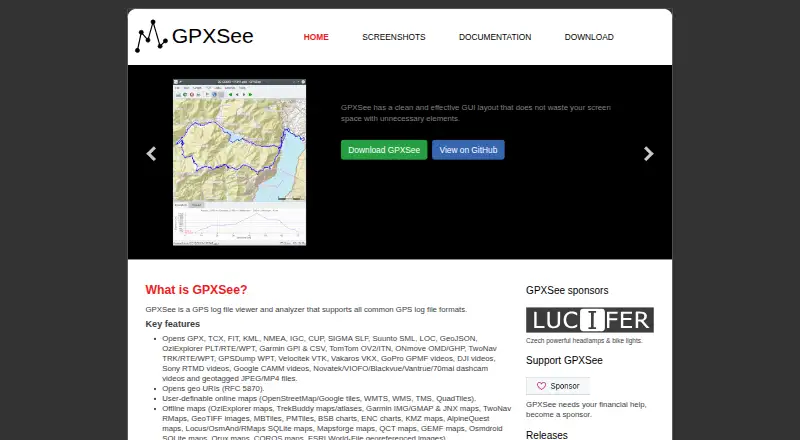
What GPXSee is
GPXSee is a GPS log viewer and analyzer for opening tracks and related data in formats such as GPX, TCX, FIT, KML, NMEA, IGC and GeoJSON, as well as Garmin, TomTom and geotagged media formats. It displays GPS data on user-definable online maps and in many offline map formats. Graphs can show elevation, speed, heart rate, cadence, power, temperature and gear ratio or shifts. You can print views or export them to PNG and PDF. GPXSee can show a real-time GPS position through the Qt positioning API when a positioning plugin is configured. It is free software under the GPLv3 license, with builds for Android, Linux, macOS and Windows and source code available. The project describes it as a small GPS data and map viewer, not full-featured GIS software. Some online map definitions need API keys or user credentials and require editing template files. On Android, multi-file maps and SQLite-based map formats may need to be placed in GPXSee’s map directory to load properly.
Who it suits
GPXSee suits people who want to view GPS tracks and related data across desktop or Android, including on online or offline maps. It is not intended as full-featured GIS software.
What it does well
- Opens a wide range of GPS and geotagged media formats.
- Supports user-definable online maps and many offline formats.
- Graphs cover elevation, speed, heart rate and more.
- Prints or exports views to PNG and PDF.
- Free software under the GPLv3 license.
What to know first
- Some online map definitions require API keys or credentials.
- Android map files may need placement in GPXSee’s map directory.
- Real-time positioning requires a configured plugin.
Limits
GPXSee is a GPS viewer rather than full-featured GIS software. Some online map definitions need API keys or credentials and edited template files; Android may need map files placed in its map directory.
Plans
| Plan | Billed and limits | Price |
|---|---|---|
| GPXSee | Free software; GPLv3 open-source license | Free |
As gpxsee.org lists them, read 4 Oct 2026. The maker's own page has the final word.
Getting started
- Open https://gpxsee.org/ and choose a build for Android, Linux, macOS, or Windows.
- Install or open the build for your platform.
- Open a GPS track or related file in a supported format.
- Choose an online map or an offline map format; complete and rename template files when a map definition requires credentials.
- On Android, place multi-file or SQLite-based maps in GPXSee's map directory if they do not load from the application menu.
GPXSee is a free, GPLv3-licensed viewer and analyzer for GPS logs and associated geographic data. It suits travelers, athletes, field users, and anyone who needs to inspect tracks across desktop or Android without adopting a full GIS platform. Its strongest case is focused file viewing, map display, activity graphs, and straightforward exports; users needing spatial analysis or web mapping should choose a broader tool.
Overview
GPXSee handles a notably broad collection of GPS and geotagged formats, including GPX, TCX, FIT, KML, NMEA, IGC, GeoJSON, Garmin, TomTom, and geotagged media. That range makes it practical for mixed device and recording workflows: you can bring together fitness logs, aviation tracks, navigation data, and location-tagged media in one viewer. The project positions itself as small and fast rather than as a complete GIS, and its published capabilities match that boundary. It is for examining and presenting recorded data, not for advanced spatial analysis.
Key features
Maps and track context
User-definable online maps and support for many offline map formats let you match the background to your route or field conditions. Some online map definitions require API keys or user credentials; their template files must be completed and renamed before use, so setup can be technical when a provider is not ready to use out of the box.
Activity and sensor graphs
Graphs cover elevation, speed, heart rate, cadence, power, temperature, and gear ratio or shifts. That is a useful analysis set for cyclists and other athletes who want to compare route and sensor data, while still staying focused on log interpretation rather than building a larger dashboard.
Position and output
GPXSee can show a real-time GPS position through the Qt positioning API, but a positioning plugin must be configured first. Printing and export to PNG and PDF make it suitable for sharing a route map or preserving a report, although the output emphasis is presentation rather than data transformation.
Pricing
GPXSee is free software at no cost, with a GPLv3 open-source license. There is no free trial because the product is already free, and there are no paid tiers, seat charges, quotas, or renewal terms to weigh. That makes it an uncomplicated choice for individuals and organizations willing to manage their own installation and configuration.
Platforms
Builds are provided for Windows, macOS, Linux, and Android, with source code also published. Windows and Mac installers are signed during the GitHub build with self-signed certificates stored in the repository, so an operating system may require you to accept or configure trust for the installer. Android has a specific map-management caveat: multi-file maps and SQLite-based map formats may fail to load from the application menu and should instead be placed in GPXSee's map directory.
Who it's for
Choose GPXSee if you need a no-cost viewer for varied GPS files, offline or custom map backgrounds, sensor graphs, and image or PDF exports. It is especially well matched to users who value a compact desktop utility and can handle occasional map-provider or platform-specific setup. Look elsewhere if your work requires spatial analysis, browser-based web mapping, or a full GIS environment; GPXSee explicitly does not aim to provide those capabilities.
Pros and cons
Pros
- Broad format coverage reduces conversion work when logs come from different devices and services.
- Offline and user-defined map support works well for controlled map collections and areas with limited connectivity.
- Training-relevant graphs include heart rate, cadence, power, temperature, and shifting data, not just route altitude.
- PNG, PDF, and print output provide practical ways to share or archive a route view.
- Free, open-source licensing removes subscription and seat-cost barriers.
Cons
- It has no spatial-analysis, web-mapping, or dashboard-builder functions, limiting it for professional GIS projects.
- Online map integrations may require API credentials and manual template-file preparation.
- Real-time positioning depends on configuring a Qt positioning plugin.
- Android users may need to copy certain map formats into a dedicated directory instead of opening them normally.
- Self-signed installer certificates can require extra operating-system trust configuration.
Alternatives
For a broader GIS workflow, compare GIS Software. QGIS is the stronger choice when you need full free, open-source GIS capabilities across desktop and self-hosted environments. Pick QGIS Cloud when publishing QGIS work as a cloud service matters more than a local-only viewer.
Felt fits users who want web and mobile map sharing with a free personal tier, though its free plan does not allow uploading their own data files. GIS Cloud is aimed at hosted mapping and tracking workflows, with a free plan and paid options such as $5 a month per asset for Track. StatSilk suits users building cloud data visualizations and offers a non-commercial cloud plan from $495 a year.
GRASS GIS is the better direction for advanced open-source geospatial analysis. NASA WorldWind is an open-source SDK and API option for applications that need globe visualization rather than a ready-made log viewer. GeoServer is preferable when serving geospatial data through a self-hosted web service, with extensions adding optional functionality.
Verdict
GPXSee is a strong fit for anyone who wants a free, focused GPS log viewer with extensive format support, useful activity graphs, customizable maps, and simple exports on desktop or Android. Choose it for inspection and route presentation; choose a full GIS or hosted mapping platform when analysis, collaboration, or web delivery is the central requirement.
Verdict
GPXSee covers common GPS viewing and analysis tasks, with map, graph and export options across desktop and Android. Keep its stated GIS scope and platform-specific map setup requirements in mind.
Questions
Does GPXSee cost anything?
GPXSee is free software. Its listed plan costs nothing, and it is licensed under GPLv3.
Which platforms are available?
The project provides builds for Android, Linux, macOS, and Windows, as well as source code.
Is GPXSee open source?
Yes. It publishes source code under the GPLv3 open-source license.
What GPS formats can it open?
Listed formats include GPX, TCX, FIT, KML, NMEA, IGC, GeoJSON, Garmin, TomTom, and geotagged media formats.
Can it use online maps?
Yes. It supports user-definable online maps and many offline map formats. Some online map definitions require API keys or user credentials and edited, renamed template files.
Can it show a real-time GPS position?
Yes, through the Qt positioning API when a positioning plugin is configured.
Facts from GPXSee's own pages
- Android limitation
- On Android, multi-file maps and SQLite-based map formats may not load properly from the application menu and should be placed in GPXSee's map directory. · gpxsee.org, 4 Oct 2026
- Downloads
- The project provides Windows, macOS, Linux, and Android builds, and also publishes source code. · gpxsee.org, 4 Oct 2026
- Export
- It supports printing and exporting to PNG and PDF. · gpxsee.org, 4 Oct 2026
- File formats
- It opens GPS tracks and related data in formats including GPX, TCX, FIT, KML, NMEA, IGC, GeoJSON, Garmin, TomTom, and geotagged media formats. · gpxsee.org, 4 Oct 2026
- Graphs
- It can display elevation, speed, heart rate, cadence, power, temperature, and gear ratio or shifts graphs. · gpxsee.org, 4 Oct 2026
- Integrations
- Some online map definitions require API keys or user credentials; those template files must be completed and renamed before use. · maps.gpxsee.org, 4 Oct 2026
- Intended scope
- The project describes GPXSee as a small, fast GPS data and map viewer, and says it is not full-featured GIS software. · gpxsee.org, 4 Oct 2026
- Maps
- It supports user-definable online maps and many offline map formats. · gpxsee.org, 4 Oct 2026
- Positioning
- It can show real-time GPS position using the Qt positioning API, subject to configuring a positioning plugin. · gpxsee.org, 4 Oct 2026
- Purpose
- GPXSee is a GPS log file viewer and analyzer that supports common GPS log file formats. · gpxsee.org, 4 Oct 2026
- Security
- The official Windows and Mac installers are signed during the GitHub build using self-signed certificates stored in the Git repository; users may need to configure their OS to accept them. · gpxsee.org, 4 Oct 2026
- Support
- The project asks users to report bugs and request features through its GitHub issue tracker. · gpxsee.org, 4 Oct 2026
Where GPXSee stands on Freedom251
- GIS Software#6 of 64