Freedom251 › Font Marketplaces

Google Fonts
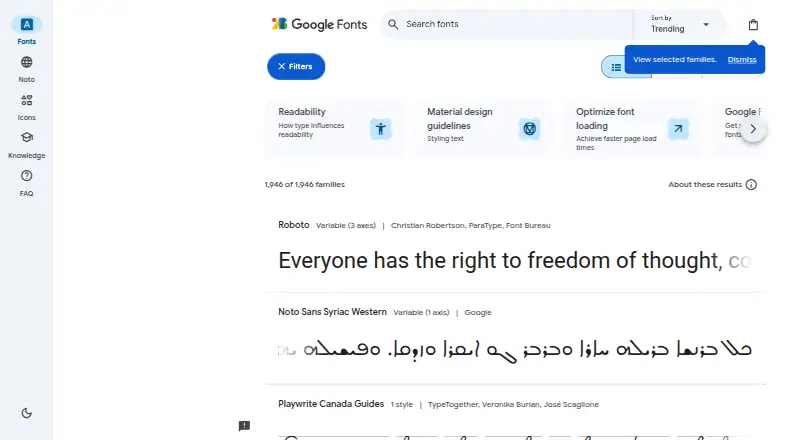
What Google Fonts is
Google Fonts is a free library of open-source fonts for websites, with commercial and non-commercial use permitted under the fonts’ licenses. A website can use a font by linking a stylesheet and naming it in CSS. Developers can also access font metadata through a REST-based API that returns JSON; each API request requires an API key. The API supports sorting by alphabet, date, popularity, style count or trending growth, and filtering by family, subset and category. When variable-font capability is requested, the response can include font files and available axis ranges. If a project needs only particular characters, the text parameter can reduce the requested font file size by up to 90%. Native Android apps can use the Font Provider in Google Play Services, supported from Android Jelly Bean API level 16. The fonts can also be self-hosted for redistribution under their license terms. Google says the Web API is designed to limit data collection, storage and use, and is not used to create end-user profiles or for advertising. The API documentation is intended for developers with JavaScript knowledge.
Who it suits
It suits web designers and developers looking for fonts to use in websites, as well as developers building native Android apps. The API documentation is aimed at developers with JavaScript knowledge.
What it does well
- Fonts permit commercial and non-commercial use.
- Websites can add fonts through stylesheets and CSS.
- API supports multiple sorting and filtering options.
- Self-hosting is permitted under license terms.
- Android Font Provider supports API level 16 and newer.
What to know first
- Each Developer API request requires an API key.
- API documentation is intended for developers with JavaScript knowledge.
Plans
| Plan | Billed and limits | Price |
|---|---|---|
| Free | Open-source fonts · commercial and non-commercial use | Free |
| Google Fonts | Open-source font families · commercial and non-commercial use · CSS web embedding · downloadable files | Free |
As fonts.google.com lists them, read 1 Oct 2026. The maker's own page has the final word.
Getting started
- Open the Google Fonts website and browse the library.
- For a website, link a stylesheet and reference the font in CSS.
- For API access, obtain an API key and make a REST request.
- For an Android app, use the Font Provider in Google Play Services.
- For self-hosting, redistribute fonts subject to their license terms.
Google Fonts is an open-source font library for websites and apps. It suits developers who want to use fonts without a subscription and choose between hosted web delivery, an API, Android support, or self-hosting. Its strongest appeal is flexible, commercially usable access; API use requires a key, and self-hosting means respecting each font’s license.
Overview
Google Fonts serves projects that need more than a catalog of typefaces. Websites can link a stylesheet and reference fonts in CSS, developers can query font metadata through a REST API, and native Android apps can use the Font Provider in Google Play Services. The library supports Android Jelly Bean (API level 16) and newer. This range makes it a practical option for teams with different delivery needs, though the API path is more technical than simply adding a stylesheet.
All fonts use open-source licenses that permit commercial and non-commercial projects. The repository also allows self-hosting, subject to each font’s license terms. That gives teams control over where font files are served, but they must observe those terms when redistributing files.
Key features
- CSS integration: Add a stylesheet link and reference a font in CSS. This straightforward route suits web teams that want to use the library without building an API integration.
- Developer API: The REST API returns font metadata as JSON. It can sort by alphabet, date, popularity, style count, or trending growth, and filter by family, subset, or category. That breadth helps applications query the catalog programmatically, but each request requires an API key. The documentation is aimed at web and application developers with JavaScript knowledge.
- Variable font data: With capability=VF, API requests can return variable font files and available axis-range metadata. This is useful for developer workflows that need those details, though it adds little to a basic stylesheet integration.
- Smaller character subsets: The API’s text parameter can reduce a requested font file’s size by up to 90% when a project needs only specific characters. That can benefit sites serving constrained character sets, while the reduction depends on requesting only the characters needed.
- Android Font Provider: Native Android apps can use the provider through Google Play Services, with support reaching back to API level 16. This offers an Android-specific route rather than relying only on web delivery.
- Privacy and support: Google says the Web API is designed to limit data collection, storage, and use, and is not used to create end-user profiles or for advertising. The repository points users to an issue tracker for font-file problems and requests about future development.
Pricing
Google Fonts is free: the Free plan costs nothing and includes open-source fonts for commercial and non-commercial use. There is no free trial because access is already free. The free offering is a library rather than a paid tier with published seat or usage caps, making it suitable for individuals and teams that want fonts without a subscription. Its main trade-off is not a price limit but the technical and licensing responsibilities of particular delivery choices: API requests need a key, and self-hosted files remain subject to their licenses.
Platforms
Google Fonts supports Android, API, Linux, macOS, self-hosted use, and the web. Its listed font formats are TTF and WOFF2. Web teams can use stylesheet-based integration, while Android developers have the Font Provider; self-hosting gives teams another delivery route under license terms. The platform range is useful for cross-environment projects, but the API and self-hosting options suit developers more than readers seeking a no-configuration desktop font manager.
Who it's for
Google Fonts is a strong fit for web developers seeking a free font library with CSS delivery, and for application developers who need searchable font metadata or variable-font information. Android developers can use its Font Provider, and teams that want to serve files themselves can self-host subject to license terms. It is less suited to people who want a nontechnical font workflow or who do not want to manage API credentials for programmatic access.
Pros and cons
- Pro: Open-source licensing permits commercial and non-commercial projects, so the library can serve both personal and business work without a subscription.
- Pro: Stylesheet delivery, a metadata API, Android support, and self-hosting give developers several ways to use the fonts.
- Pro: The API’s filters and sorting options help developers find families by category, subset, or other criteria, while the text parameter can cut file size by up to 90% for specific character needs.
- Con: Every Developer API request requires an API key, adding setup for applications that query the catalog.
- Con: The Developer API documentation targets developers with JavaScript knowledge, so it is not the clearest fit for a nontechnical user.
- Con: Self-hosting requires users to follow the applicable font license terms, so it is not a license-free redistribution shortcut.
Alternatives
Browse Font Marketplaces for a broader set of options. Consider Adobe Fonts if its basic library of about 5,500 fonts and freemium access better suit you; its Free plan is available with trial subscriptions and some free, team, enterprise, and education accounts.
Fontstand offers free font testing and a paid foundry subscription with custom pricing, making it an option for readers who want to try fonts before subscribing. Font Bros offers free fonts and webfont licenses for most fonts, with custom pricing, for readers considering a separate font source.
Morisawa Fonts has a free plan limited to five fonts selected by Morisawa, with a restriction on registering logotypes made with those fonts as trademarks; choose it if that limited selection fits your needs. Fontshare is another free option, with personal and commercial use permitted across media, scale, and location for an unlimited period.
YouWorkForThem Fonts sells a Mondial Plus standard font license for $30, paid once, with web, eBook, and mobile app licenses available under buying options, making it worth considering when a specific licensed font is the priority. Font Bundles offers a Hobbyist plan at $11.99 a month, with access to over 3.6 million products, 10 downloads a month, and a personal license with each; it suits readers who want a subscription with a defined monthly download allowance.
Fontspring offers an Ebook plan with a perpetual license and unlimited ebook copies and formats on Worry-Free licenses, for readers focused on ebook licensing. Fontspring is also an option for readers comparing font licensing services.
Verdict
Choose Google Fonts if you want an open-source font library that is free for commercial and non-commercial work and can be delivered through CSS, an API, Android, or self-hosting. Its flexible access routes are the central advantage; look elsewhere if you need a less developer-oriented workflow or want to avoid API-key setup for catalog queries. For self-hosting, follow the individual font licenses.
Verdict
Google Fonts offers a free, open-source font library with several ways to select and deliver fonts. Teams using the Developer API should account for its API-key requirement and developer-oriented documentation.
Questions
Does Google Fonts cost anything?
The Free plan is priced at $0 and covers open-source fonts for commercial and non-commercial use.
Can I use Google Fonts commercially?
Yes. The fonts are released under open-source licenses and can be used in commercial or non-commercial projects, subject to license terms.
Does the Developer API require authentication?
Yes. Each REST-based Developer API request requires an API key.
Can I self-host the fonts?
Yes. The repository states that fonts can be self-hosted and redistributed subject to their license terms.
Can I use Google Fonts in Android apps?
Yes. The Google Fonts Font Provider in Google Play Services supports native Android apps on Android Jelly Bean API level 16 and newer.
Where can I report font-file problems?
The Google Fonts repository directs users to its issue tracker for font-file problems and future-development requests.
Facts from Google Fonts's own pages
- Android
- Google Fonts provides a Font Provider in Google Play Services for native Android apps, supporting Android Jelly Bean API level 16 and newer. · developers.google.com, 1 Oct 2026
- Android integration
- Google Fonts supplies a Font Provider through Google Play Services for native Android apps. · developers.google.com, 15 Oct 2026
- Android requirements
- The provider supports Android Jelly Bean API level 16 and newer, with AndroidX or Android O APIs. · developers.google.com, 15 Oct 2026
- Android security
- Android provider requests require the signature of the application exposing the provider. · developers.google.com, 15 Oct 2026
- API authentication
- Every Developer API request requires a Google API key appended to the request URL. · developers.google.com, 15 Oct 2026
- API filtering
- The API supports family, subset, category, WOFF2 and variable-font capability filters. · developers.google.com, 15 Oct 2026
- API format
- The Google Fonts Developer API is REST-based and returns font metadata in JSON. · developers.google.com, 1 Oct 2026
- API sorting
- API results can be sorted by alphabet, date, popularity, style count or trending growth. · developers.google.com, 15 Oct 2026
- Audience
- The Developer API documentation is intended for web and application developers with JavaScript knowledge. · developers.google.com, 1 Oct 2026
- Browser delivery
- The web API generates a stylesheet tailored to the requesting browser user agent and then serves an appropriate font format. · developers.google.com, 15 Oct 2026
- Browser rendering limit
- Google documents that browsers may show blank text or a flash of unstyled text while web fonts load. · developers.google.com, 15 Oct 2026
- Company size
- LinkedIn lists Google Fonts as a public company page with 11–50 employees. · linkedin.com, 15 Oct 2026
- Contribution process
- Font submissions and upgrades are handled through GitHub issues and require a Google Contributor License Agreement. · github.com, 15 Oct 2026
- CSS embedding
- A webpage can apply a Google Font by adding a stylesheet link and referencing the family in CSS. · developers.google.com, 15 Oct 2026
- Developer API
- The Developer API is a REST service returning JSON metadata for families, styles, subsets, files, versions, axes and tags. · developers.google.com, 15 Oct 2026
- Documentation depth
- Developer documentation covers CSS usage, Android downloadable fonts, API schemas, filtering, variable fonts and browser behavior. · developers.google.com, 15 Oct 2026
- Font browsing
- The catalog lets users preview and select font families through an interactive web interface. · fonts.google.com, 15 Oct 2026
- GDPR criticism
- Wikipedia records a February 2022 German court ruling that embedding Google Fonts exposed a visitor IP address without a legal basis, with self-hosting suggested as a remedy. · en.wikipedia.org, 15 Oct 2026
- Integrations
- Google Design says hosted families integrate with Figma, Canva, Google Workspace, Adobe and Wix. · design.google, 15 Oct 2026
- Launch year
- Google Fonts launched in 2010. · en.wikipedia.org, 15 Oct 2026
- Licenses
- Most families use SIL Open Font License 1.1, while some use Apache 2.0 or Ubuntu Font License 1.0. · github.com, 15 Oct 2026
- Licensing
- All fonts are released under open-source licenses and can be used in commercial or non-commercial projects. · developers.google.com, 1 Oct 2026
- Limit: privacy and offline use
- A G2 reviewer flags reliance on Google's CDN as a privacy and offline-availability concern. · g2.com, 15 Oct 2026
- Limit: rendering and performance
- G2 reviewers report inconsistent rendering across browsers or devices and occasional page-speed warnings. · g2.com, 15 Oct 2026
Where Google Fonts stands on Freedom251
- Font Marketplaces#1 of 27
- Web Font Marketplaces#1 of 15