Freedom251 › AI Graphic Design Software
Glittr
What Glittr is
Glittr generates branded creative and platform-specific captions from a prompt, then schedules posts across social channels. Its in-browser editor lets you edit designs and resize them for different formats. Designs can be exported as PNG, JPG, or WebP. The Free plan includes 10 AI-generated designs per month, all design formats, the full editor, and those export formats. Pro costs $9.99 a month and includes unlimited AI designs, a commercial license, priority generation, high-resolution and print-ready exports, and auto-publishing to Pinterest, Instagram, and LinkedIn.
Glittr can also turn a published blog post into Pinterest pins, social cards, and email banners. It says users can produce 50+ designs from blog titles in an afternoon. Its REST API accepts a natural-language prompt and returns an HTML/CSS design; the site gives an average response time of 1.4 seconds. The API can be used with named agent frameworks including OpenAI Agents SDK, LangChain, CrewAI, AutoGPT, and n8n. API users can create isolated keys per agent and set rate limits and generation caps for each key. Glittr says copy rewriting and design creation are available in 30+ languages. Its intended audiences include bloggers, content marketers, social media managers, and e-commerce businesses.
Who it suits
Glittr suits bloggers, content marketers, social media managers, and e-commerce businesses creating branded visuals and captions for social posts. Its API may also suit teams connecting prompt-based design generation to agent frameworks.
What it does well
- Edits and resizes designs in an in-browser editor.
- Exports designs as PNG, JPG, or WebP.
- Schedules posts across six named social channels.
- Turns published blog posts into pins, social cards, and email banners.
- API users can set per-key rate limits and generation caps.
What to know first
- The Free plan is limited to 10 AI-generated designs per month.
- Pro auto-publishing is listed for Pinterest, Instagram, and LinkedIn.
Limits
The Free plan includes 10 AI-generated designs per month. Pro costs $9.99 a month and adds unlimited AI designs, a commercial license, priority generation, high-resolution and print-ready exports, and auto-publishing to Pinterest, Instagram, and LinkedIn.
Plans
| Plan | Billed and limits | Price |
|---|---|---|
| Free | forever · 10 AI-generated designs per month · all design formats · PNG, JPG, WebP exports · full in-browser editor | Free |
| Pro | monthly · unlimited AI designs · commercial license · priority generation · high-resolution and print-ready exports · auto-publish to Pinterest, Instagram and LinkedIn · first access to new features | $9.99 a month |
As useglittr.com lists them, read 15 Oct 2026. The maker's own page has the final word.
Getting started
- Visit useglittr.com.
- Choose the Free plan or Pro at $9.99 a month.
- Enter a prompt to generate a design and caption, then edit or resize it in the browser editor.
- Export a design as PNG, JPG, or WebP, or schedule posts across supported social channels.
- For API use, send a natural-language prompt to the REST API.
Verdict
Choose Glittr if you need prompted branded designs, social captions, and a browser editor, or want an API that returns HTML/CSS designs. The Free plan is capped at 10 AI-generated designs per month; Pro costs $9.99 a month and adds unlimited designs and auto-publishing to three named channels.
Questions
Is there a free plan?
Yes. The Free plan costs nothing and includes 10 AI-generated designs per month, all design formats, the in-browser editor, and PNG, JPG, and WebP exports.
How much does Pro cost?
Pro costs $9.99 a month. It includes unlimited AI designs, a commercial license, priority generation, high-resolution and print-ready exports, and auto-publishing to Pinterest, Instagram, and LinkedIn.
Which social channels can Glittr schedule posts for?
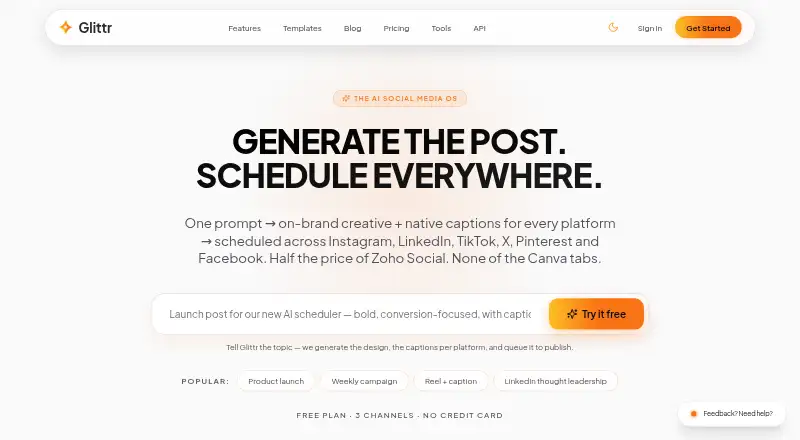
Glittr says it can schedule posts across Instagram, LinkedIn, TikTok, X, Pinterest, and Facebook.
What export formats are available?
Designs can be exported as PNG, JPG, or WebP.
Does Glittr have an API?
Yes. Its REST API accepts a natural-language prompt and returns an HTML/CSS design. Named agent frameworks include OpenAI Agents SDK, LangChain, CrewAI, AutoGPT, and n8n.
Can Glittr create content in different languages?
Glittr says users can rewrite copy through the API and create designs for global audiences in 30+ languages.
Facts from Glittr's own pages
- API
- The REST API accepts a natural-language prompt and returns a production-ready HTML/CSS design; the site gives an average response time of 1.4 seconds. · useglittr.com, 5 Oct 2026
- API controls
- Glittr says users can issue separate API keys and impose rate limits and generation caps per agent. · useglittr.com, 15 Oct 2026
- API extensibility
- The API section names OpenAI Agents SDK, LangChain, CrewAI, AutoGPT and n8n as compatible frameworks. · useglittr.com, 15 Oct 2026
- API free allowance
- The API promotion offers five free generations without requiring a credit card. · useglittr.com, 15 Oct 2026
- API integrations
- The site names OpenAI Agents SDK, LangChain, CrewAI, AutoGPT, and n8n as agent frameworks that can use its HTTP API. · useglittr.com, 5 Oct 2026
- API response
- The homepage example shows a REST POST to /api/v1/designs/generate returning HTML, an image URL and usage data, with an advertised average response of 1.4 seconds. · useglittr.com, 15 Oct 2026
- Automation
- Its blog-to-graphics pipeline creates Pinterest pins, social cards, and email banners from a published blog post. · useglittr.com, 5 Oct 2026
- Batch generation
- The blog-to-graphics workflow is described as generating 50 or more publish-ready designs from blog titles. · useglittr.com, 15 Oct 2026
- Brand analytics
- Its comparison section describes live Brand Pulse analytics across channels. · useglittr.com, 15 Oct 2026
- Caption generation
- The service says it rewrites captions natively for each social platform. · useglittr.com, 15 Oct 2026
- Commercial rights
- The Pro plan includes a commercial license for selling generated work. · useglittr.com, 15 Oct 2026
- Content calendar
- Glittr advertises a drag-and-drop content calendar for organizing posts. · useglittr.com, 15 Oct 2026
- Design editing
- It provides an editable in-browser design editor and lets users resize designs for different formats. · useglittr.com, 5 Oct 2026
- Export formats
- PNG, JPG and WebP exports are listed on the Free plan. · useglittr.com, 15 Oct 2026
- Fitness poster feature
- The fitness poster maker generates multiple on-brand options and supports instant editing. · useglittr.com, 15 Oct 2026
- Fitness poster size
- The fitness poster page recommends an 18x24 canvas and allows text, color, imagery and layout edits. · useglittr.com, 15 Oct 2026
- Format resizing
- The product says one design can be resized for social, presentation, email and print formats. · useglittr.com, 15 Oct 2026
- Free-plan limit
- The Free plan caps AI generation at 10 designs per month. · useglittr.com, 15 Oct 2026
- Independent creator listing
- IndieTools credits Arnav Puri as the creator and tags the product AI, design, marketing and social-media scheduling. · indietools.app, 15 Oct 2026
- Independent description
- TrustMRR describes Glittr as a programmatic design platform generating print-quality posters and flyers from text prompts with AI. · trustmrr.com, 15 Oct 2026
- Independent directory summary
- IndieTools categorizes Glittr as a free AI design and graphic-design generator that turns text into designs and schedules social posts. · indietools.app, 15 Oct 2026
- Independent domain metric
- TrustMRR displays an Ahrefs domain rating of 9 out of 100 for useglittr.com. · trustmrr.com, 15 Oct 2026
- Independent founder record
- TrustMRR lists Arnav Puri as Glittr’s founder. · trustmrr.com, 15 Oct 2026
- Independent founding date
- TrustMRR records Glittr as founded in January 2026. · trustmrr.com, 15 Oct 2026
Where Glittr stands on Freedom251
- AI Graphic Design Software#5 of 31
- Social Media Design Software#13 of 44