Freedom251 › Hardware Monitoring Software
GKrellM
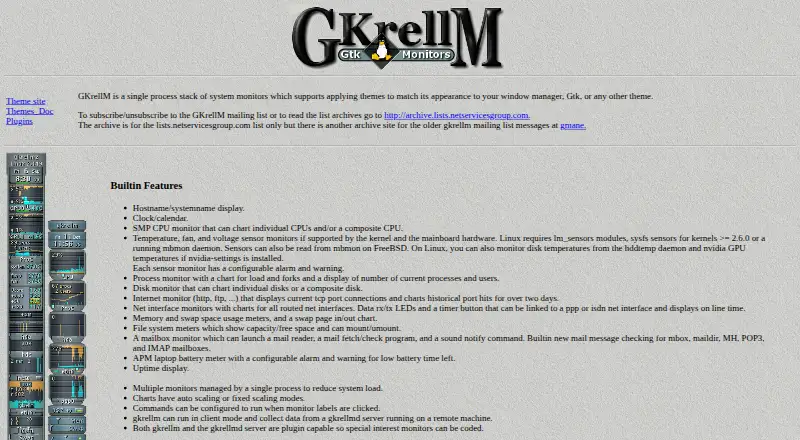
What GKrellM is
GKrellM is a free system-monitoring application that presents monitors in a single-process stack. Its built-in monitors cover CPU activity, processes, disks, network interfaces, memory, swap, filesystems, sensors, mailboxes, battery, uptime, and a clock and calendar. Charts can scale automatically or use fixed values, while sensor and battery monitors support configurable alarms and warnings. Themes can be chosen to match a window manager, GTK, or another theme.
GKrellM and its gkrellmd server support plugins for specialized monitors; community examples include wireless monitoring, audio control, and SNMP variables. The Internet monitor shows current TCP port connections and charts port hits over more than two days. The mailbox monitor checks mbox, maildir, MH, POP3, and IMAP mailboxes. The maker lists builds for Linux, FreeBSD, Mac OS X, NetBSD, and OpenBSD, and links to a Windows version and installer. The application requires GTK 2.0, GDK 2.0, and GLib 2.0, while gkrellmd can run without GTK or X libraries. Some Linux sensor readings depend on hardware, kernel support, and additional software.
Who it suits
GKrellM suits users who want a stack of system monitors and charts on supported desktop systems. It may also fit users who want plugin-based monitoring or mailbox checks.
What it does well
- Monitors CPU, memory, disks, networks, and other system areas.
- Charts offer automatic or fixed scaling.
- Sensor and battery monitors can show configurable alarms.
- Supports themes and plugins for specialized monitors.
- Available for several Unix-like systems, with a Windows version linked.
What to know first
- The application requires GTK 2.0, GDK 2.0, and GLib 2.0.
- Linux sensor readings may depend on hardware and additional software.
- No security certification or compliance standard is stated.
Limits
GKrellM is free software under the GNU General Public License. On Linux, temperature, fan, voltage, disk temperature, and NVIDIA GPU temperature readings can depend on hardware support and listed software or daemon dependencies.
Plans
| Plan | Billed and limits | Price |
|---|---|---|
| Free software | GNU General Public License | Free |
As billw2.github.io lists them, read 3 Oct 2026. The maker's own page has the final word.
Getting started
- Open the GKrellM website.
- Choose the build or installer for your operating system.
- Install the application, which requires GTK 2.0, GDK 2.0, and GLib 2.0.
- Use themes or plugins to customize the monitors.
Verdict
GKrellM combines a wide set of system monitors with charts, alarms, themes, and plugin support. Check the application requirements and sensor dependencies for the platform and readings you need.
Questions
How much does GKrellM cost?
The listed Free software plan costs nothing under the GNU General Public License.
Which operating systems does GKrellM support?
The maker describes builds for Linux, FreeBSD, Mac OS X, NetBSD, and OpenBSD, and links to a Windows version and installer.
What does GKrellM monitor?
Its built-in monitors cover CPU, processes, disks, network interfaces, memory, swap, filesystems, sensors, mailboxes, battery, uptime, and clock and calendar.
Does GKrellM support plugins and themes?
Yes. GKrellM and gkrellmd support plugins, and GKrellM supports themes.
What are GKrellM's application requirements?
The application requires GTK 2.0, GDK 2.0, and GLib 2.0. The gkrellmd server requires GLib and can run without GTK or X libraries.
Facts from GKrellM's own pages
- Charts and alarms
- Charts support automatic or fixed scaling, and sensor and battery monitors can use configurable alarms and warnings. · billw2.github.io, 3 Oct 2026
- Custom sensor support
- Yes · billw2.github.io, 21 Sept 2026
- Free plan
- Yes · billw2.github.io, 21 Sept 2026
- Latest listed release
- The official page identifies gkrellm-2.3.5.tar.bz2 as the latest release tarball. · billw2.github.io, 3 Oct 2026
- Linux sensor dependencies
- On Linux, temperature, fan, and voltage monitoring depends on kernel and motherboard support and may require lm_sensors, sysfs sensors, or mbmon; disk temperature and NVIDIA GPU temperature monitoring also have listed daemon or software dependencies. · billw2.github.io, 3 Oct 2026
- Mail support
- The built-in mailbox monitor checks mbox, maildir, MH, POP3, and IMAP mailboxes and can launch configured mail-related commands. · billw2.github.io, 3 Oct 2026
- Networking monitor
- The built-in Internet monitor displays current TCP port connections and charts historical port hits for over two days. · billw2.github.io, 3 Oct 2026
- Platform support
- The maker describes Linux, FreeBSD, Mac OS X, NetBSD, and OpenBSD builds, and links to a Windows version and installer. · billw2.github.io, 3 Oct 2026
- Plugins
- Both GKrellM and gkrellmd support plugins for special-interest monitors; the maker lists community plugins for functions including wireless monitoring, audio control, and SNMP variables. · billw2.github.io, 3 Oct 2026
- Purpose
- GKrellM is a single-process stack of system monitors that supports themes matching a window manager, GTK, or other theme. · billw2.github.io, 3 Oct 2026
- Remote monitoring
- GKrellM can run as a client and collect data from a gkrellmd server on a remote machine. · billw2.github.io, 3 Oct 2026
- Requirements
- The GKrellM application requires GTK 2.0, GDK 2.0, and GLib 2.0; the gkrellmd server requires GLib and can run without GTK or X libraries. · billw2.github.io, 3 Oct 2026
- Security and compliance
- The official page states that GKrellM is released under the GNU General Public License and does not state a security certification or compliance standard. · billw2.github.io, 3 Oct 2026
- Support
- The maker invites users to email Bill Wilson with questions or suggestions and links to a GKrellM mailing list. · billw2.github.io, 3 Oct 2026
- Supported platforms
- Linux,FreeBSD,Mac OS X,NetBSD,OpenBSD,Windows · billw2.github.io, 21 Sept 2026
- System monitoring
- Built-in monitors include CPU, processes, disks, network interfaces, memory, swap, filesystems, sensors, mailboxes, battery, uptime, and clock/calendar. · billw2.github.io, 3 Oct 2026
- Themes
- GKrellM supports themes, and the official page links to a theme site and theme documentation. · billw2.github.io, 3 Oct 2026
Where GKrellM stands on Freedom251
- Hardware Monitoring Software#7 of 59
- Hardware monitoring tools#15 of 59